Bring your data to Propfusion
- Sample sheets for leads and listings
- Owners and tenants from Excel or CSV
- Export to CSV or Excel
Moving from another system
Your old system's spreadsheets are the way in
There is no direct connector to other CRMs. Your records come across as spreadsheet exports, put into Propfusion's import templates.
- 01
Export what you have
Export your leads, listings, owners and tenants from your current system as spreadsheet files.
- 02
Fill Propfusion's template
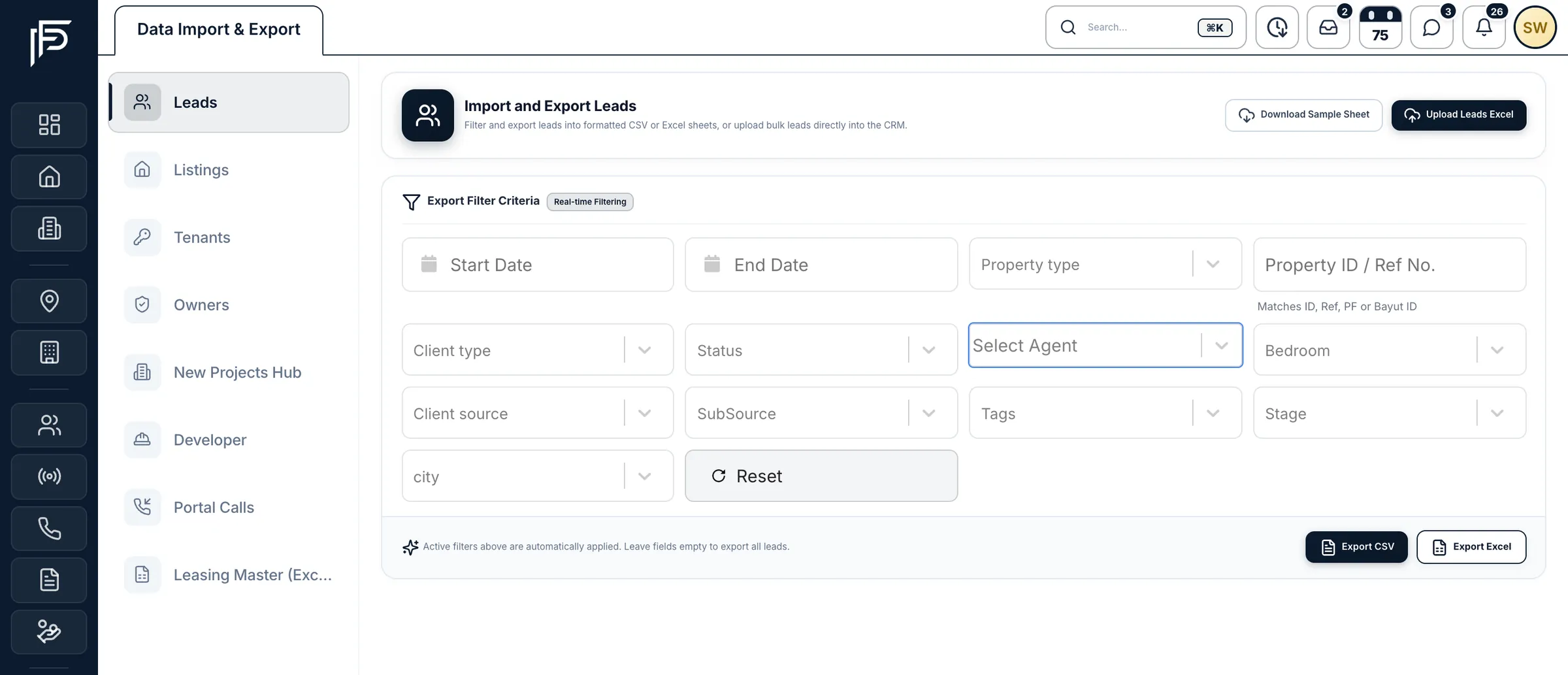
Download Propfusion's sample sheet for leads or listings from the Data Import & Export page and put your rows into it. Owners and tenants can come in as Excel or CSV.
- 03
Upload and assign
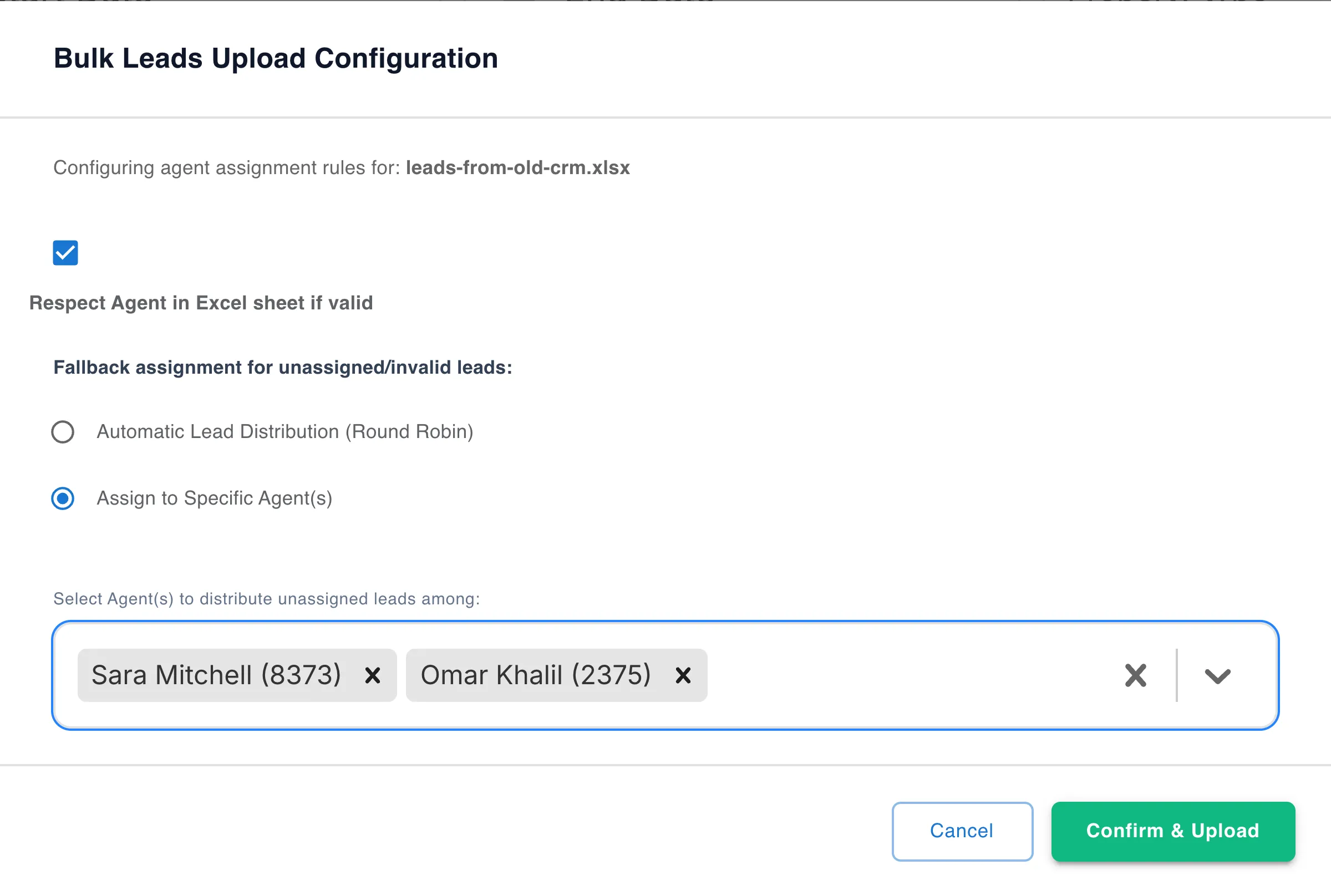
Upload the sheet. For leads, choose whether to keep the agent given in each row by their Propfusion staff ID, and send the rest to automatic distribution or to agents you pick.
What you can bring in
Every kind of record, and how it comes in
Spreadsheets for the records you keep yourself, connected portals for what already lives on Property Finder and Bayut, and an assisted migration for leasing portfolios.
From spreadsheets
For the records you keep yourself, or export from your current system.
LeadsExcel · sample sheet
Keep the agent given in each row by staff ID; the rest go to automatic distribution or to agents you pick.
ListingsExcel · sample sheet
Use Propfusion's sample sheet, or upload a Bayut/Dubizzle listings sheet instead.
Owners and landlordsExcel or CSV
Ends with a summary of how many rows were added, how many failed, and why.
TenantsExcel or CSV
Ends with the same summary of added rows, failed rows and the reasons.
ContactsExcel or CSV
A sheet with a name column and a phone column.
From the portals
Connect Property Finder and Bayut by entering your portal keys under Settings, then pull in what is already there.
Property FinderConnected portal
The listings and leads you already have on Property Finder.
BayutConnected portal
The listings you already have on Bayut.
Assisted migration
For property-management portfolios kept in Propfusion's Leasing Master workbook layout.
Leasing portfolioLeasing Master workbook
Units, owners, tenants, rental agreements and cheque schedules come in together.
Leads, listings, owners, tenants and the Leasing Master workbook each have their own tab on the Data Import & Export page.
From the first upload to a working team
Who owns each imported lead, who can sign in, and what each person can see.
Lead import
Decide who owns every lead you bring in
- Keep the agent given in each row by staff ID
- Send the rest through your company's automatic lead distribution
- Or rotate them among the agents you choose
Your team
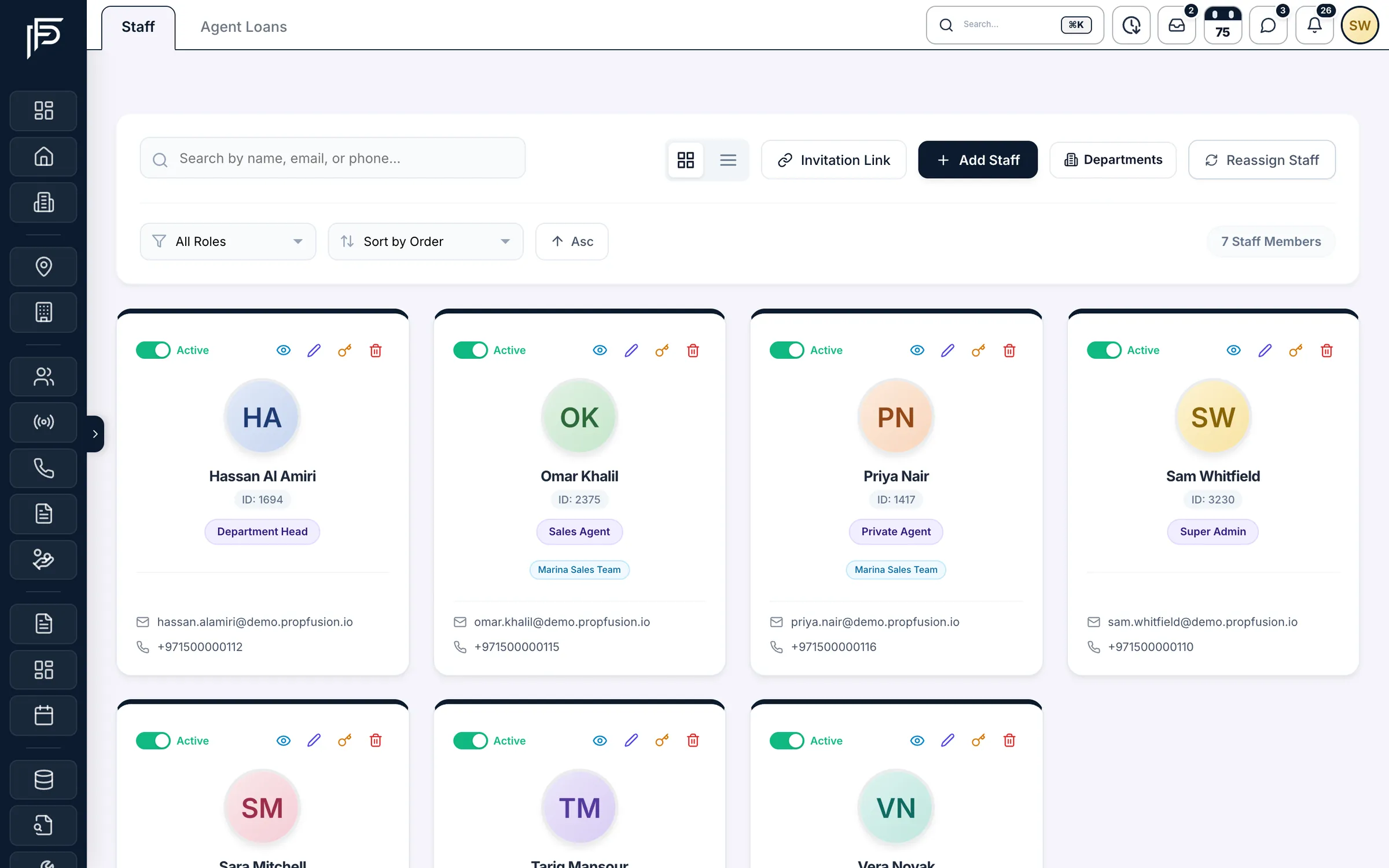
Add your team, or send them a link
- Name, email, phone, role and team for each person
- A welcome email goes out when email sending is set up
- Registration-link sign-ups wait for you to activate them
Roles and permissions
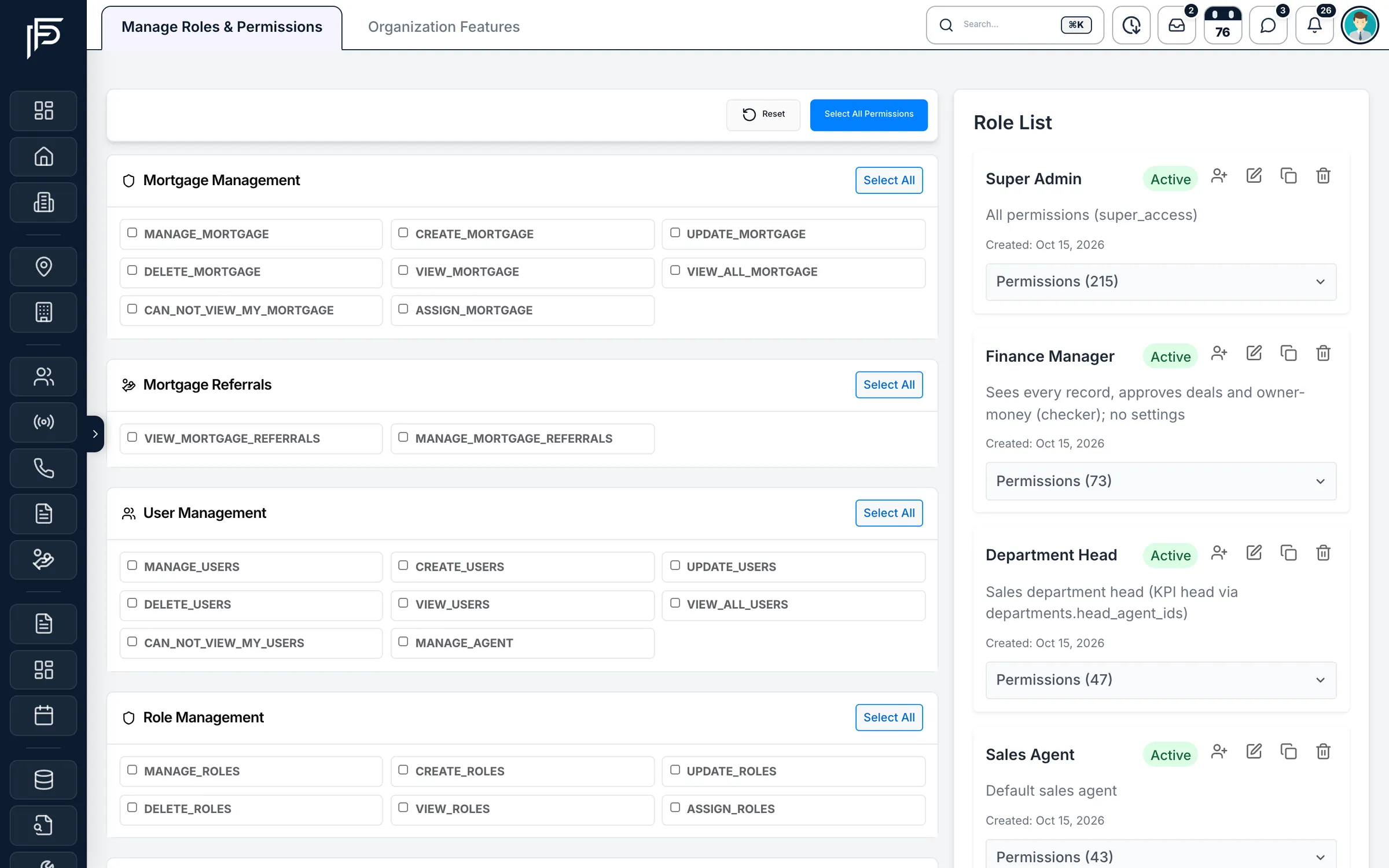
Roles that decide who sees what
- Own or everyone's leads, listings, projects and reports, set role by role
- Ready-made roles in place from the start
- Each person's guided tours follow what their role allows
First sign-in
A short setup when your company first signs in
The CRM walks a new company through a few questions, its company details, its areas and developers, and then its first team and staff. Each company gets its own database, set up with ready-made roles, lead stages, groups, ratings, statuses, tags and KPI defaults.- A few questions, then your company details
- Your areas and developers
- Your first team and its staff
Property management
Move a leasing portfolio in one go
If your portfolio is kept in Propfusion's Leasing Master workbook layout, units, owners, tenants, rental agreements and cheque schedules come in together. It is an assisted migration: the import needs that fixed workbook layout, so plan it with our team.- Previewed first, and saved only when you commit
- A committed batch can be rolled back
- .xlsx or .xlsm, up to 10 MB and 10,000 rows per sheet
Screens show the Propfusion Demo Realty sample workspace. All people, listings and numbers are fictional.
Also included
The details behind a clean move
Small things that keep your records, and who can see them, in order from the first day.
Export to CSV or Excel
Export leads, listings, owners and tenants to CSV or Excel whenever you need a copy.
Exports follow visibility
A leads export only contains the leads the person exporting is allowed to see.
Import summaries
Owner and tenant imports end with how many rows were added, how many failed, and why.
Import access by permission
Only staff with the Manage Settings permission can use the Data Import & Export page.
A database of your own
Each company's records are kept in a separate database, and a login issued for one company is refused by every other.
Access ends when someone leaves
When a staff account is deactivated or deleted, that person's login stops working on their very next action.
Password reset by email
A forgotten password is reset with a one-time code sent to the user's email.
Guided tours for new staff
87 interactive tours on the real web screens, in 13 learning paths with levels from Beginner to Master.
A built-in user manual
A searchable manual inside the CRM, with reading paths for new users, sales agents, property managers and administrators.
Questions
Data import questions
- Can Propfusion connect directly to our current CRM?
- No. There is no direct connector to any other CRM. Export your records from your current system as spreadsheets, put them into Propfusion's import templates and upload them on the Data Import & Export page.
- Which files can we import?
- Leads and listings are imported from Excel using Propfusion's sample sheets, and listings can also come from a Bayut/Dubizzle listings sheet. Owners, landlords, tenants and contacts can be imported from Excel or CSV; a contacts sheet needs name and phone columns.
- Our lead sheet already has an agent for each lead. What happens to that?
- You choose. The lead sheet's agent column takes each agent's Propfusion staff ID, which is shown on their staff card, so agent names from another system are not matched. When you import, decide whether to keep the agent given in the sheet. Any remaining leads either go through your company's automatic lead distribution or are rotated among the agents you pick.
- Our listings are already on Property Finder and Bayut. Do we enter them again?
- No. Once an admin enters your portal keys under Settings, the listings and leads already on Property Finder, and the listings already on Bayut, can be pulled into the CRM.
- We manage rental properties. Can the whole portfolio come across?
- Yes, if it is kept in Propfusion's Leasing Master workbook layout: units, owners, tenants, rental agreements and cheque schedules come in together. The import is previewed first, saved only when you commit, and a committed batch can be rolled back. It is an assisted migration, because it needs that fixed layout.
- Can we export our data again?
- Yes. Leads, listings, owners and tenants can be exported to CSV or Excel. A leads export only contains the leads the person exporting is allowed to see.
Related features
Keep exploring
- Lead managementThe leads list your imported leads join, with automatic distribution and follow-ups.Learn more
- Security and accessRoles and permissions, and a separate database for each company.Learn more
- Property managementOwners, tenants, rental agreements and cheques for your whole portfolio.Learn more
See your own data in Propfusion
Start a free trial and upload a sample sheet, or book a live demo to plan your move with our team.