Release notes

2026.10.29Major release

Payment plan proposals, off-plan bookings, client reports and metro maps

This week's releases (28 and 29 October): payment plan proposals with AI help, EOIs and bookings for off-plan sales, market reports and CMAs for clients, metro layers on the maps, WhatsApp numbers for every agent, owner KYC links, check-in fixes and security hardening.

Open this release
  • Payment plan proposals

    New

    Up to three payment plans for one client on a project or a sale listing, with buyer fees, a mortgage estimate and a live preview. The client gets a private page in your brand, and the PDF adds the plan pages after the brochure.

  • AI drafts the plan

    New

    Describe a plan in plain words, or ask for three suggestions from the client's cash, monthly budget and mortgage. Every draft is marked to check, and nothing is saved until you click Looks right.

  • Off-plan EOIs and bookings

    New

    Record each EOI from Submitted to developer to Allocated, book the unit with its checklist and down payment, mark the SPA signed and the Oqood registered, then create the deal from the booking. A company admin turns it on.

  • Market reports and CMAs

    New

    A branded market report for a building, area or community, or a CMA with a suggested price range from comparable sales. Send it as a private link or a PDF, and see when the client opens it.

  • Metro on the maps

    New

    A Layers menu with metro and tram lines, the planned Blue Line (2029) and Gold Line (2032) and traffic. Listing and project cards show the nearest metro station, and a Near metro filter keeps homes within 500 m, 1 km or 2 km.

  • WhatsApp for every agent

    New

    Agents connect their own WhatsApp Business numbers through Meta's official sign-up and keep the app on their phones. The company number and every agent's number share one inbox, and the chats stay with the company when an agent leaves.

  • Suggested WhatsApp replies

    New

    WhatsApp AI suggests up to three replies in the agent's own style and the client's language. The agent edits and presses Send. It stays off until an admin turns it on.

  • Owner KYC links

    New

    Send an owner a link to fill in their details, upload passport and Emirates ID copies and sign, without signing in. Staff see what changed before they verify it. Rentals, tenants and the owner page also have a cleaner layout.

  • Check-in that always answers

    Improved

    Check In and Check Out follow your own records and say why when they can't, a forgotten check-out no longer blocks the next day, and the location wait is capped at 12 seconds. Coming in the next app update: check-in can also share your live location with your manager until you check out; you can switch it off or pause it for a break.

  • Security hardening

    Improved

    Payment keys you save are encrypted when stored and screens show only their last four characters, short links lead only to our own sites or your company's domains, and holiday-home card payments are always priced from the booking saved in your CRM.
2026.10.27Feature update

PropFusion AI saves for you, after your yes

PropFusion AI now finishes the job: it opens the form, fills it in and asks once before it saves. One yes can cover a batch of the same task. Automatic e-mails also link to a page where you manage your own e-mail updates.

Open this release
  • Opens and fills forms

    Improved

    Ask for a new message template or another record, and the assistant opens the right form and fills it in.

  • Saves after your yes

    New

    It asks once in plain words, with Yes and Not now buttons. Answer by tapping, typing or saying it; the assistant can never say yes for you.

  • One yes for a batch

    New

    For repeated work it shows the plan first, for example five templates, and one yes covers them all.

  • A firmer yes for risky steps

    New

    Deleting, sending to clients, payments and settings still need you to tap the button or say the exact word.

  • Better on voice calls

    Improved

    Shorter spoken answers, and fewer repeated questions when the line is noisy.

  • Manage my e-mail updates

    New

    Automatic e-mails link to a page where you manage your own e-mail updates: turn off one kind of e-mail, or pause them all. Sign-in codes and other security e-mails always arrive.

2026.10.25Feature update

A faster help chat, backed by a new support desk

Help inside the CRM is quicker. The help chat answers from our Help Center and shows the article it used, and passes you to a person whenever it isn't sure or you ask.

Open this release
  • Help chat

    Improved

    Open Support and choose Chat with us. Answers come from the Help Center, with a link to the article they came from.

  • A person when you need one

    New

    Tap Talk to a person at any time. The chat is handed over with a clear message, and the reply arrives live.

  • Files and images

    New

    Send screenshots and files in the chat, both ways.

  • Rate the help you got

    New

    Rate a resolved chat out of five stars. Writing again reopens it.

  • In your own brand

    Improved

    The help chat carries your company's brand and works on phones and large screens alike.

2026.10.25Feature update

Market Transactions: sales and rentals, more filters and trends

The Market Transactions page now covers sales and rentals, with the filters agents asked for and a Market pulse view with trends, a map and rental yields.

Open this release
  • Sold and Rented

    New

    Switch between sales and rentals at the top of the page. Rentals show new and renewed contracts, median rent and rent per square foot.

  • More filters

    New

    Residential or commercial, first sale or resale, several places at once, and periods from 7 days to 3 years.

  • Trends

    New

    Monthly medians and volumes, split by property type, bedrooms, or ready and off-plan.

  • Map and yields

    New

    Median price per square foot by area on a map, and rental yields.

  • On your phone

    Improved

    A full-screen filter sheet with its own sort order.

2026.10.24Feature update

Smart lead stages: leads move when your agents act

When an agent starts a WhatsApp chat, makes a call or books a viewing, the lead can move to the stage you choose, with an undo. You decide which action moves a lead where.

Open this release
  • Moves on its own

    New

    WhatsApp started, call started or answered, viewing booked and viewing done can each move the lead to a stage you pick.

  • Moved automatically, with Undo

    New

    The lead page and the lead's history say what moved it and who did it, and one tap puts it back.

  • Your rules, your stages

    New

    Rules use your company's own stages, can differ for sale and rent leads, and switch off one by one.

  • Only forward

    New

    Leads only move forward. Closed, won and pool leads are left alone, and a stage a person set recently is kept (24 hours by default).

  • Automations stay quiet

    New

    A stage's own automations don't run on automatic moves unless you switch that on for the stage.

2026.10.24Major release

Deals and commissions: drafts, co-listing parts and clawback

Deals now have a clear path from draft to approval, can start from a contract, and handle the commission cases brokerages meet every month: co-listed deals and deals that fall through after payout.

Open this release
  • Drafts and returns

    New

    Save a deal as a draft, submit it for approval, and get it back with Finance's note when something needs changing.

  • Start from a contract

    New

    Start a deal from a sale agreement, tenancy contract, lead, listing or off-plan project, and the parties, property, price and dates fill in.

  • Co-listing parts

    New

    Agents on a co-listed deal share one agent part, 50/50 by default and editable, and each agent's own rate applies to their part.

  • Fell through after payout

    New

    Mark an approved deal as fell through even after the agents were paid; the commission is recovered from each agent's next one.

  • What you owe

    New

    Agents see only their own line: what they owe on the deal and in their wallet.

  • Deal facts and duplicates

    New

    MOU and transfer dates, title deed, Ejari, cheques and ID expiry on the deal, and a warning when the same unit was entered in the last 60 days.

2026.10.24Feature update

Automatic e-mails: see every one, switch any off

General settings has a new Automatic E-mails page: every e-mail the CRM sends on its own, with a switch for the whole company and a way to silence one person. Everything stays on until you change it.

Open this release
  • Every automatic e-mail

    New

    Grouped by area, with who gets it, how often, how many went out in the last 30 days, and a preview in your own brand.

  • One switch per e-mail

    New

    Turn an e-mail type off for the whole company, with an undo.

  • Per person

    New

    Pause all automatic e-mails for one person, or turn single types off just for them.

  • Recent log

    New

    What was sent, silenced or failed, kept for 90 days without addresses or e-mail text.

  • Security e-mails always arrive

    New

    Sign-in codes, password resets and other security e-mails can't be switched off.

2026.10.23Feature update

Connect your CRM to Claude

Each company can now connect its own Propfusion CRM to Claude, and ask about leads, listings and deals or add leads and follow-ups in plain words. It stays off until a company admin switches it on.

Open this release
  • Your company's own address

    New

    Claude connects at your company's own CRM address. The Claude page in the CRM shows the address and the steps.

  • Your own permissions

    New

    Each person signs in with their own CRM login, and Claude sees only what that person may see.

  • Money stays read-only

    New

    Commissions, payouts and other money data can be read through Claude, never changed.

  • Admins decide

    New

    Off by default. Admins choose who may use it, see who is connected and can sign anyone out.

2026.10.17Feature update

Company phone lines in the web CRM

Call clients from your company's numbers, with every call, recording and missed call on the lead. Admins also get pages for AI usage and background jobs.

Open this release
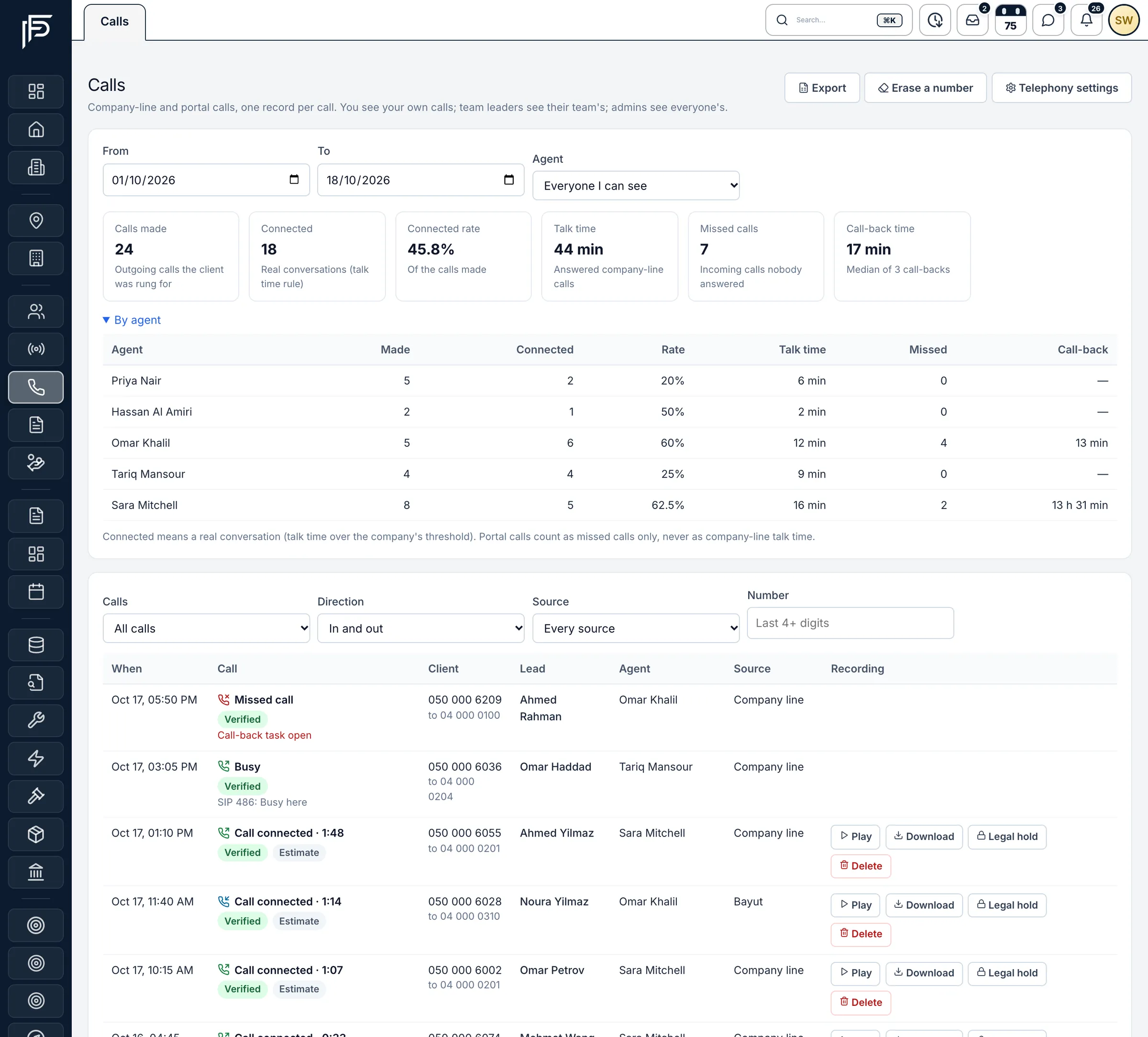
Propfusion CRM: Calls page with calls made, connected rate, talk time, missed calls, a by-agent table and recordings to play or download
Every company and portal call, by agent, with recordings.
  • Call via company number

    New

    The Call button on a lead rings the agent first, then the client, and logs the call on the lead.

  • Calls page

    New

    Every company call, answered or missed, with its recording. It replaces the old Portal Calls page.

  • Telephony settings

    New

    Numbers, agent lines, hours and recording, call limits, a do-not-call list and the recording access log.

  • Missed-call follow-up

    New

    A missed call alerts the agent and adds a call-back follow-up to the lead. The team leader is alerted if nobody calls back.

  • AI usage and background jobs

    New

    Admins can see how much AI the company uses and the state of background jobs.

  • WhatsApp media

    Improved

    Photos and files in older WhatsApp conversations load from the archive.

2026.10.16Major release

PropFusion AI: chat, live voice and the CEO Strategy Studio

A new AI assistant that knows your CRM. Ask about your data, talk to it on a live voice call, and let it open pages and fill in forms for you. Nothing is saved until you confirm.

Open this release
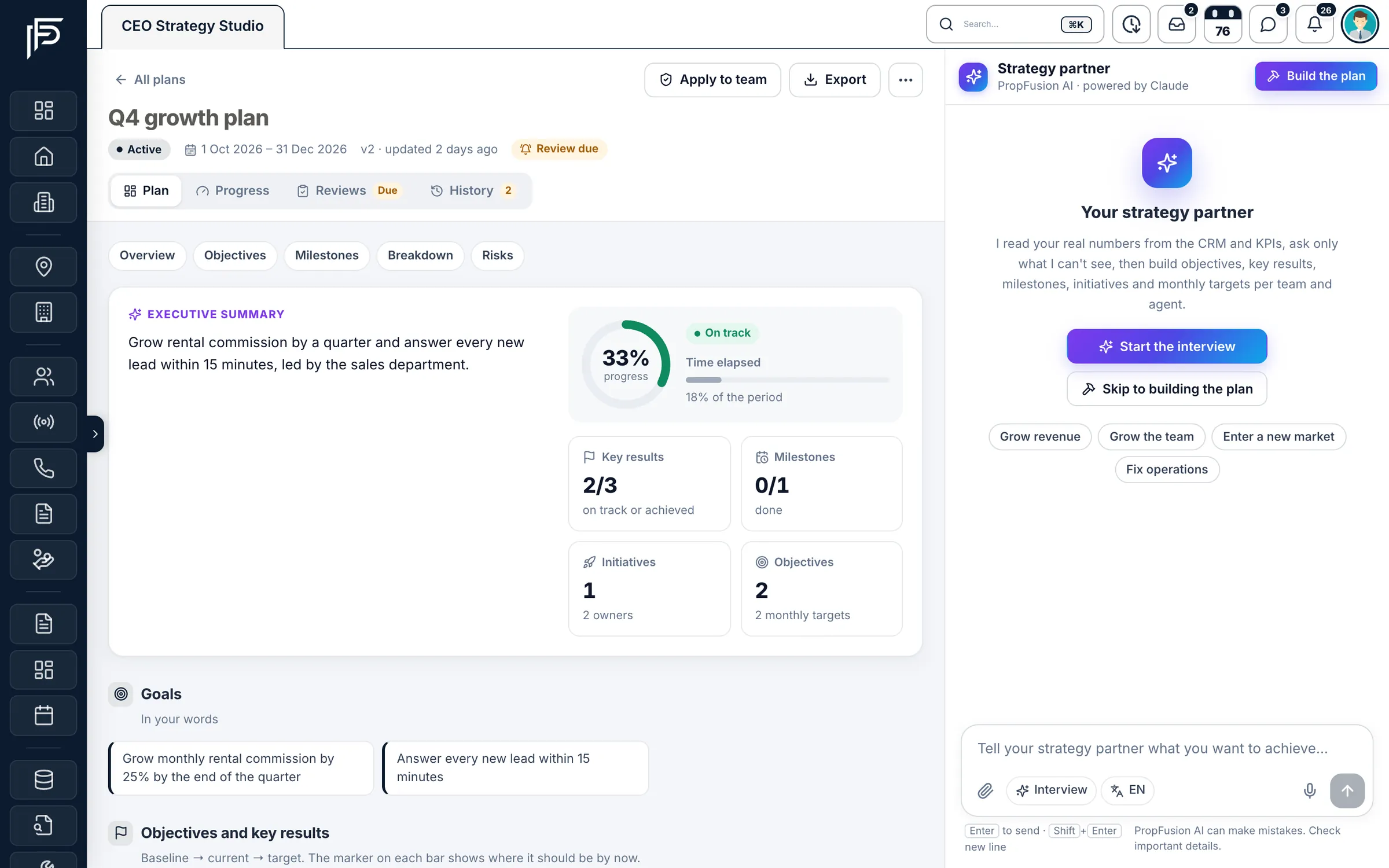
Propfusion CRM: CEO Strategy Studio with a Q4 growth plan, progress, key results and milestones, and an AI strategy partner panel
Plan growth with targets broken down by team.
  • PropFusion AI chat

    New

    Ask about your leads, listings and deals, or how to do something, in English, Arabic, French or Russian.

  • Live voice calls

    New

    Talk to PropFusion AI hands-free. Speech is transcribed by Whisper on Propfusion's own server, with the browser's own recognition as a fallback.

  • AI on your screen

    New

    It opens pages, points to buttons and fills in forms, and leaves the saving to you.

  • CEO Strategy Studio

    New

    Turn a growth goal into targets broken down by team.

  • Video tours

    New

    Make a video tour of a listing from its photos.

  • AI keys stay on the server

    Improved

    Ask AI search and Property Copilot run server-side, and AI summaries and property suggestions no longer need your own OpenAI key.

2026.10.15Major release

Targets & Performance for every team member

Targets and results now sit on every staff page, with a target planner, a monthly close, department scorecards, and badges and streaks earned from real results.

Open this release
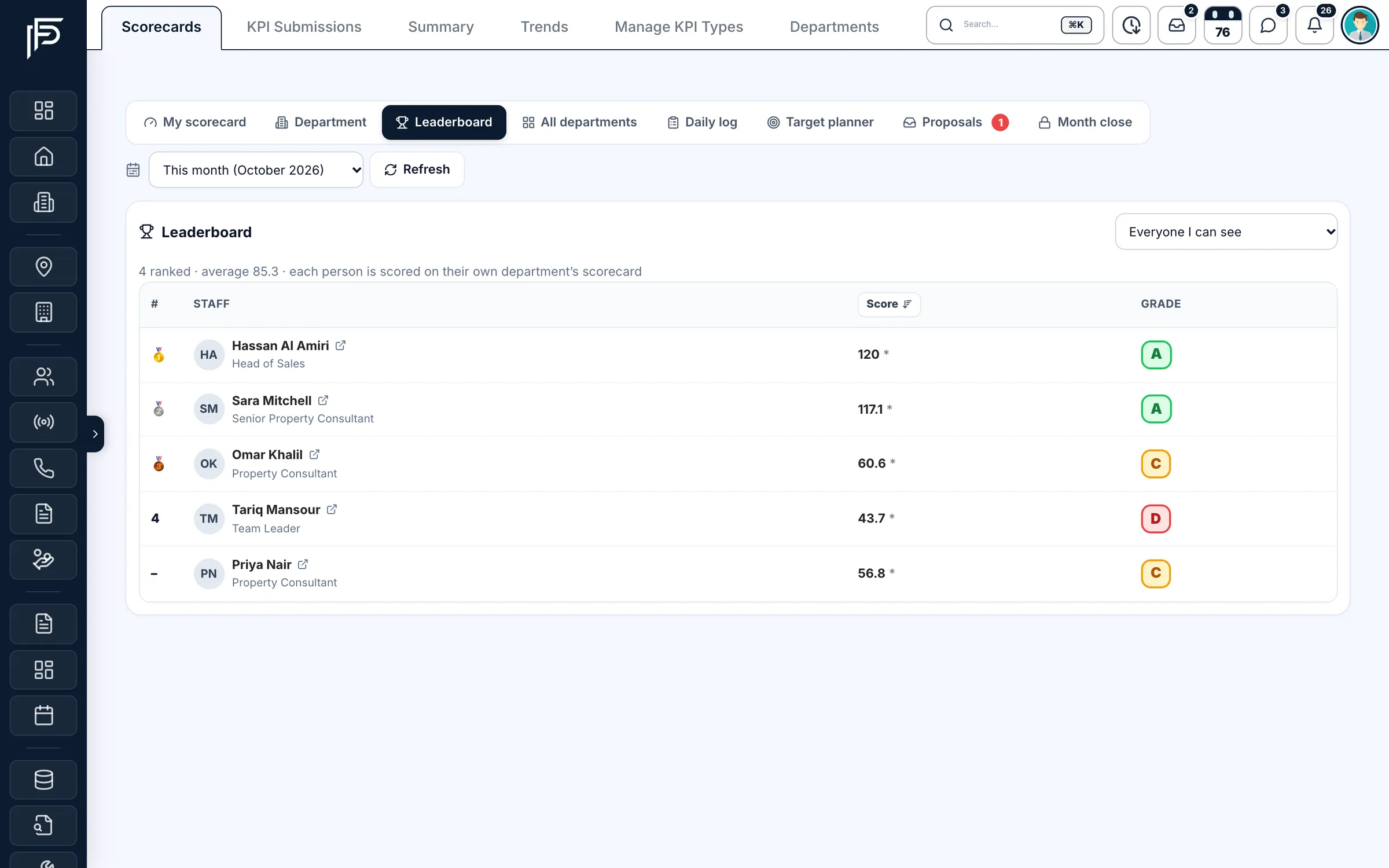
Propfusion CRM: KPI leaderboard ranking staff by monthly score, with each person's role and letter grade
The KPI leaderboard, with the team ranked by score.
  • Targets & Performance tab

    New

    On every staff page: each person's targets, progress and grade.

  • Target planner

    Improved

    Ramps that follow each target's direction, one rank pool for the team, and a cleaner layout.

  • Month close

    New

    Admins close each month on confirmed results. Late changes and their reasons stay in the month's history.

  • Badges and streaks

    New

    Awarded from each closed month's results and shown on the Performance tab.

  • Department KPI scorecards

    New

    Scorecards for each department, alongside personal ones.

2026.10.15Major release

Leasing and finance: Cheque Desk, tenancy contracts and owner money

The leasing and back-office side of the brokerage, built out: Dubai tenancy contracts, a Cheque Desk, owner accounts with two-person approval, and compliance for every deal.

Open this release
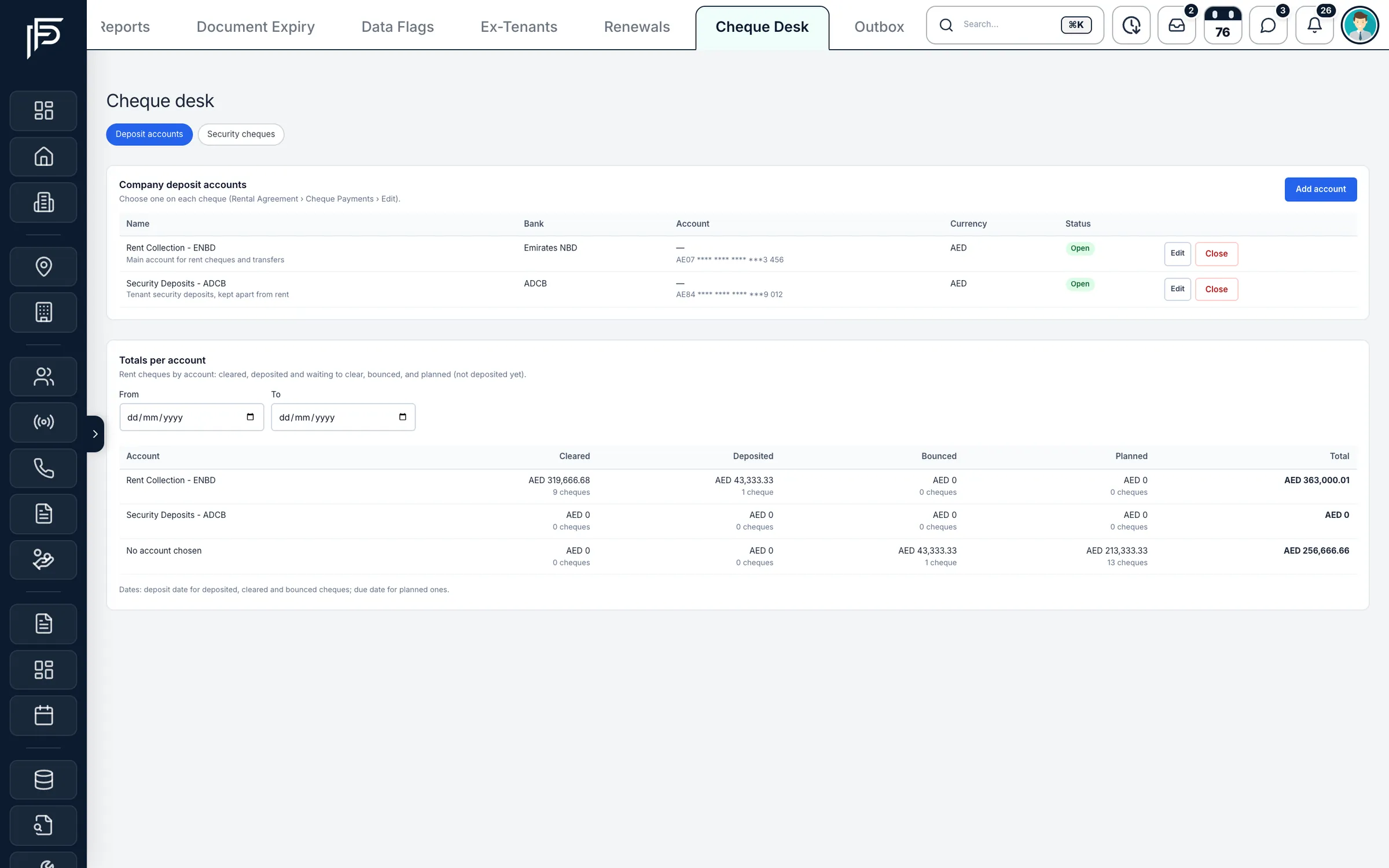
Propfusion CRM: Cheque desk with company deposit accounts and rent cheque totals per account: cleared, deposited, bounced and planned
See rent cheques cleared, deposited, bounced or planned for each bank account.
  • Tenancy contracts

    New

    Fill a Dubai tenancy contract that creates the rental agreement and its cheque schedule.

  • Cheque Desk and cheque reports

    New

    Every cheque due, deposited or bounced, with deposit accounts, totals and security cheques.

  • Owner Money

    New

    Owner accounts credited when rent clears, minus the management fee. Charges and payouts need a second person to approve.

  • Deals & Compliance

    New

    KYC for every party, the AML register and an AML pack for each deal.

  • Legal cases and company assets

    New

    Track disputes, equipment, SIM cards and cars, and who holds each item.

  • Maintenance and tenant reminders

    Improved

    Maintenance notifications with assignees, and WhatsApp reminder settings for tenants.

2026.10.12Feature update

WhatsApp Pro, team chat on the web and a smarter listing form

More of the day's work in one place: a fuller WhatsApp Pro workspace, PropFusion Chat in the browser, and a listing form that fills itself in from the permit.

Open this release
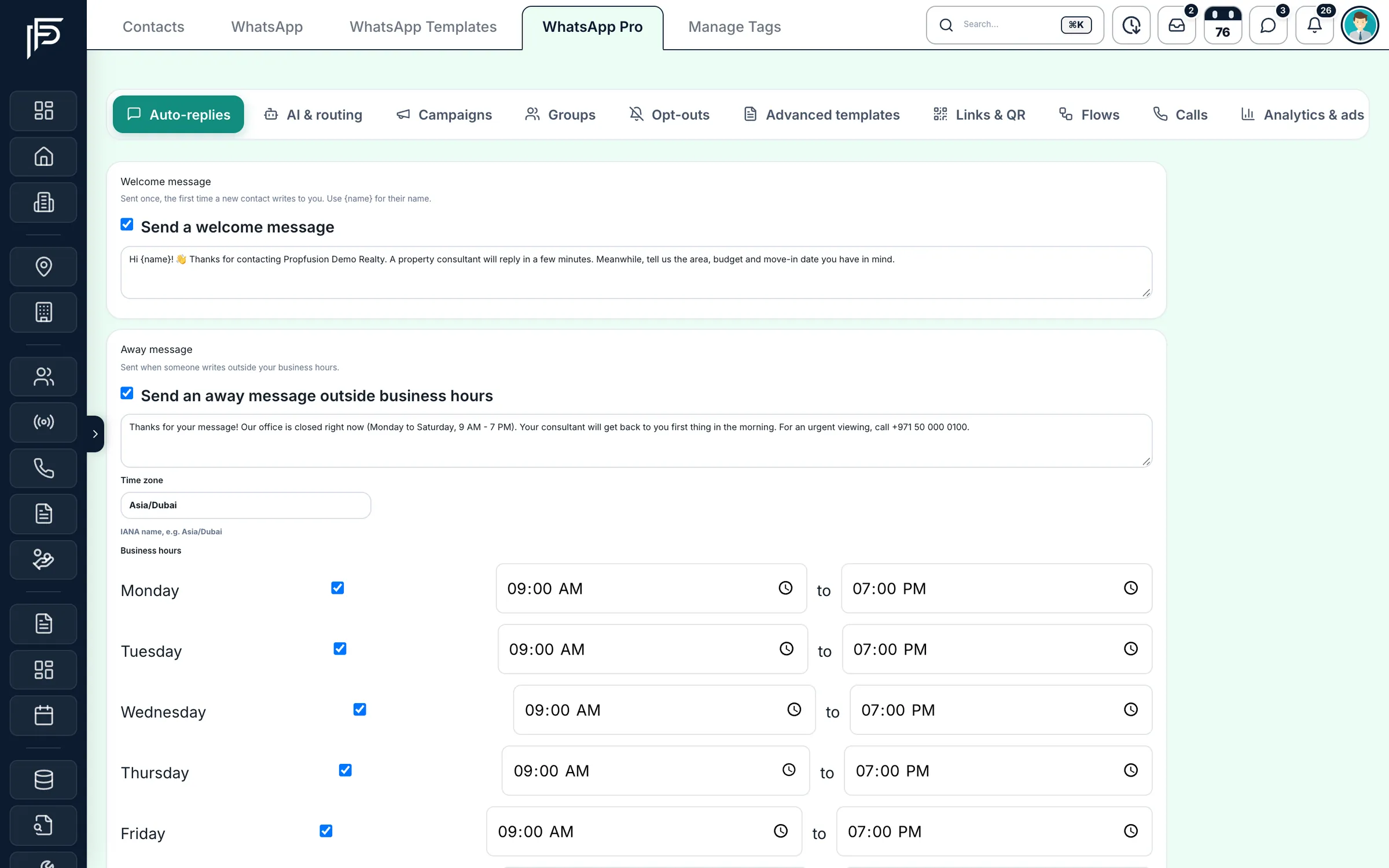
Propfusion CRM: WhatsApp Pro auto-replies with a welcome message, an away message and business hours for each day
Greet new WhatsApp contacts and answer after hours automatically.
  • WhatsApp Pro

    New

    Groups, events and advanced templates, webhook forwarding, and guided setup for the company number.

  • WhatsApp calling check

    New

    See whether WhatsApp calling is ready on your company number.

  • PropFusion Chat on the web

    New

    The same team chat as the app, with live alerts.

  • Permit lookup in the listing wizard

    New

    With your portal account connected, enter the listing's permit number and its details fill in for you.

  • Bayut from the listing menu

    New

    Create and remove Bayut listings from Check portal status in a property's menu, and filter listings by their Property Finder state.

  • Personal link page

    New

    A branded link page for every agent, ready for their social profiles.

2026.10Major release

Guided tutorials, one-tap follow-ups and live lead alerts

Interactive tutorials in the CRM and the mobile app, faster follow-ups with quick notes and smart reminders, a daily briefing with live lead alerts, and new HR tools.

Open this release
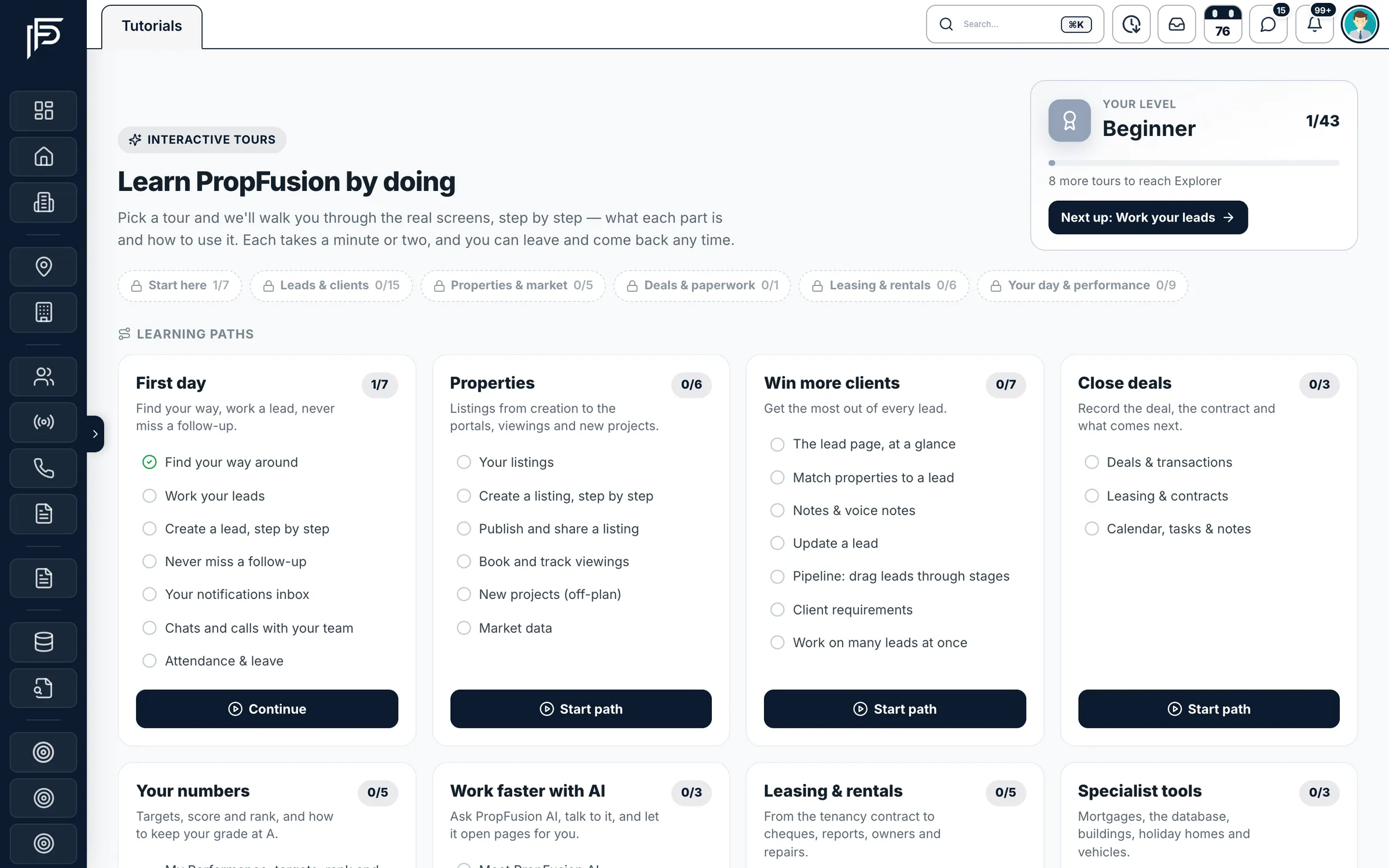
Propfusion CRM: Tutorials page with interactive tours grouped into learning paths and a level progress card
Guided tours train new agents on the real screens.
  • Interactive tutorials

    New

    Guided tours on the real screens, on the web and in the app, with levels to work through and, on the web, learning paths.

  • One-tap follow-ups

    New

    Quick notes set the next reminder at your company's default time, and stage changes prompt the next follow-up.

  • Daily briefing and live alerts

    New

    A morning summary, plus a sound and pop-up the moment a new lead arrives.

  • Response time and report card

    Enhanced

    How fast each lead is answered and how every agent moves leads, with a grade per agent.

  • HR: attendance, leave and hiring

    New

    Check in with location and photo, plan leave on the HR calendar, and manage job posts and applicants.

  • Mobile app

    Enhanced

    A follow-up agenda with swipe actions, in-app tutorials and a more reliable connection check.

2026.09Major release

Owner and tenant portals, invoices and the live agent map

Self-service portals for owners and tenants, property-management tools, a real invoice system, smarter lead routing and a live map of the field team.

Open this release
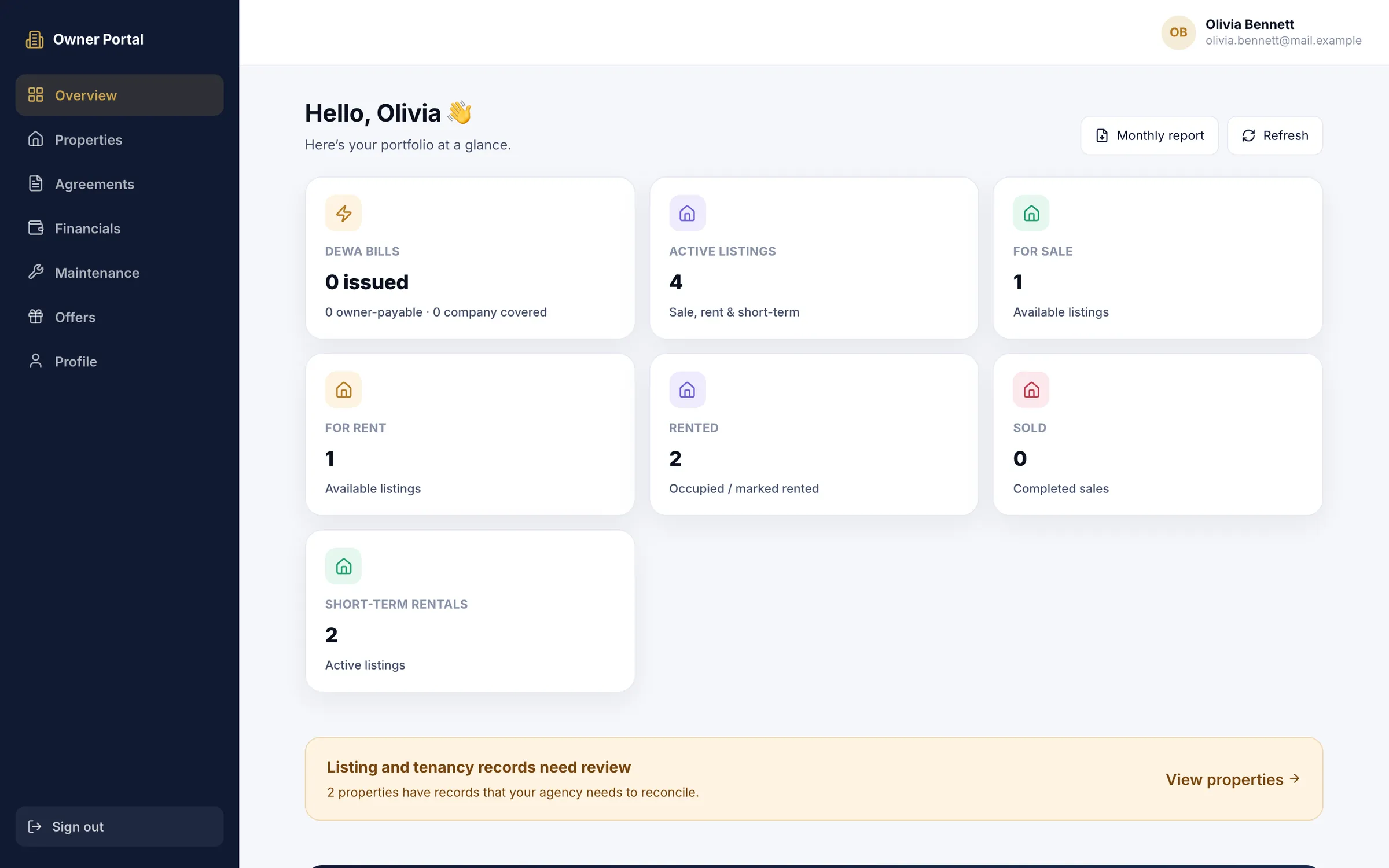
Propfusion CRM: Owner portal overview with DEWA bills and active, for-sale, for-rent, rented, sold and short-term listing counts
Owners see their listings, rentals and DEWA bills in their own portal.
  • Owner and tenant portals

    New

    Owners see income, documents and maintenance; tenants see their lease, payments and requests.

  • Maintenance and DEWA ledger

    New

    Maintenance tickets that agents can raise themselves, and DEWA bills per unit that owners can see.

  • Invoices and VAT ledger

    New

    Numbered, status-tracked invoices, and a VAT ledger grouped by UAE filing quarter.

  • Financial Analytics

    New

    Income and expenses, agent loans and a multi-agent forecast on one dashboard.

  • Live agent map

    New

    Field agents share their location from the app for the working day, and managers see the team on one map, with today's trail and a team timeline. Viewing it needs its own permission.

  • Distribution and rescue plans

    New

    Share leads by source, day and agent weight, and re-route leads that sit idle.

  • Meta Conversions API

    New

    Tell Meta which leads moved forward, stage by stage, so campaigns aim at better clients.

  • Follow-ups page

    New

    Every follow-up as a list or a year calendar, with rescheduling, matching the app.

Screens show the Propfusion Demo Realty sample workspace. All people, listings and numbers are fictional.

Tell us what to build next

Send us the feature your team needs most, or start a free trial and get every new release as it ships.