Interactive maps

Interactive property maps for Dubai brokerages

See your sale and rental listings, off-plan projects and communities on interactive maps of Dubai and the UAE. Filter by price, bedrooms, agent or community, then click a pin for the photo, the price and the full record.

  • For Sale, For Rent and off-plan maps
  • Filters for price, beds, agent and community
  • Click a pin, open the record
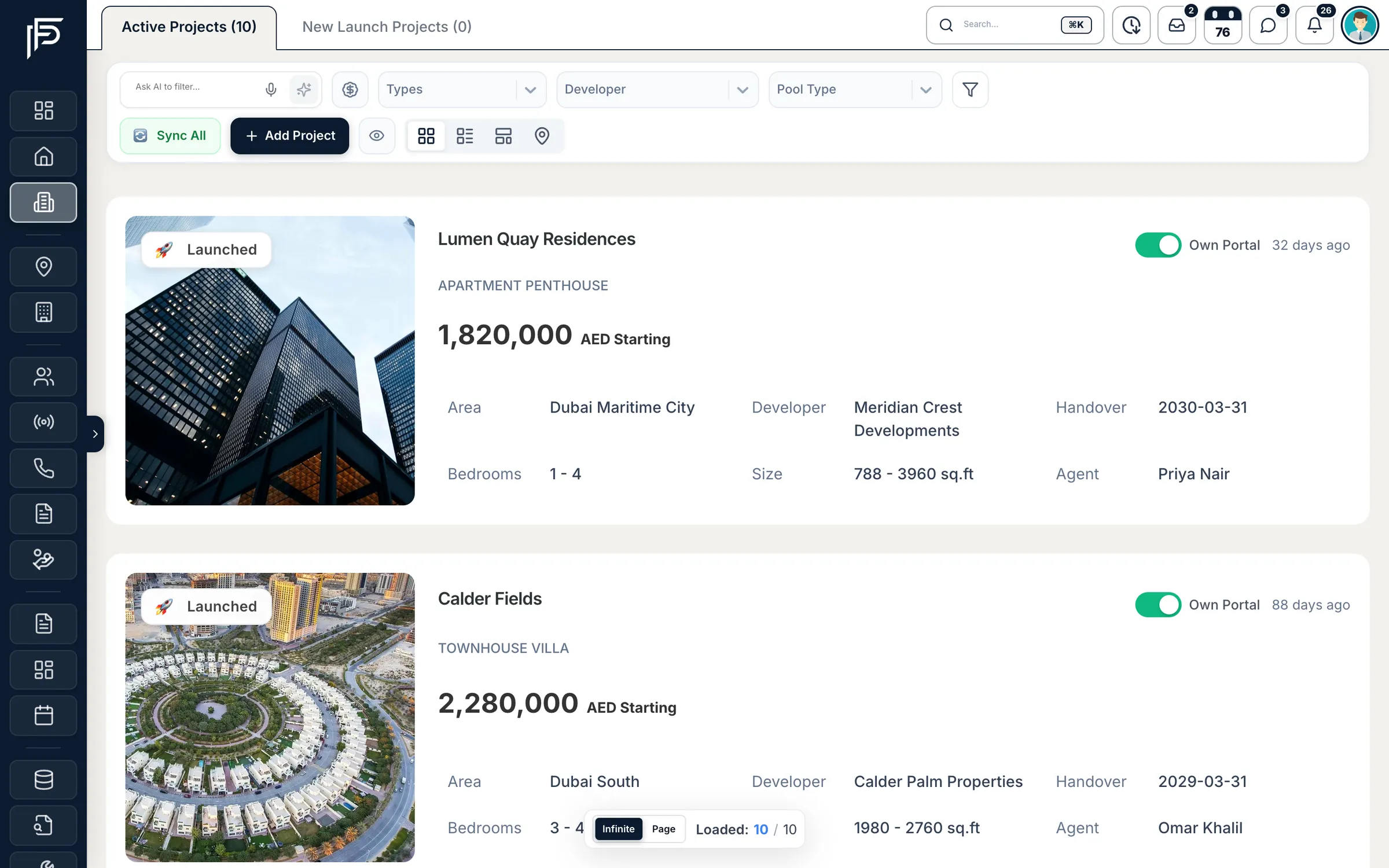
Propfusion CRM: Off-plan project cards with photo, starting price, area, developer, handover date, bedrooms, size and agent

How it works

From address to pin, with no extra work

  1. Step 1: Pin it once

    When you add a listing, search for the building or area and pick it from the suggestions. The pin is set for you.

  2. Step 2: Filter the map

    Narrow the map by price, bedrooms, furnishing, completion status, agent or community.

  3. Step 3: Open the record

    Click a pin to see the photo and price, then go straight to the full listing or project.

Two maps

Your listings and your off-plan projects, mapped

The properties map draws on the listings your team keeps in the CRM, and the projects map on your own projects or the developers' project pool, so what you see is current.

Properties map

Every active listing on one map

Switch between For Sale and For Rent and the map redraws with your current inventory. Search by city, community, sub-community or building, or open the filters to narrow it down.

  • Filters for price, bedrooms, property type, furnishing, completion status, agent, owner and tag
  • Pins group into clusters as you zoom out and separate as you zoom in
  • Click a pin for the photo, title and price, then open the full listing
Off-plan projects map

Off-plan projects across the UAE

See your own active off-plan projects, or switch to the pool of projects that developers share on Propfusion. Keep only the ones selling now, and filter by developer, property type, bedrooms, price, city or community.

  • Pins coloured by property type, with a legend, or marked with the developer's logo
  • Tap a project for its image, starting price and project page

Communities

Know every community you cover

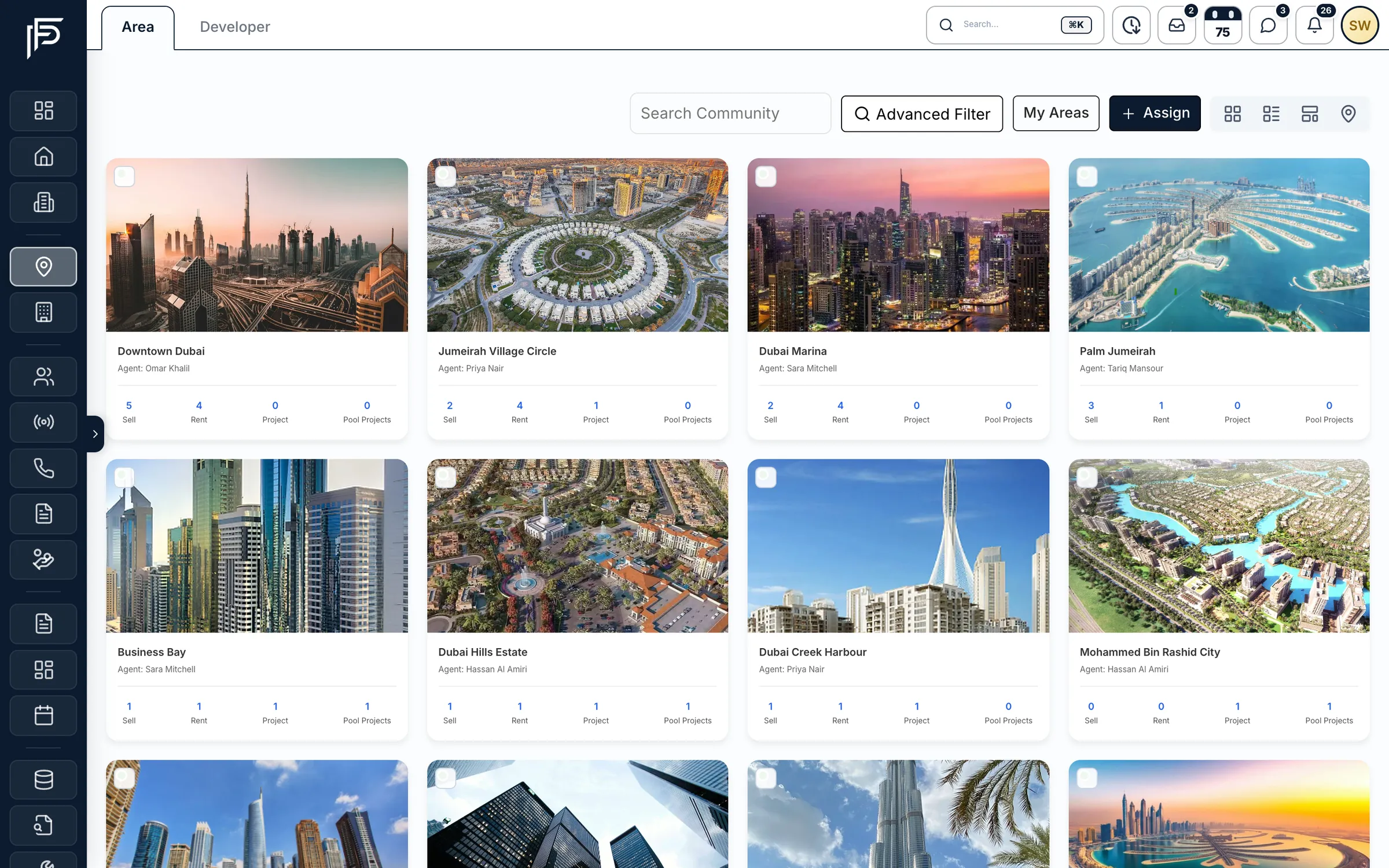
Areas lists each community with its photo and links straight to its sale listings, rentals, projects and pool projects. Pick several communities and open one combined view of their districts, buildings and map.
  • Grid, table, interactive and map views of your areas
  • One click to the listings and projects in a community
  • Assign agents to the areas they cover
Propfusion CRM: Area cards for Dubai communities with photo, assigned agent and sell, rent, project and pool project counts

Screens show the Propfusion Demo Realty sample workspace. All people, listings and numbers are fictional.

Across the CRM

Location tools wherever you work

Maps are not a separate module. They sit in the leads list, the listing pages, the dashboard and the app.

  • Leads on a map

    Switch the leads list to Map view to see clients by the area they want, with their preferred properties.

  • Field team locations

    Agents can share their location from the app for a set time. Managers see who is where and can replay a day's route with stops and distance.

  • Map, satellite and traffic

    Change the base map to road, satellite, hybrid or terrain, and turn on traffic, transit or cycling layers.

  • Emirate boundaries

    The listings and projects maps outline each emirate in its own colour, so you can read the whole UAE at a glance.

  • Building and area search

    Type a building or area while adding a listing and pick it from the suggestions. No pasting coordinates.

  • Street View on listing pages

    The location card on every listing page includes Google Street View, so an agent can check the building before a viewing.

  • Location on share pages

    The listing pages you send to clients include a map of the property's location.

  • Projects map on the dashboard

    The dashboard shows your off-plan projects on a map, marked with developer logos.

  • Map in the mobile app

    The Propfusion app has its own off-plan projects map, with the same Selling filter.

Questions

Interactive maps questions

Do I have to enter map coordinates?
No. When you add a listing, search for the building or area and pick it from the suggestions. The pin is set for you.
What can I filter the maps by?
The properties map filters by price, bedrooms, property type, furnishing, completion status, agent, owner and tag. The off-plan map filters by developer, property type, bedrooms, price, city or community, and can show only the projects selling now.
Can I see my leads on a map?
Yes. Switch the leads list to Map view to see clients by the area they want, with their preferred properties.
Can managers see where the field team is?
Agents can share their location from the app for a set time. Managers then see who is where, and can replay a day's route with its stops and distance.
Which base maps are available?
Road, satellite, hybrid and terrain, with optional traffic, transit and cycling layers. Listing pages also include Google Street View in their location card.
Is there a map in the mobile app?
Yes. The Propfusion app has its own off-plan projects map, with the same Selling filter.

See your inventory on the map

Start a free trial, or book a live demo and we will walk you through the maps in a working CRM.