Transactions, commissions and finance in one place
- Commission splits per agent
- Approve once, wallets update
- Invoices and a VAT ledger
How it works
From signed deal to paid commission
- Step 1
Record the deal
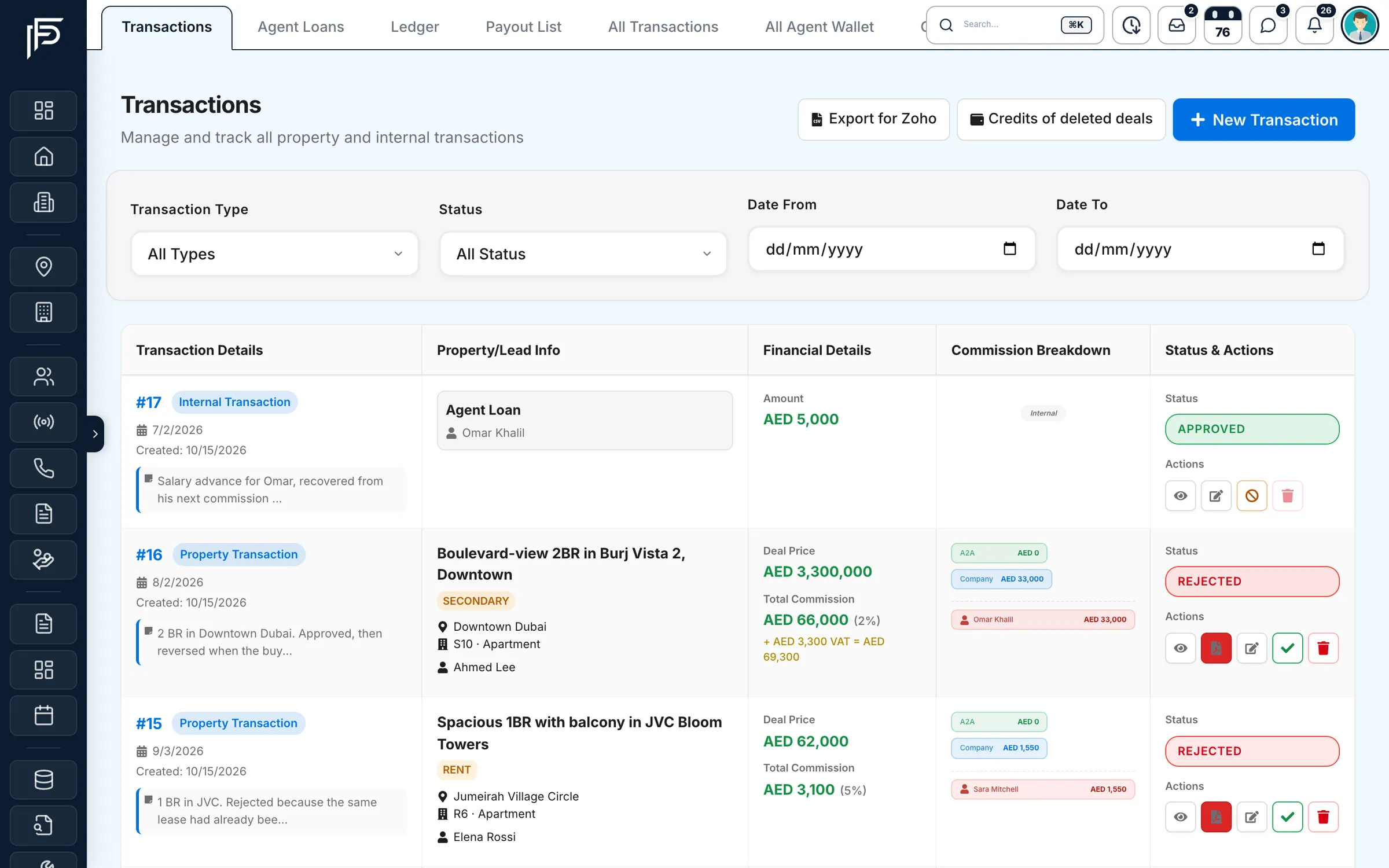
The agent adds the property, the parties, the deal price and the total commission, split between agents, the company and any referral.
- Step 2
Finance approves it
Approve the deal, or reject it with a reason. A rejection takes back any wallet credits the approval posted.
- Step 3
Wallets and books update
Each agent's share lands in their wallet, the deal counts in the VAT ledger and the analytics, and its invoice is one click away.
A finance desk built for brokerages
Commissions, splits, payouts and VAT are where spreadsheets break. Propfusion keeps them on one record, from the offer to the payout.
Deals
Every deal on one record, from KYC to commission
- Each agent's share of the commission, as a percentage or a fixed amount
- Who approved the deal and when, with notes on how the split was agreed
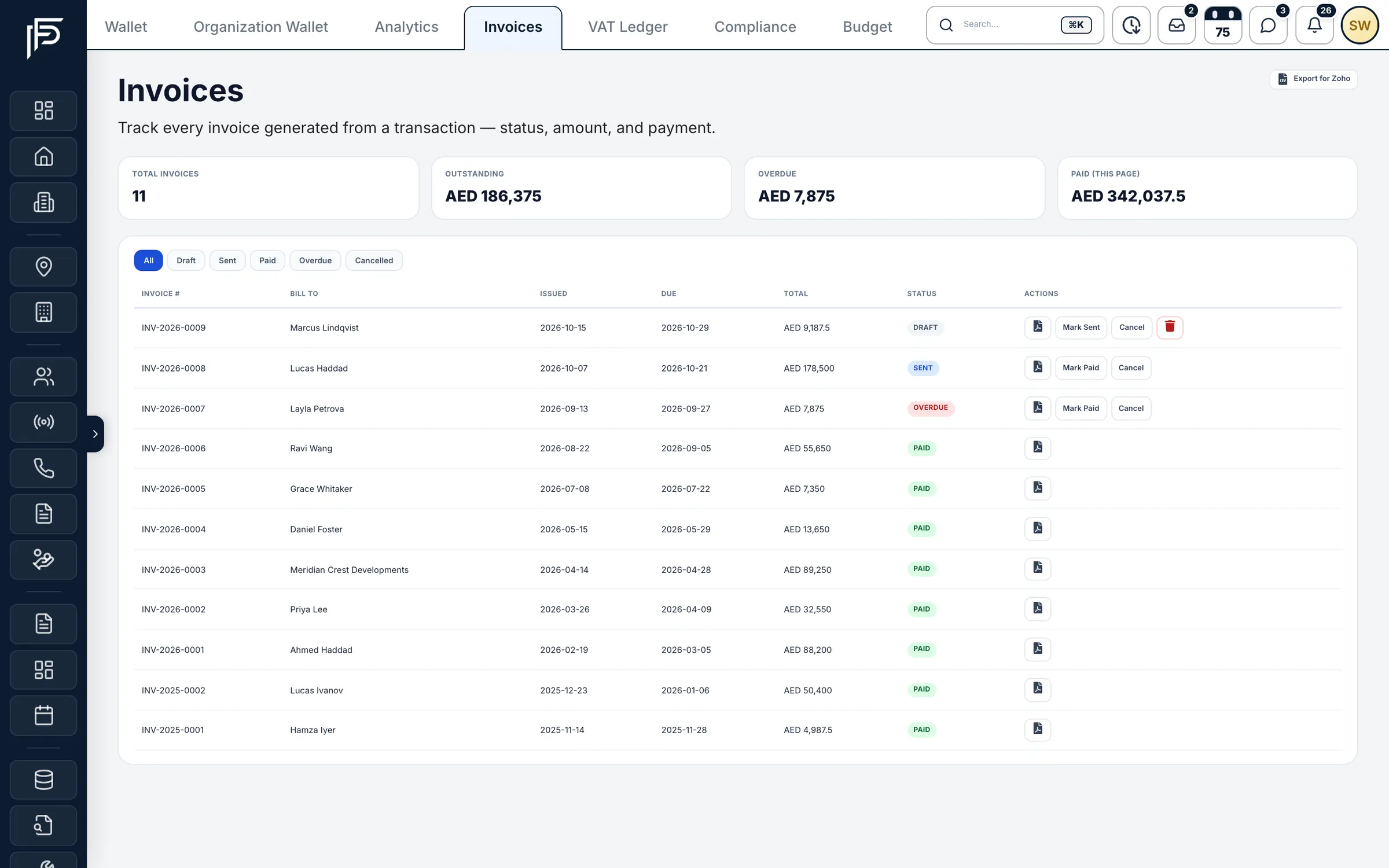
- Generate a numbered invoice with your company details from the deal
Financial analytics
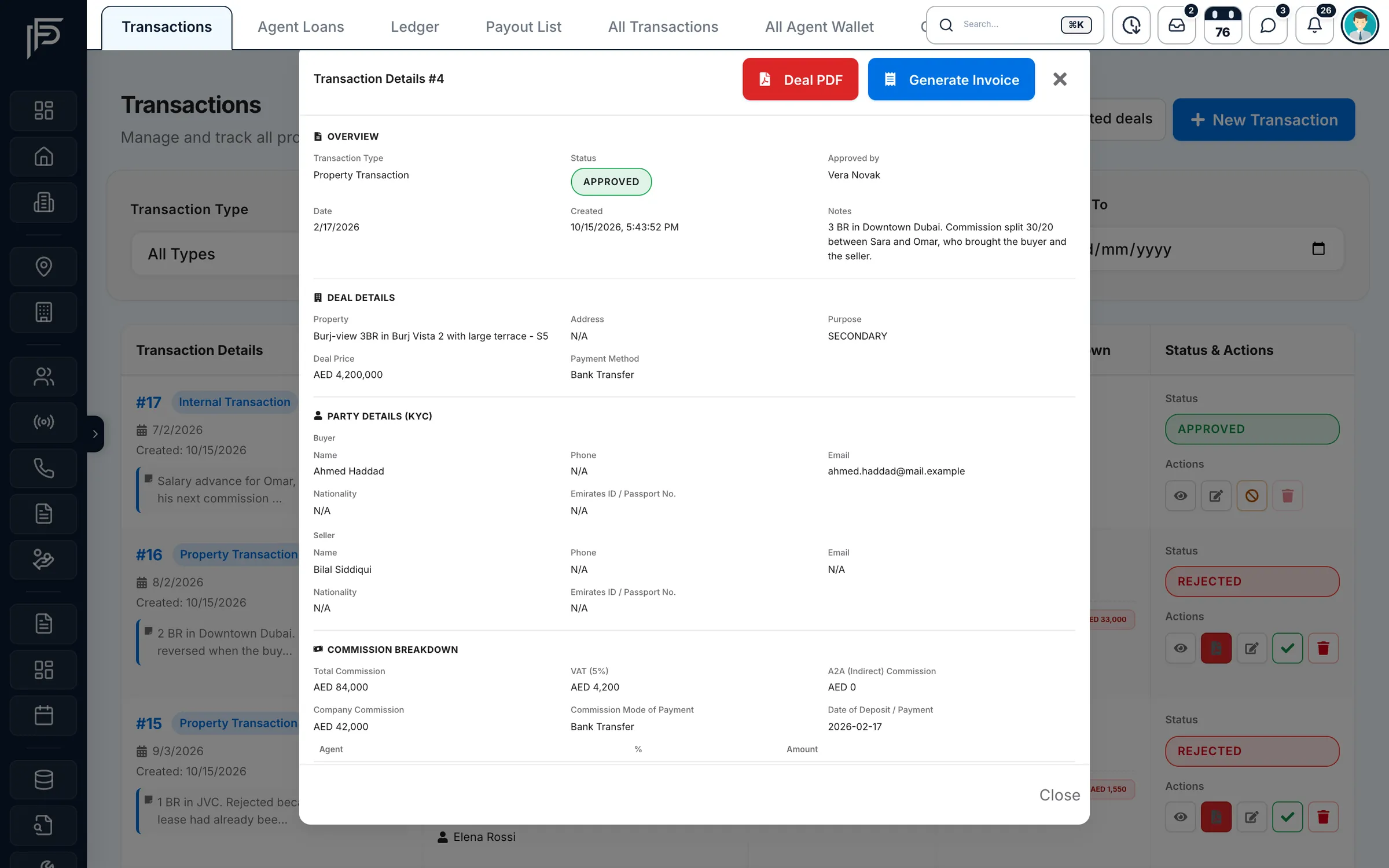
See where the money comes from
- Income by source: rental, off-plan and secondary commission, Ejari mark-up and more
- Expense breakdown by category
- Loans paid out to agents, shown next to income and expenses
Deal compliance
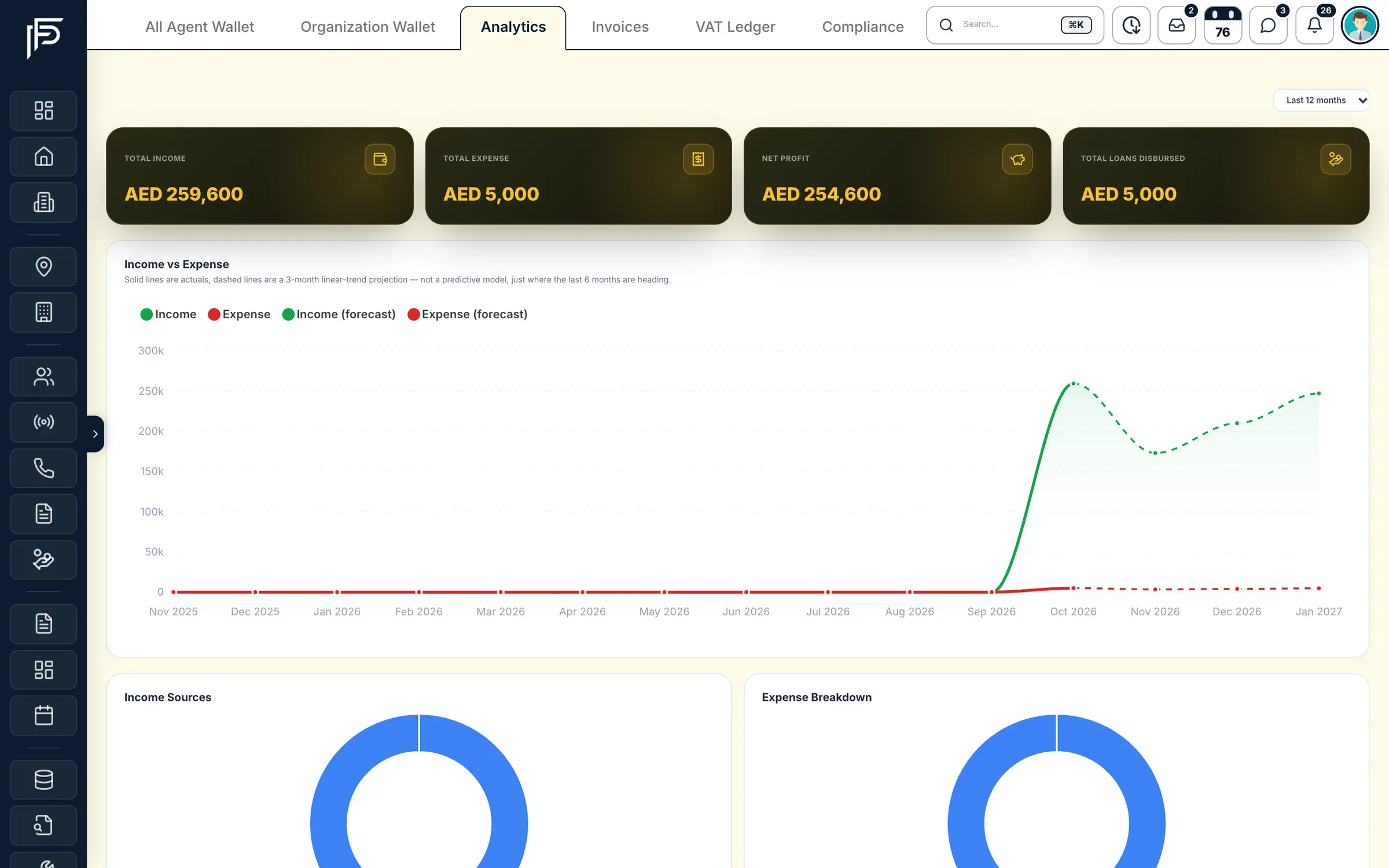
Off-plan instalments, chased on time
- Instalments due in the next 30 days, with the deal, the client and the amount
- Each schedule shows how much has been paid of the total
- Referral payables, the AML register and contract fees in the tabs next to it
Cheque desk
Rent cheques, accounted for
- Company deposit accounts with bank, masked IBAN and currency
- Totals per account for any date range
- Security cheques the company holds, tracked in their own tab
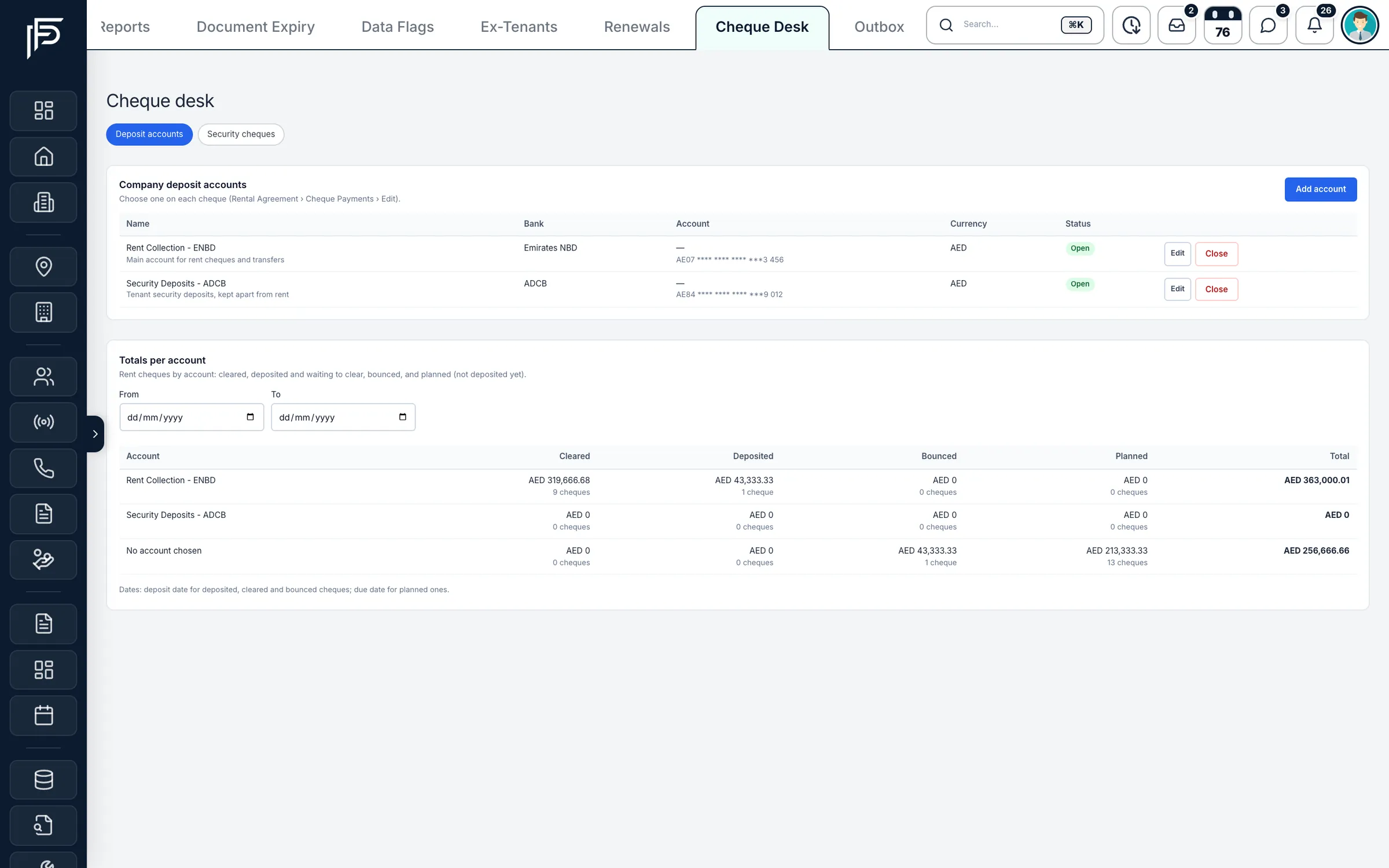
Screens show the Propfusion Demo Realty sample workspace. All people, listings and numbers are fictional.
After approval
An invoice for the client, a wallet for every agent
Once finance approves a deal, each agent's share is already in their wallet, ready for a payout request, and the client's invoice is one click away, generated from the same record.
In the app
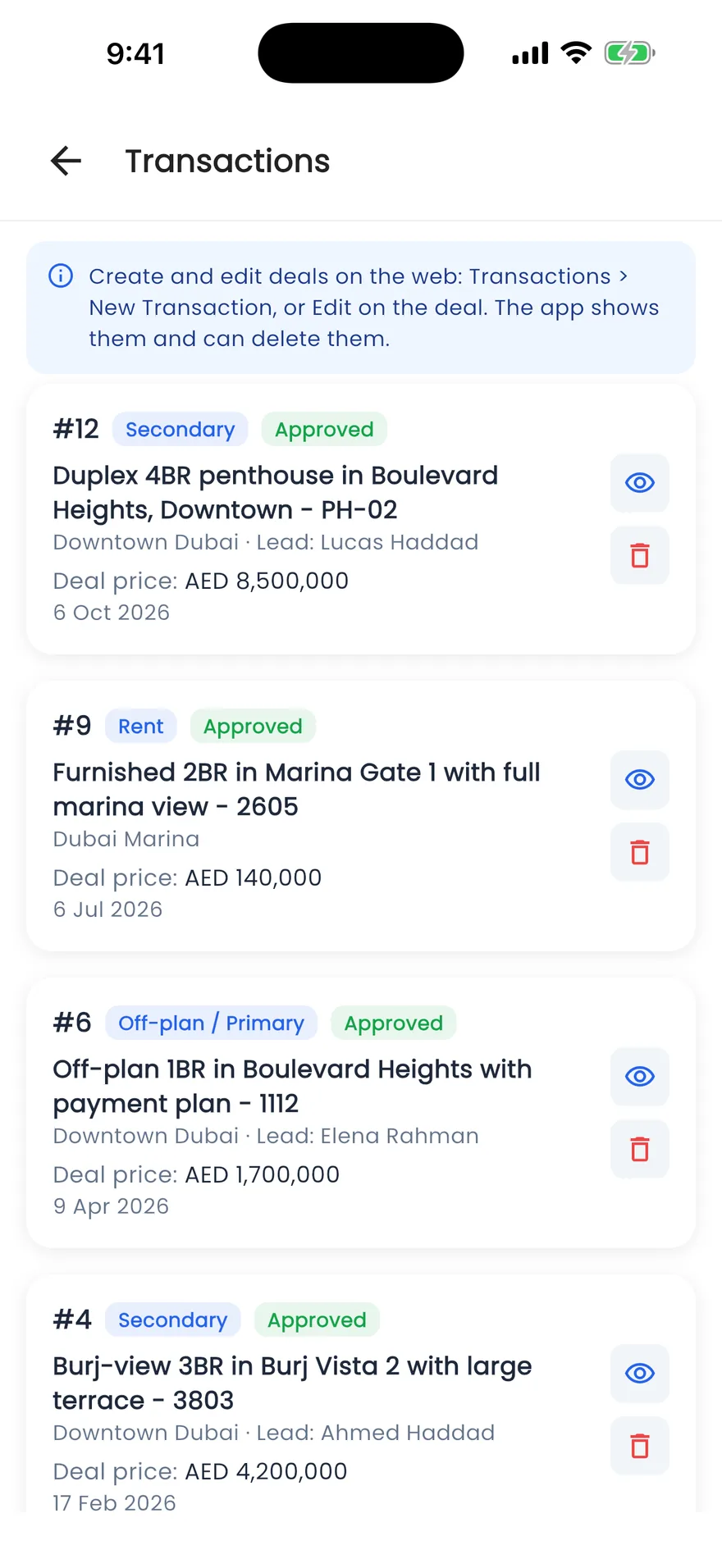
Deals and commissions in every agent's pocket
The Propfusion app lists each deal with its type, approval status, property, lead and price, so an agent can check where their commission stands between viewings. Deals are created and edited on the web, where finance approves them.
- Secondary, rental and off-plan deals, each with its approval status
- Wallet and ledger under the agent's profile in the app
- Monthly targets, deals and commission on the My performance screen
Transactions & finance
The rest of the finance workspace
Payouts, loans, budgets, VAT and the company's own books, all in AED and all tied back to the deal.
VAT ledger
Net VAT payable each quarter: output VAT on approved deals minus input VAT on expenses, with the filing date and a CSV for each quarter.
Expenses with supplier TRN
Record each company expense with its VAT, the supplier's TRN and the invoice, so input VAT is counted correctly.
Payout list
Every payout request in one list. Approve or reject each one, deducting any loan recovery.
Agent loans and employee costs
Loans and company-paid costs such as visas and Emirates IDs, each with a monthly deduction plan that pre-fills the next payout.
Ledger
Every wallet credit and debit, for agents and for the company, with the deal or entry behind it.
Internal transactions
Salaries, penalties, agent loans and company expenses, recorded next to the deals.
Budget
A budget per category each month, from last month or the six-month average. Finance is alerted at 80% and 100% of a category.
Subscriptions
Portal packages and software with their next charge date, VAT and a reminder before renewal.
Access by role
Agents see their own deals and wallet. Only finance and admins see every transaction and the company's money.
How is a commission split recorded?
On the deal itself. Enter the total commission, then each agent's share as a percentage or a fixed amount, the company's share and any agent-to-agent or referral share. When finance approves the deal, each agent's share is credited to their wallet.
What happens if finance rejects a deal?
The deal is rejected with a reason, and any wallet credits that its approval had posted are taken back, so balances stay right.
Can agents see each other's deals and earnings?
Not unless you allow it. Without the permission to view all transactions, an agent sees only their own deals, wallet and ledger. Company income, expenses, budgets and VAT are for finance and admins.
How do agents get paid their commission?
An agent requests a payout from their wallet, up to the amount available for withdrawal. Finance approves or rejects it in the payout list, and any loan or employee-cost deduction planned for the month is pre-filled.
Are off-plan instalments chased automatically?
Yes. Once a payment schedule is set on an off-plan deal, the agents get reminders 30, 7 and 0 days before each instalment and again after it becomes overdue. You can change the days per schedule, and the client is emailed once your company email is set up.
Can our accountant work from these numbers?
Yes. Every invoice downloads as a PDF, approved deals or invoices export as a CSV in Zoho Books' invoice import format, and the VAT ledger gives net VAT payable per quarter with a CSV for each.
Related features
Works with the rest of Propfusion
Targets & performance
Approved deals count toward each agent's commission targets, credited by their share of the split.
Learn moreContract management
Tenancy contracts, brokerage agreements and booking forms from nine templates, with renewals and Ejari tracked.
Learn moreProperty management
Rental agreements, cheque schedules, maintenance and owner statements for managed units.
Learn more
Close the month with numbers everyone trusts
Start a free trial and record your first deal today, or book a demo and we'll walk your finance team through splits, wallets and VAT.