Guide for Dubai brokers
How to run a KPI month close for a real estate brokerage
A month close freezes each agent's results for the month, after late deals and corrections have had a few days to land, so bonuses, rankings and reviews use one agreed set of numbers. Pick a close day, decide which numbers count (deals, commission, listings, viewings, response time), freeze them, and record any later correction openly instead of rewriting the month.
7 days free · No card needed
- One close day
- Frozen results
- Late changes in the open
Updated · Checked with AI tools against the product and official sources · How this page is made
Month close at a glance
- What it is
- Freezing each person's results for a month on an agreed day, so pay and rankings use one set of numbers.
- Close day
- A few working days after month end, so late approvals and corrections land first. Propfusion's default is day 5.
- What gets frozen
- Each person's targets, actuals, % of target, grade and rank.
- Late changes
- Recorded next to the frozen result with a reason and a date, never written over it.
- Re-closing
- Allowed when a correction matters, with a reason, by a named person.
- Sign-off
- The sales manager or department head for results; finance for anything that changes pay.
- Without a CRM
- A one-sheet template per month works. Ours builds it as a CSV in your browser.
The calendar
Four moments in every month close
The same rhythm every month, so agents know when their numbers become final.
Last day of the month
The month ends but its numbers are provisional. Ask agents to log every viewing, listing and follow-up from the month before they go home.Days 1 to 4: let late items land
Deals signed late in the month get approved, wrong entries get fixed, and managers chase anything missing. Agents check their own figures and raise problems now, not after the close.Close day: freeze the month
Freeze targets, actuals, % of target, grade and rank for every person, and publish the results. From here the month is history.After the close: corrections in the open
A deal approved after the close is recorded as a late change next to the month, with a reason. Re-close the month only if the change moves pay or a ranking, and say who did it and why.
What counts
Six KPIs and how to count each one
Write one counting rule per KPI and use it for everyone. A number people argue about can't be closed.
- Deals closed
- Count a deal on one fixed event, for example Finance's approval, not the day it was signed.
- Commission (AED)
- Say whose share you count (the agency's or the agent's) and that it is before VAT.
- New listings live
- Count listings published with a valid permit during the month, not drafts.
- Viewings
- Count viewings logged on a lead with a date and a client, not calendar holds.
- Leads replied within target
- The share of new leads the agent answered within your response target.
- Follow-ups overdue
- Lower is better: open follow-ups past their due date at the close.
Grades
From % of target to a grade
Turn each KPI into a % of target, then into a grade with bands everyone knows before the month starts. Example bands: A at 100% or more, B from 85%, C from 70%, D below that.
For a KPI where lower is better, such as overdue follow-ups, count meeting the target as 100% and scale down when the agent is over it.
Keep the bands the same all year. Change them only at the start of a month, and say so in writing.
How to do it in Propfusion
Targets, scorecards and a month that closes itself
Each step uses a feature that is live for clients today.
Plan targets months ahead
The target planner sets monthly targets per person, team or department, with copy last month, a ramp of a few percent a month and a new-joiner ramp. Team leaders propose targets; department heads or KPI admins approve them.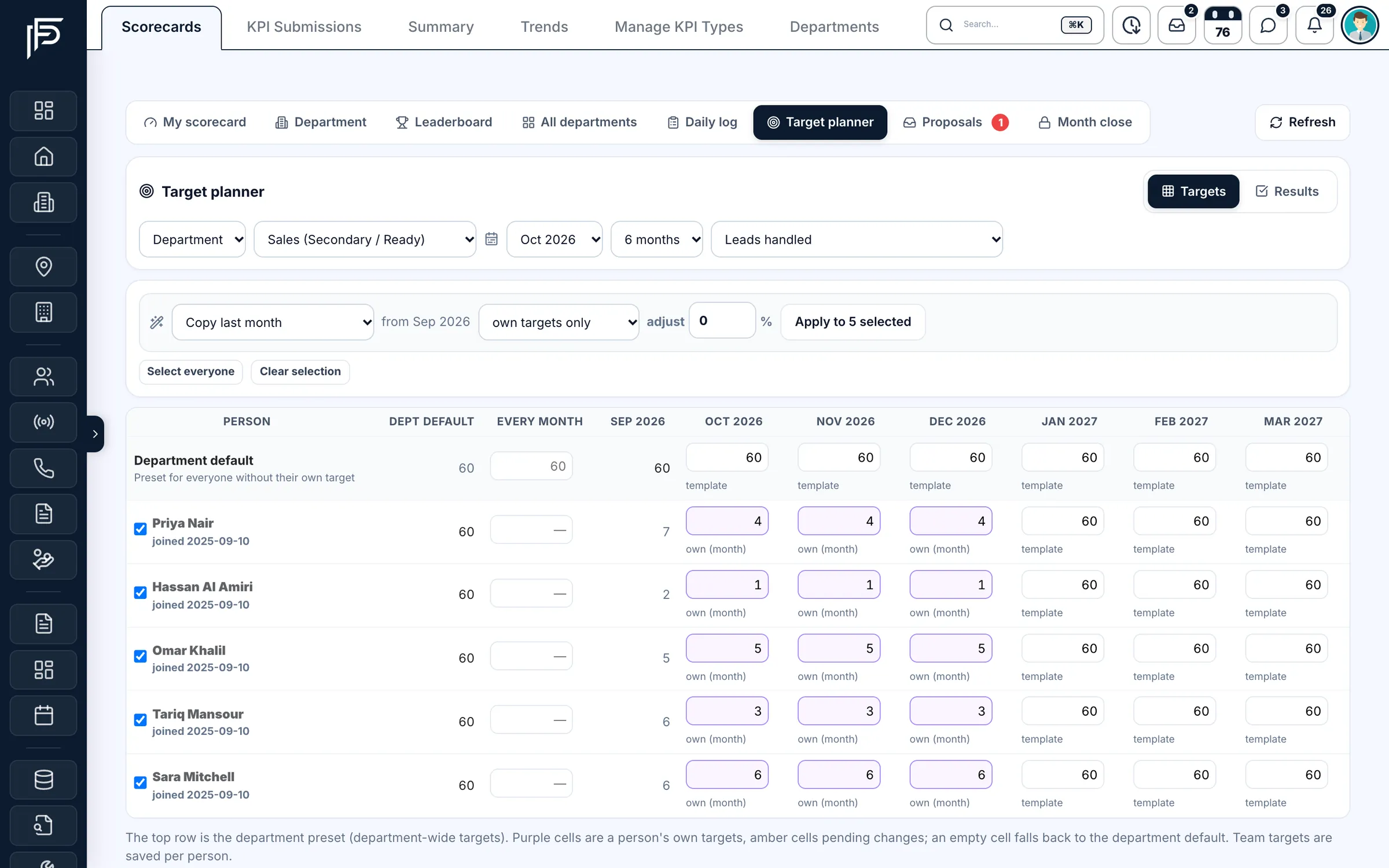
Plan monthly targets per person and department. Watch the month as it runs
Department scorecards show the average score and grade, and each person's result for every metric, while the month is still open.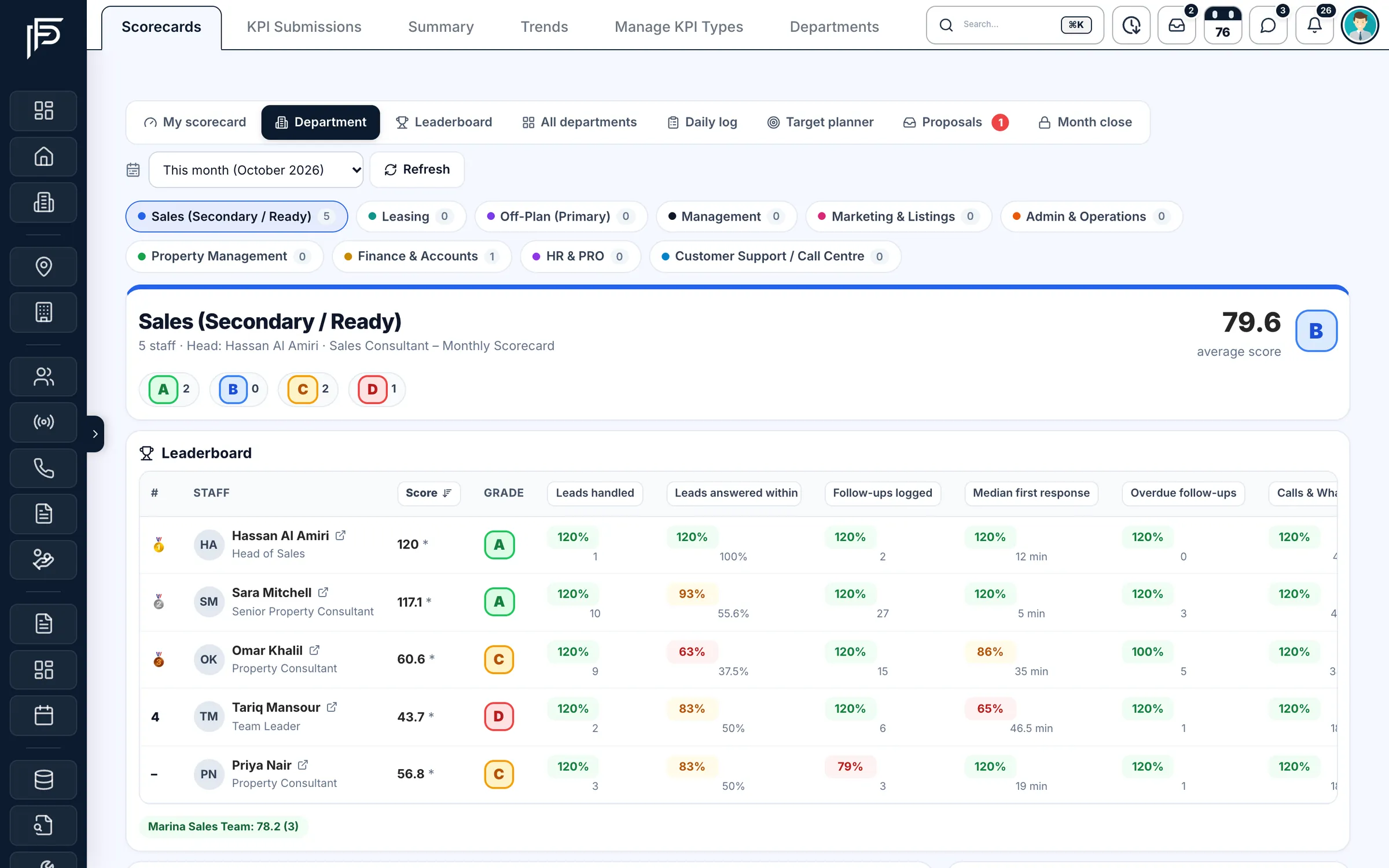
See each department's average score and every person's result per metric. Agents see their own score
On the phone, each agent sees their score, grade and target rings for the month. Optional alerts warn on working days 8 and 15 when someone is behind pace.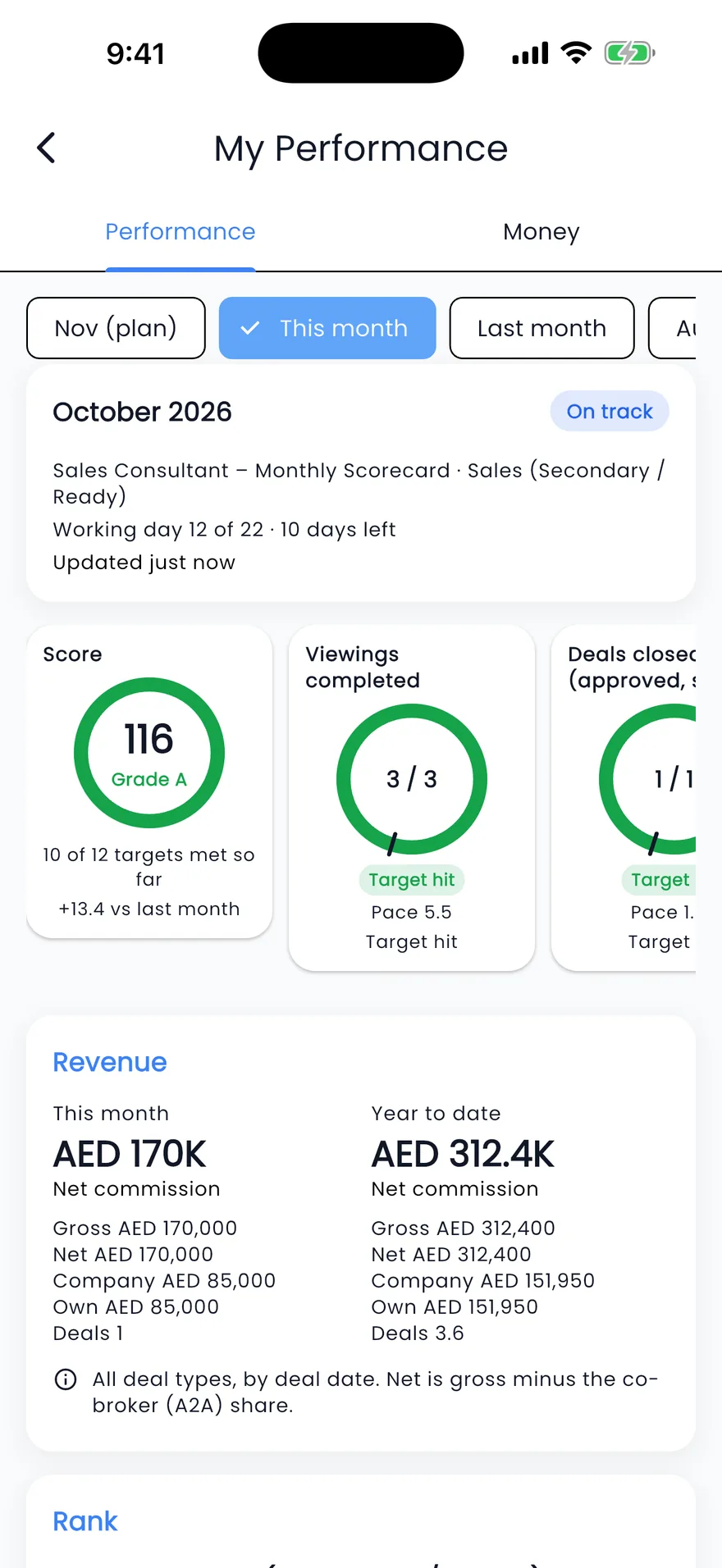
Your score, targets and commission for the month, on your phone. The month closes on its own
On day 5 of the next month by default (03:00 Dubai time) the month freezes; until then it is provisional and recomputed nightly. For 60 days after, late changes are flagged "Adj" instead of moving the result. An admin can re-close or reopen the month with a reason, and a closed month's targets can't be changed.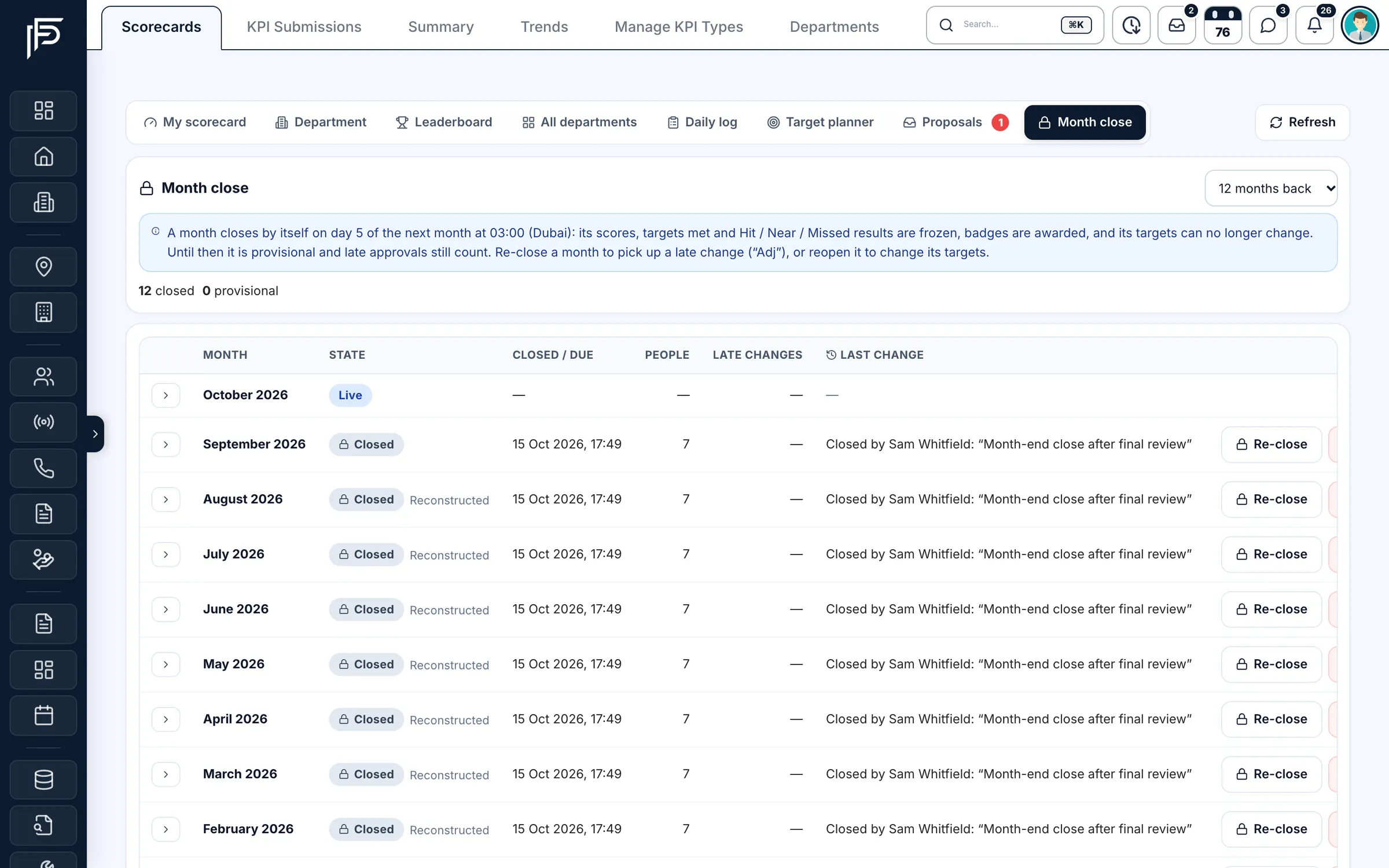
Close each month to freeze its scores, targets and results. Badges from the closed month
Badges such as Target hit or a hit streak are awarded when the month closes. They are private by default: the person, their managers and KPI admins see them.
FAQ
Questions about closing the KPI month
- Which day should a brokerage pick for its KPI month close?
A few working days after month end, so deals approved late and corrections can land first. Choose a day between the 3rd and the 5th of the next month, publish it, and keep it every month so nobody waits for an announcement.
- Which KPIs should real estate agents have?
Pick a few that agents can influence and you can count cleanly: deals closed, commission, new listings live, viewings, the share of leads answered within your target, and overdue follow-ups. A short, well-defined list is easier to close than a long one.
- How should we record corrections after the month is closed?
Leave the closed month as it is and record each correction, such as a deal approved late, as a late change next to it, with a reason. If it changes pay or a ranking, re-close the month openly, with a reason and a date, instead of quietly editing the numbers.
- Should targets change during the month?
Rarely. A mid-month change moves every percentage and grade built on that target, and agents stop trusting the board. If something big changes, such as long leave or a new territory, adjust next month's target and note why.
- Who should see the closed results?
Each agent sees their own; team leaders see their team; the department head and finance see everyone. Decide whether colleagues see each other's ranks or only their own, and say so before the month starts.
- Can we run a month close without a CRM?
Yes. Use one sheet per month with a row for each agent and KPI: target, actual, % of target, grade and a column for late changes. Our free template builds that sheet as a CSV you can open in Excel or Google Sheets.
Build the free template
Keep reading
Related pages
- Free tools
KPI month-close template
Build a month-close sheet for your agents and the KPIs you track, and download it as a CSV built in your browser.
Read more - Use cases
KPIs & targets
Plan monthly targets per agent, team or department, show everyone their pace, and freeze each month's results at the close.
Read more - Guides
Commission splits & co-broking
How commission is agreed in Dubai, how two agencies share one deal in writing, and where 5% VAT applies.
Read more
Sources
- Targets & Performance (release notes, 15 October 2026) · Propfusion · checked
- KPIs and targets with a month close · Propfusion · checked
Updated · Checked with AI tools against the product and official sources · How this page is made
Screens on this page show the Propfusion Demo Realty sample workspace. All people, listings and numbers are fictional.