Use case · KPIs & targets
KPIs and targets for real estate agents, with a month close
Propfusion lets admins and department heads plan monthly targets per agent, team or department, and shows every person their score, grade and pace during the month. A few days after month end the month closes: its results are frozen, later changes are flagged instead of rewriting history, and an admin can re-close or reopen it with a reason.
7 days free · No card needed
- Target planner
- Live leaderboard
- Frozen month close
Updated · Checked with AI tools against the product and official sources · How this page is made
At a glance
- Targets
- Planned months ahead per person, team or department, with Copy last month, a monthly ramp (+x%) and a new-joiner ramp
- Proposals
- Team leaders propose targets; department heads or KPI admins approve them. Nobody sets their own
- Scorecards
- My scorecard, Department, Leaderboard, All departments and a Daily log
- Month close
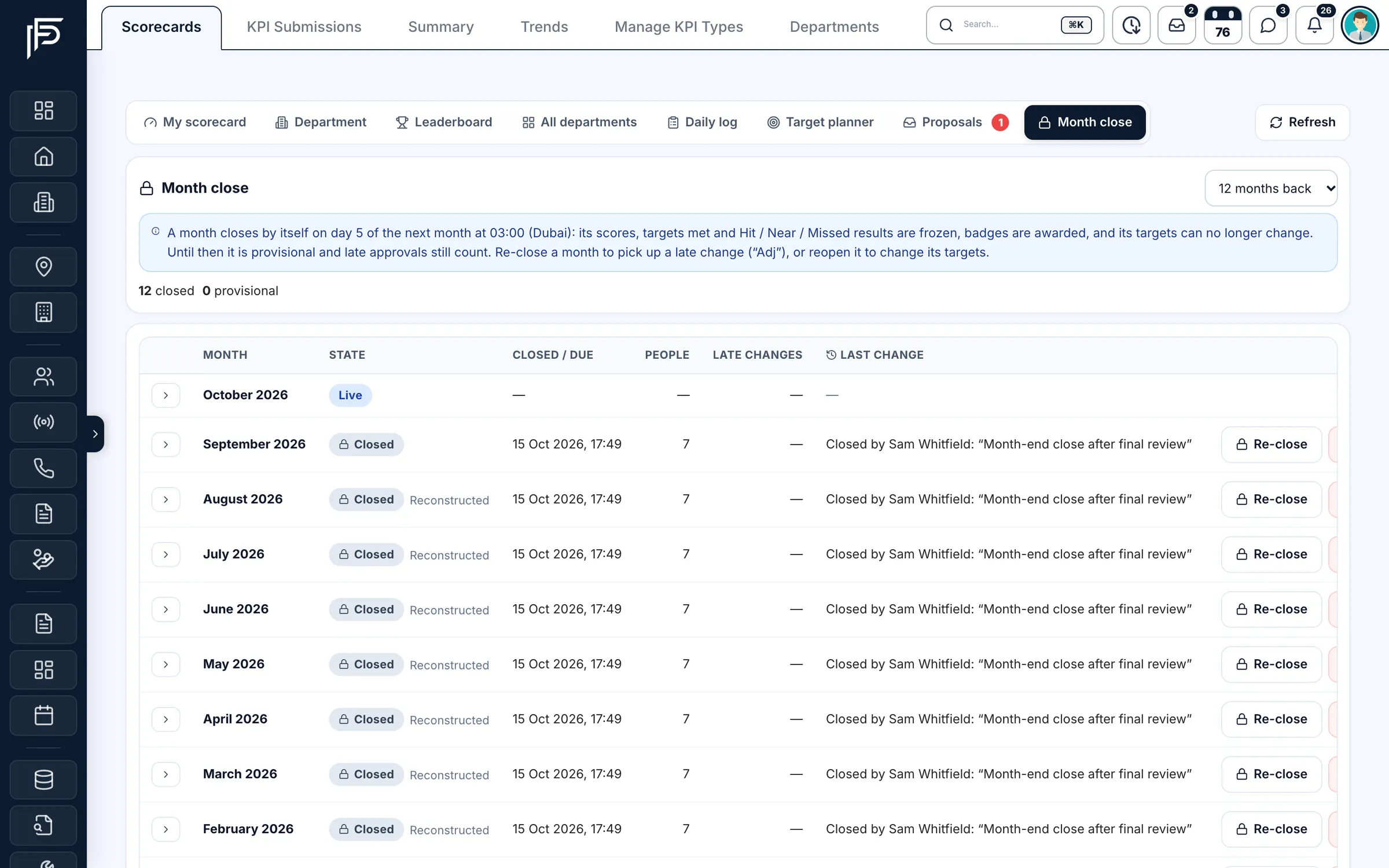
- By default on day 5 of the next month at 03:00 Dubai time the month freezes. Until then it is provisional and recomputed every night
- Late changes
- For 60 days after the freeze, changes are flagged “Adj” instead of moving the result. An admin can re-close or reopen the month with a reason
- Frozen targets
- A closed month's targets can't be changed
- Alerts
- “Behind pace” on working days 8 and 15, “Target hit”, and the month's result. Off until an admin switches them on
- Badges
- Awarded when a month closes, such as target hit or a hit streak. Private by default
- Ask the AI
- “Who is behind pace this month?” PropFusion AI asks you to confirm before it sets a target
The month, step by step
What happens to a KPI month
Every month goes through the same three states, so everyone knows which numbers can still move.
- Live while the month runs: scores and pace update as deals are approved and activity is logged.
- Provisional from the 1st of the next month until the close day: results are worked out again every night, so late approvals still count.
- Frozen from the close day (day 5 by default, 03:00 Dubai time): each person's scorecard, targets, result and rank are kept as they were. Later changes show as “Adj” for 60 days, and an admin decides whether to re-close.
How it works
Plan, track and close
The screens admins, department heads, team leaders and agents use across one month.
Plan the targets
Open the target planner and set each month's targets per person, team or department, starting from the department default. Copy last month, ramp up by a percentage each month, or give a new joiner a gentler start.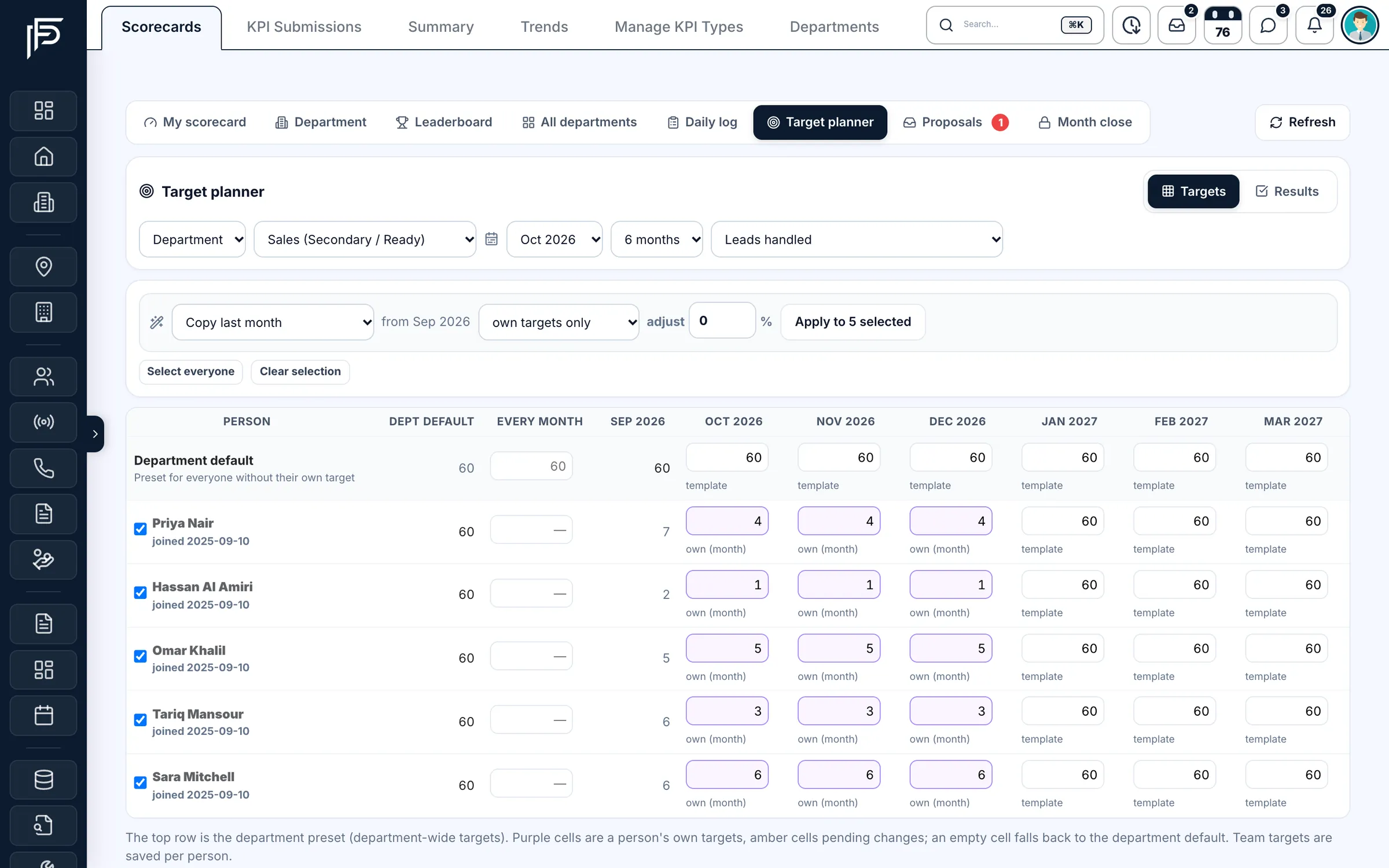
Monthly targets per person against the department default. Watch the month as it runs
The leaderboard ranks people by score and grade, and each person's scorecard shows how far they are from each target and what pace they need. Results update as deals are approved and activity is logged.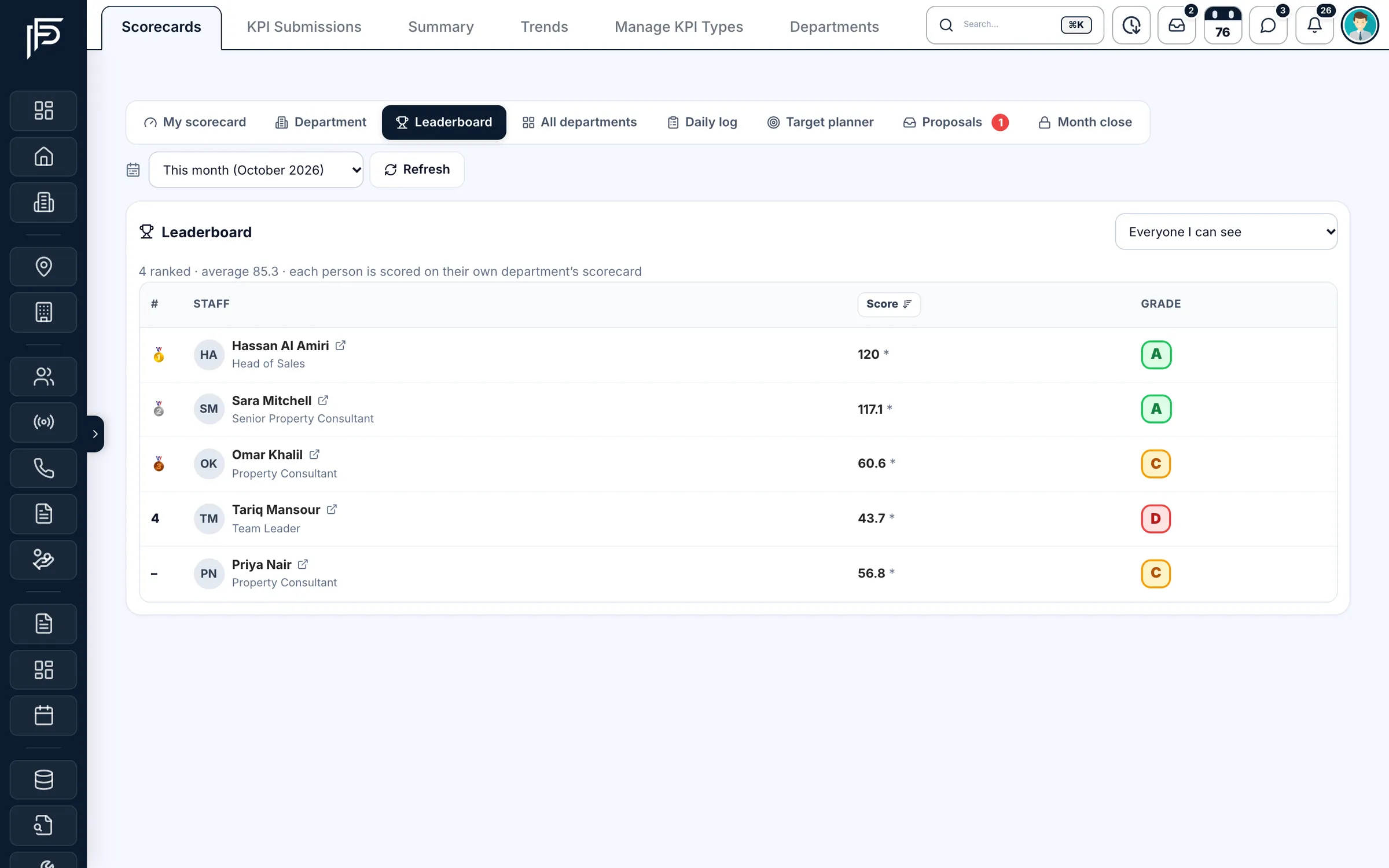
The team ranked by monthly score and grade. Open one person's page
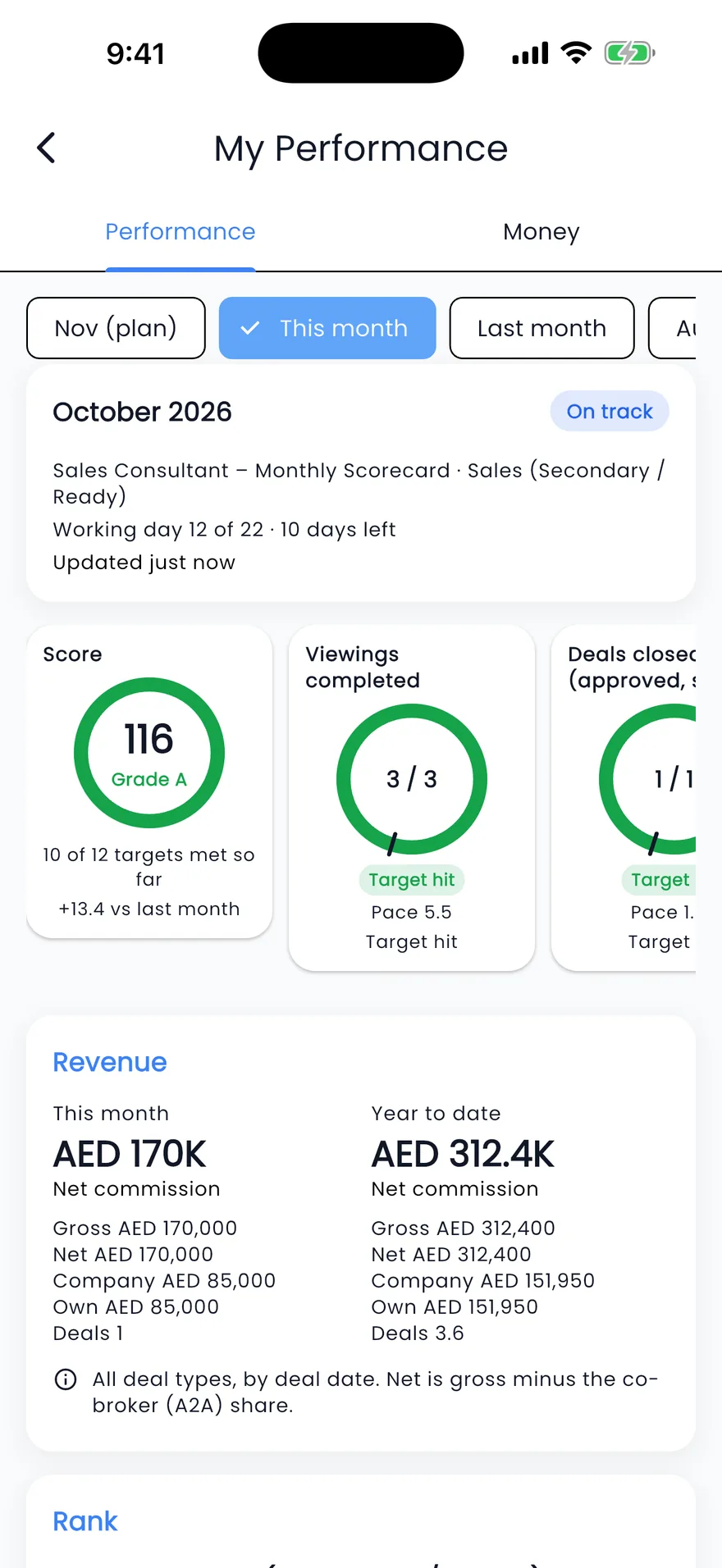
A staff member's Performance tab shows their score and grade, a ring for each headline target, a 12-month hit, near or missed history and the records behind each number. Team leaders and department heads see the same page for their people.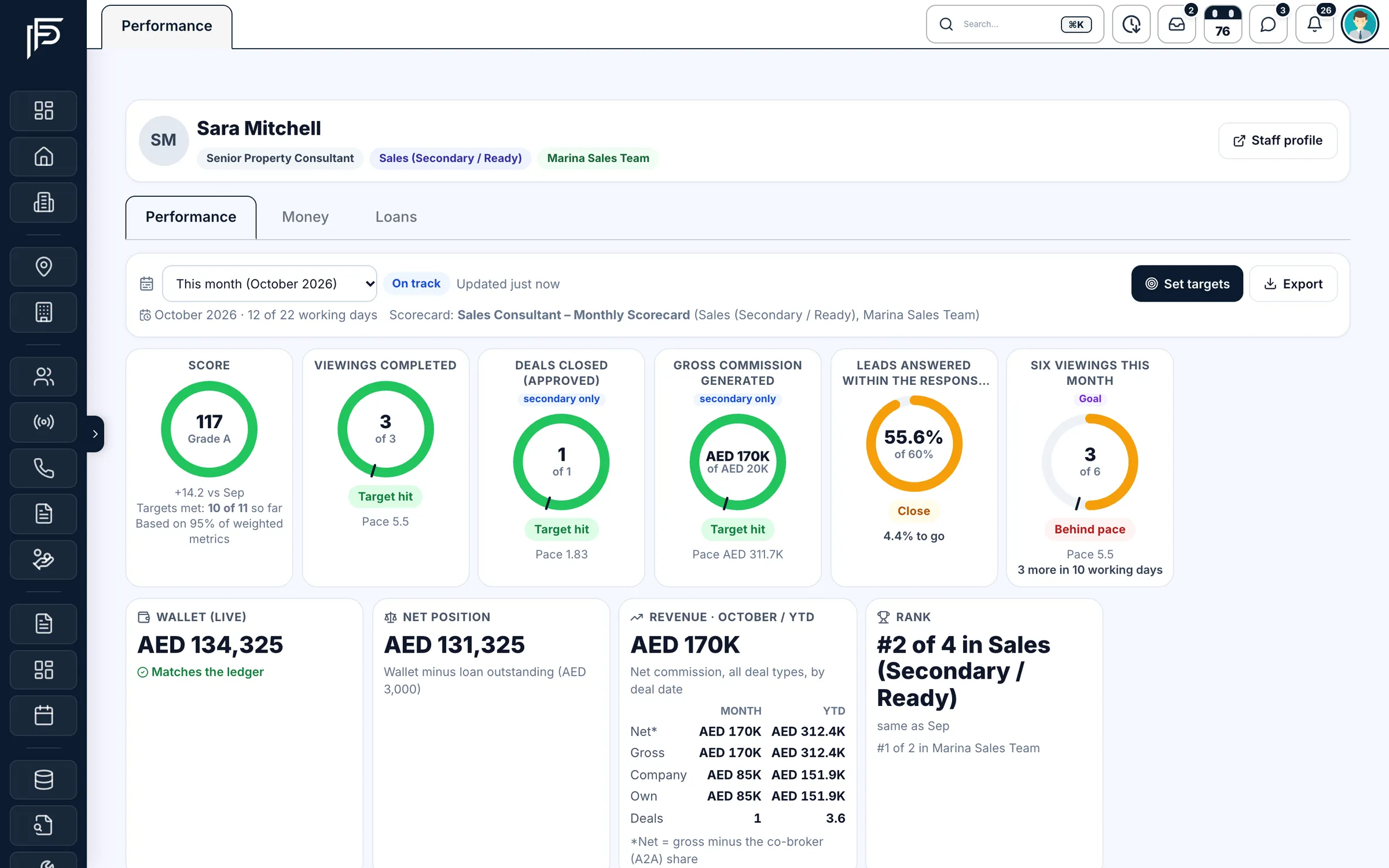
One person's score, targets, earnings and rank. Close the month
On the close day the month freezes by itself. KPI admins see every month's state on the Month close page and can close a month early, re-close it to pick up a late change, or reopen it, each with a reason that stays in the history.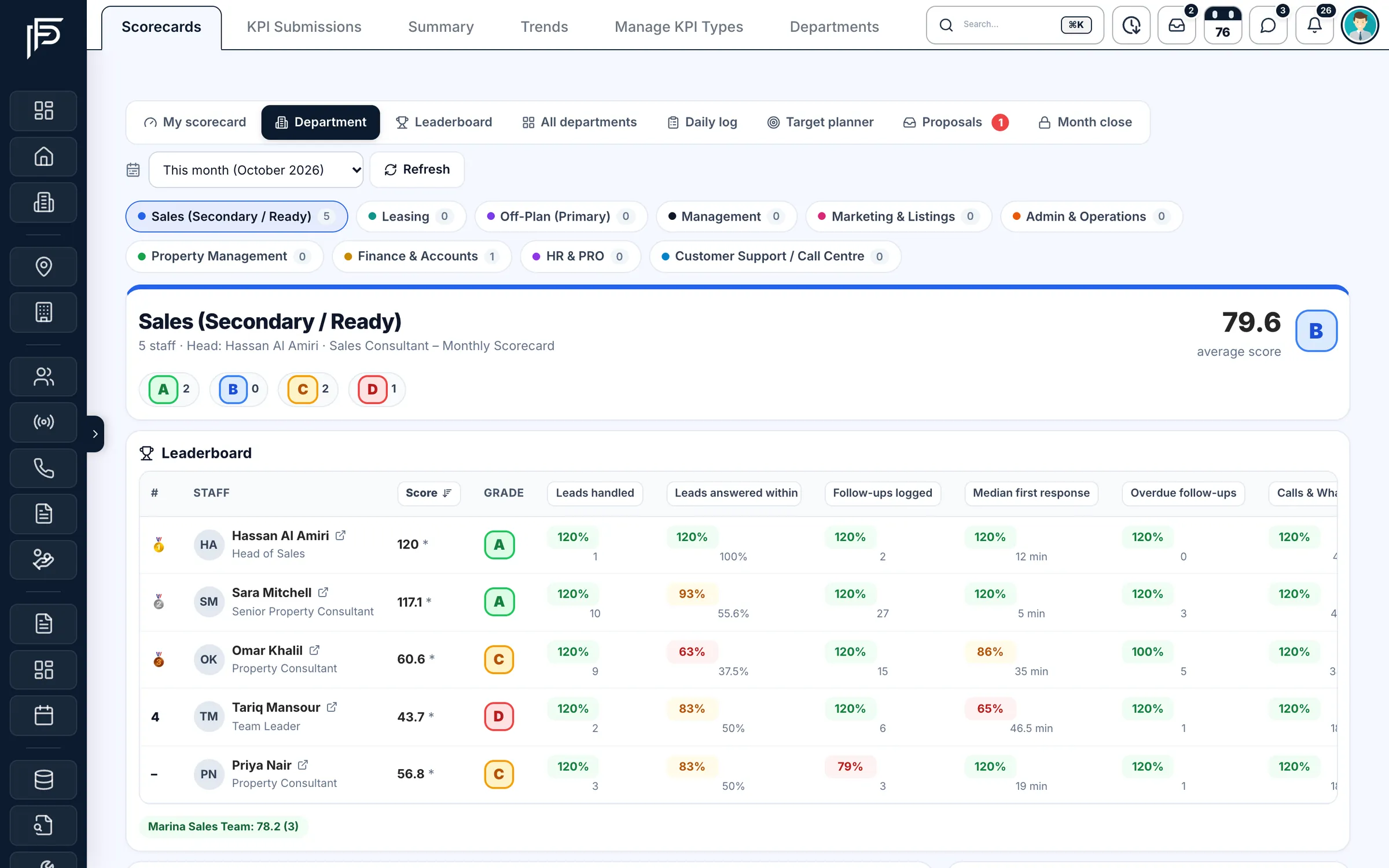
A department's average score and grades, ready to review at month end.
FAQ
Frequently asked questions
- When does a KPI month close?
By default on day 5 of the next month, at 03:00 Dubai time. Until then the month is provisional and its results are worked out again every night, so late approvals still count. After the freeze, results are read from the frozen copy.
- What if a deal is approved after the month has closed?
The frozen result stays as it was, and for 60 days a daily check marks the difference as a late change (“Adj”). A KPI admin can re-close the month with a reason to take the change in.
- Can team leaders set targets for their team?
They propose them. The department head or a KPI admin approves or rejects each proposal, and the team leader is told the decision. Admins and department heads set targets directly.
- Who can see an agent's KPI score?
The agent, their team leader, their department head and KPI admins. A person marked as not sharing their KPIs is hidden from everyone else, and earnings can be kept private the same way.
- Can agents see their targets on the phone?
Yes. The KPI Dashboard in the app's menu shows their score and grade, target rings and the month's figures, and agents can submit their daily KPI numbers from the app.
- Can we change the grade bands?
Yes. Each department has its own grade bands, working days and holidays, set on the Departments tab by people who manage KPI templates or users.
Keep reading
Related pages
- Guides
KPI month close
Pick a close day, decide which numbers count, freeze them, and record later corrections openly.
Read more - Free tools
KPI month-close template
Build a month-close sheet for your agents and the KPIs you track, and download it as a CSV built in your browser.
Read more - Use cases
Deals & commissions
Deals go from draft to Finance's approval and pay each agent at their own rate, with co-listing splits and clawback when a deal falls through.
Read more - Use cases
AI CRM
PropFusion AI answers questions about your own leads, listings and deals by text or voice, and opens screens or fills forms once you say yes.
Read more
Sources
- Targets & Performance for every team member (release notes) · Propfusion · checked
- HR and KPI (feature tour) · Propfusion · checked
Updated · Checked with AI tools against the product and official sources · How this page is made
Screens on this page show the Propfusion Demo Realty sample workspace. All people, listings and numbers are fictional.
Close every month on one set of numbers
Start a free trial and plan next month's targets for your team, or book a demo and see a month close on real screens.
7 days free · No card needed