
Holiday homes & short-term rentals
Every unit, calendar and owner in one place
One calendar for all your units, Airbnb and Booking.com calendars by iCal, and each owner's share in their own portal.
30-minute live demo on a sample portfolio · No card, no commitment.Or message us on WhatsApp
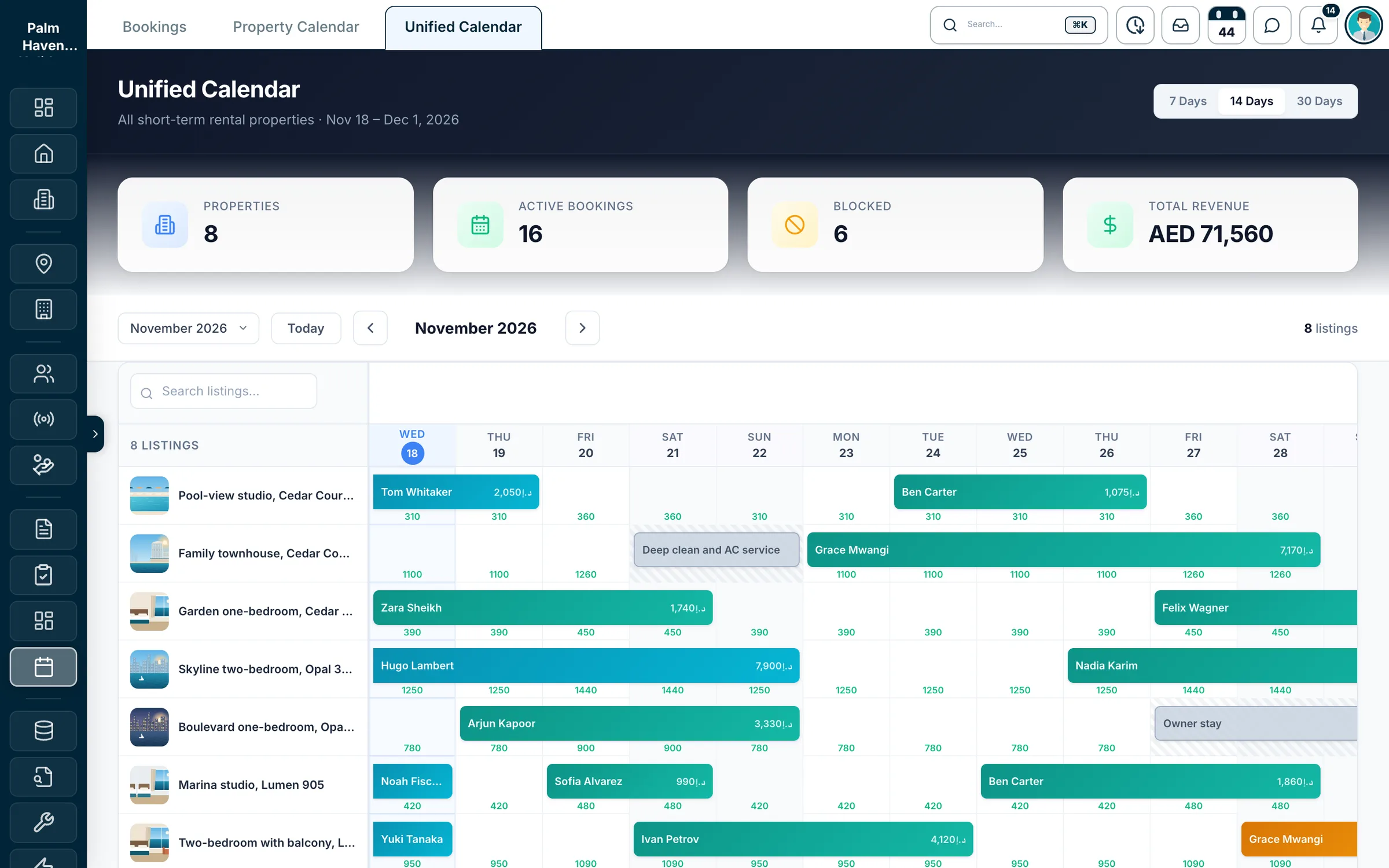
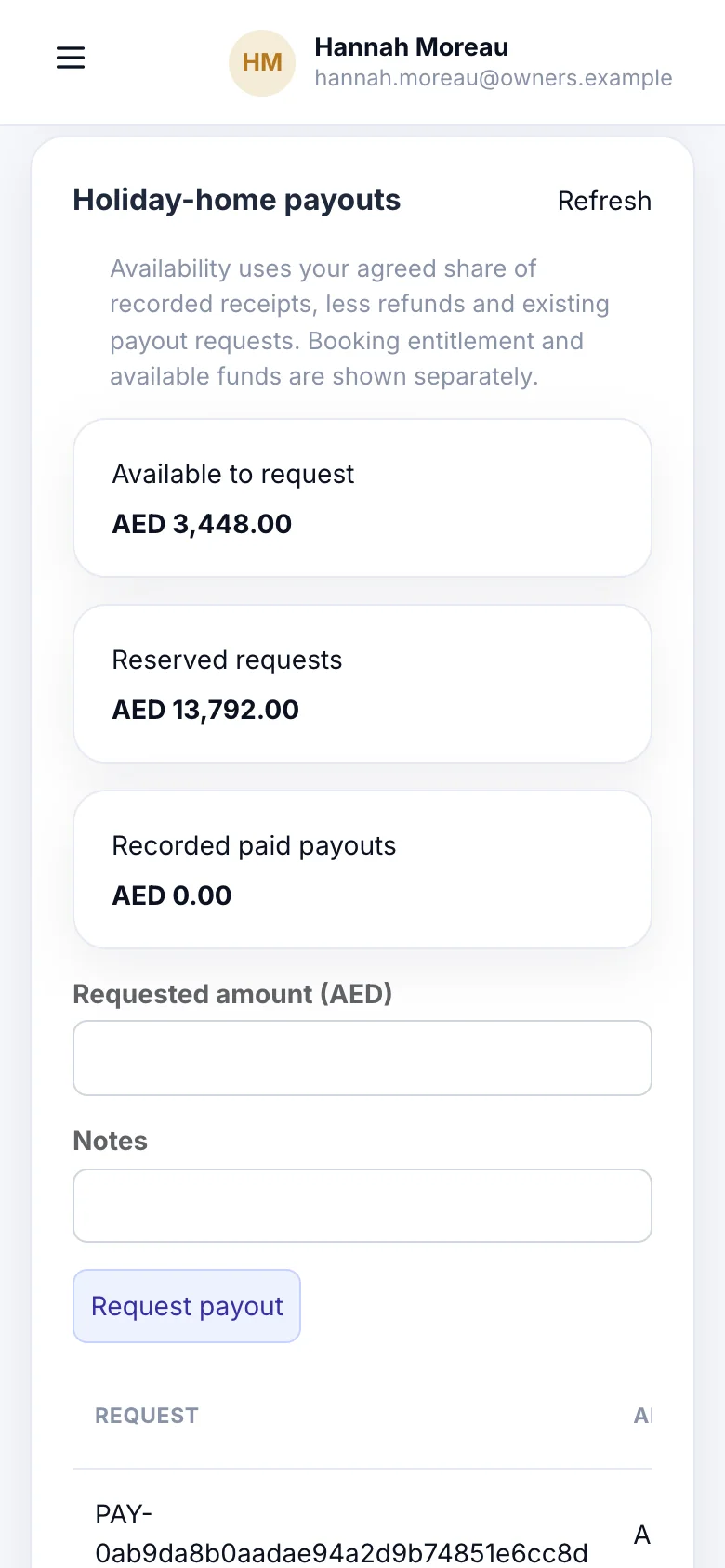
The unified calendar, and an owner's portal on a phone. Fictional operator.
One calendar for every unit
Apartments and villas side by side, with prices, bookings and blocked nights.
Airbnb and Booking.com by iCal
Their calendars come in about every 15 minutes, and your own feed goes out.
Owner share on every booking
A commission or a fixed owner amount, from the terms you agreed.
A portal for your owners
Owners see their share of each stay and ask for a payout.
From scattered to sorted
Stop running owners' homes from spreadsheets and extranets
- The usual way: A spreadsheet per owner and a calendar per channelWith Propfusion: One calendar for every unit, with each booking's guest, dates and price.
- The usual way: Checking Airbnb and Booking.com by hand before taking a direct bookingWith Propfusion: Their calendars come in by iCal about every 15 minutes, and a booking over a booked or blocked night is refused.
- The usual way: Owner shares worked out on a calculator at the end of the monthWith Propfusion: Each booking keeps the owner's share from your terms: a commission, or a fixed amount per night, month or booking.
- The usual way: Owners asking on WhatsApp what their flat earnedWith Propfusion: Owners log in to their own portal, see their share of each stay and request a payout.
- The usual way: Rent, cleaning and the DTCM fee lumped into one figureWith Propfusion: Every booking keeps rent, cleaning and the DTCM fee apart, next to your management fee and the net income.
Units and calendars
Every unit and its calendar, in one place
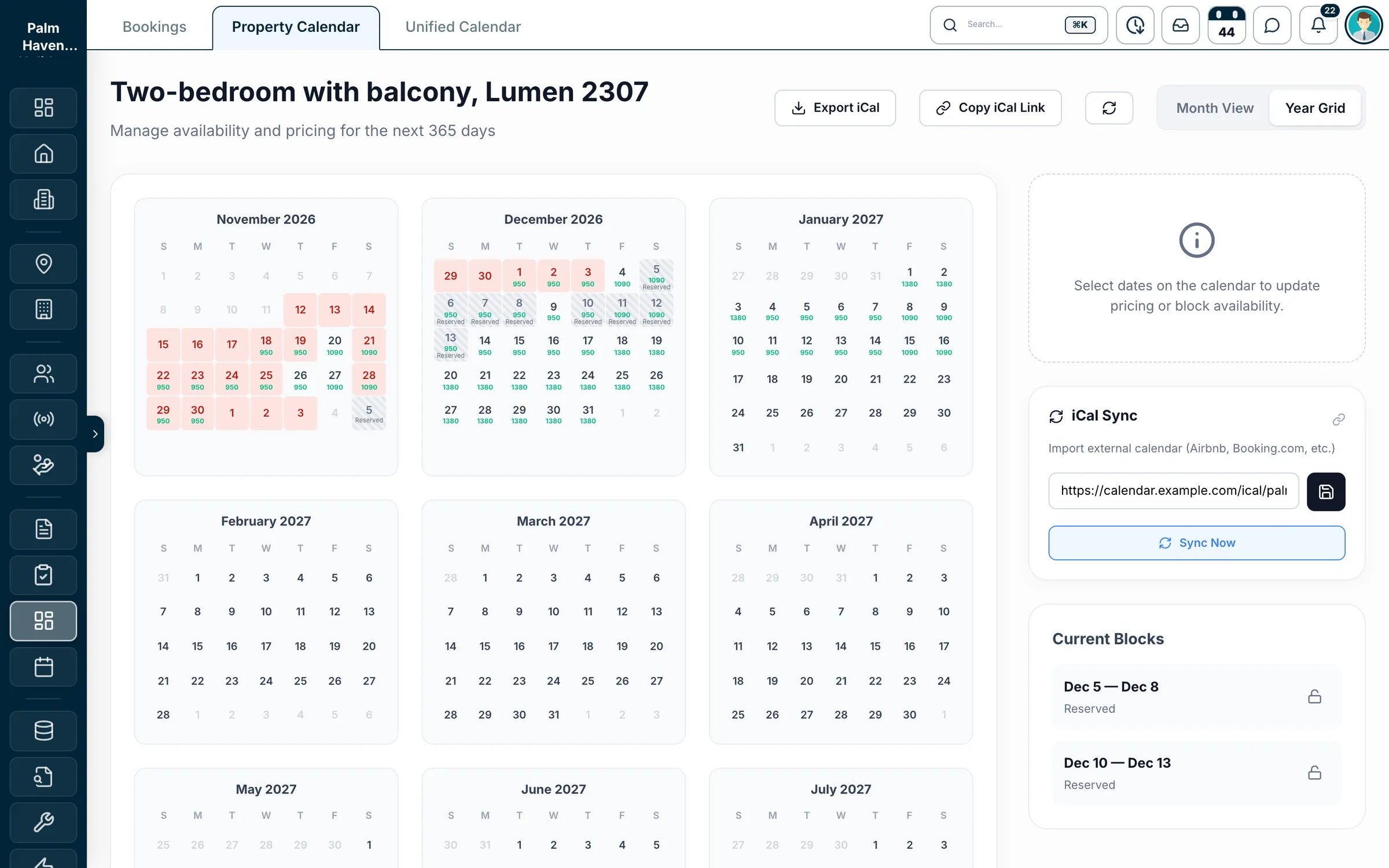
The calendar
- Every unit in one view over 7, 14 or 30 days, with the nightly price under each night
- Search by unit name, ID or building
- Drag across nights to set a price or block them with a reason, such as an owner stay
- Each unit's own calendar for the next 365 days, by month or as a year grid
What each unit holds
- Building, unit number and floor
- Bedrooms, bathrooms, size and guests
- Nightly price and cleaning fee
- Photos and amenities
- Check-in and check-out times
- House rules and cancellation policy
- The unit's owner and the agent in charge
Each unit is a short-term listing in your property database, next to your rent and sale listings.
Screens show Palm Haven Holiday Homes, a fictional operator made for this page. Its units, owners, guests and numbers are all made up.
Airbnb and Booking.com
Channel calendars in, your calendar out
Propfusion keeps each unit's calendar in step with Airbnb and Booking.com by iCal, the calendar link both channels give you. Nights booked there are blocked here, and the nights you book here can be blocked there.
In from the channel
Paste a unit's Airbnb or Booking.com iCal link. Propfusion reads it about every 15 minutes, or when you press Sync now, and the booked nights show as blocked dates on that unit.
Out to the channels
Each unit has its own iCal feed with your bookings and blocked dates. Paste it into Airbnb and Booking.com, download it as a file, or reset the link when you need to.
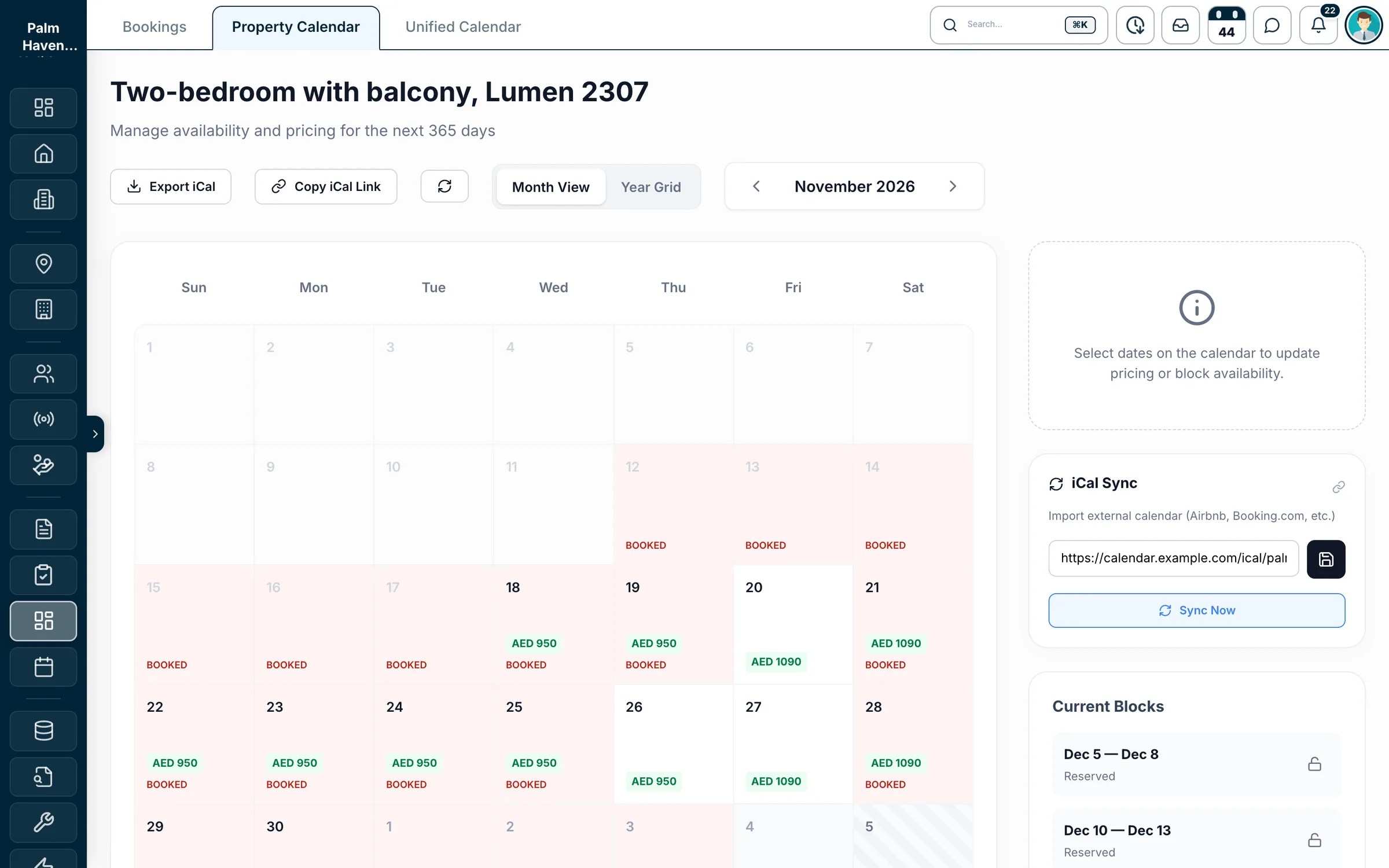
A unit's iCal panel: the channel's link, Sync now, and the nights it brought in. Fictional operator.
- One import link per unit. Give the unit's own feed to the other channels.
- iCal carries dates only. Prices, guest details and messages stay on each channel.
- Not a channel manager: Propfusion does not push prices or stay rules to Airbnb or Booking.com today.
Bookings
Every stay, from booking to check-out
- Pending
- Confirmed
- Hosting
- Completed
- or Cancelled
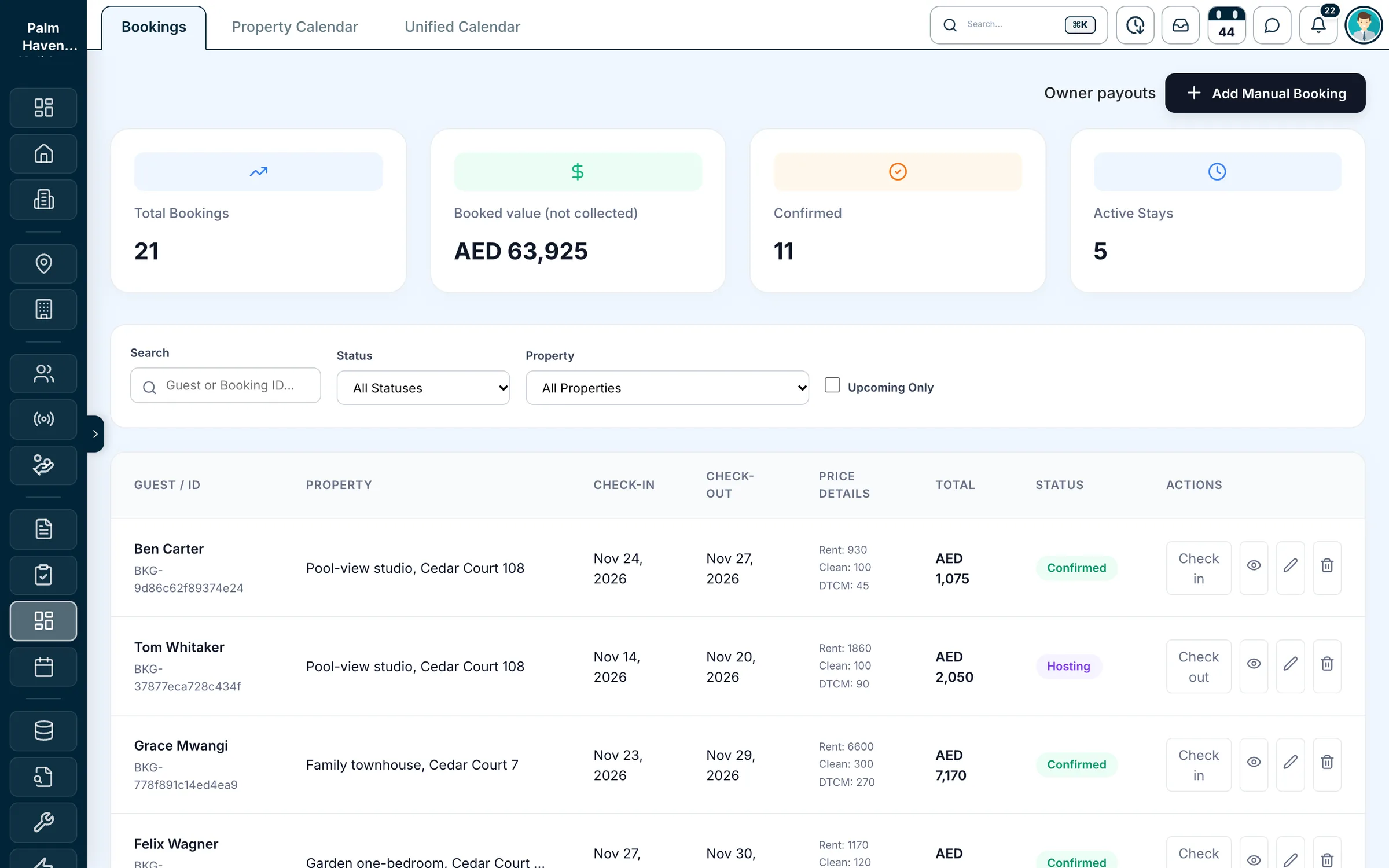
Direct and repeat guests
Add a booking by hand with the stay dates, the price split and the owner's terms. Pick the guest from your tenant records or type their name.
Check-in and check-out
Check guests in and out from the list. A stay moves from Confirmed to Hosting to Completed, and check-in can't happen before its date.
No double bookings
A booking that overlaps another booking, a blocked night (imported ones too) or a long-term tenancy on the same unit is refused.
Money in and out
Record receipts and refunds by bank transfer, card, cash or cheque, each with its own reference.
Cancellations on record
Cancel a booking and settle the owner's share for it. The original terms stay on record.
A history for every booking
Every change, status, receipt, refund and settlement is kept with the booking.
Fictional operator, made-up numbers.
See it on a sample portfolio
A 30-minute live demo · No card, no commitment
Owners
Each owner's share, on every booking
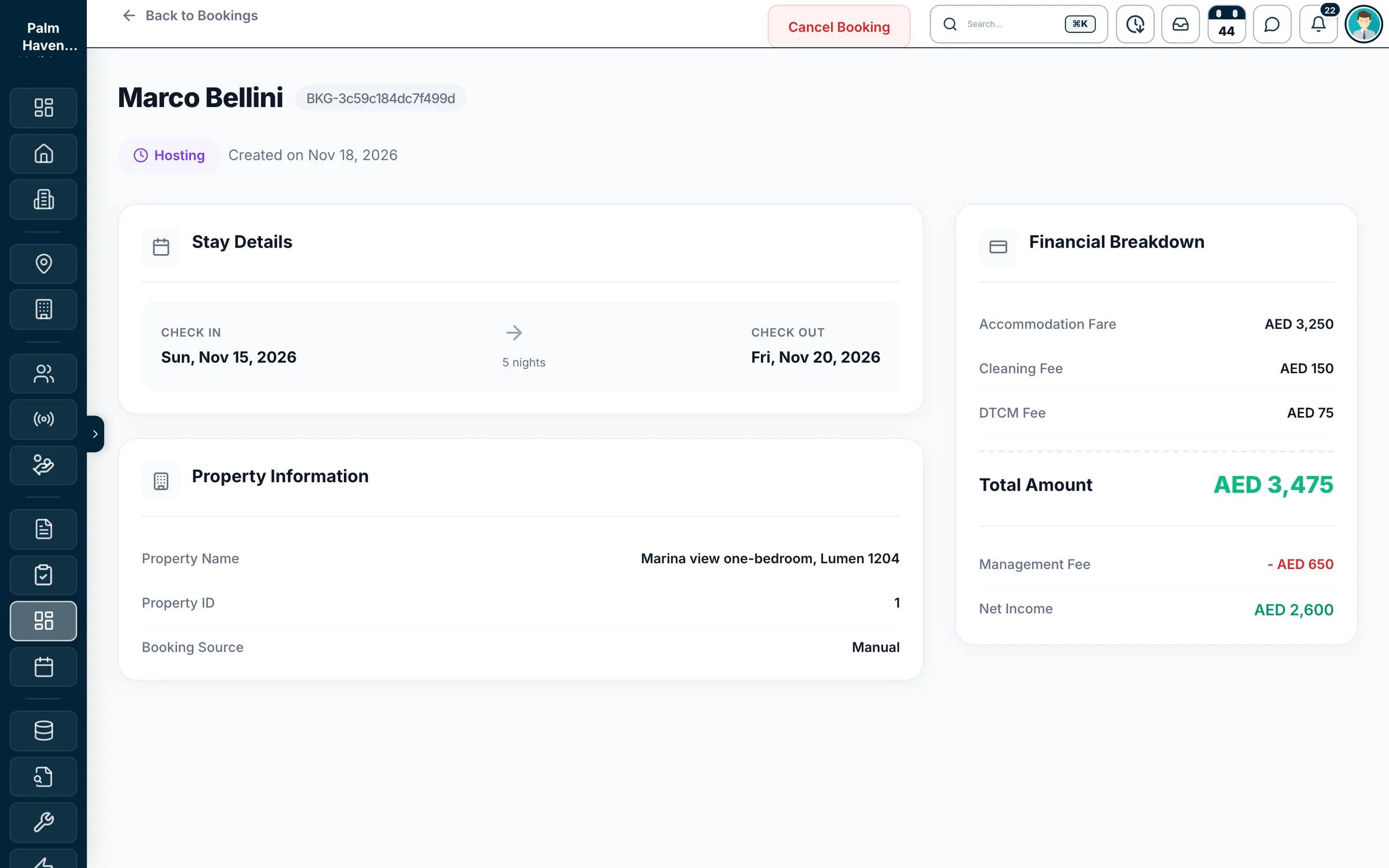
Agree the terms once per owner, and every booking on their unit works out your management fee and their share. No month-end calculator, no arguing over which fees count.
- A commission percentage, or a fixed owner amount per booking, per night or per month
- Preview the owner's share before you save a booking
- Each booking keeps its own copy of the terms, so changing a unit's terms later leaves past bookings as they were
- Commission applies to the rent; cleaning and the DTCM fee stay separate
One booking
Marina view one-bedroom · 5 nights
- Rent (5 × AED 650)
- AED 3,250
- Cleaning fee
- AED 150
- DTCM fee
- AED 75
- Guest pays
- AED 3,475
- Management fee (20% of rent)
- − AED 650
- Owner's share
- AED 2,600
Cleaning and the DTCM fee stay out of the commission and the owner's share.
Owner portal
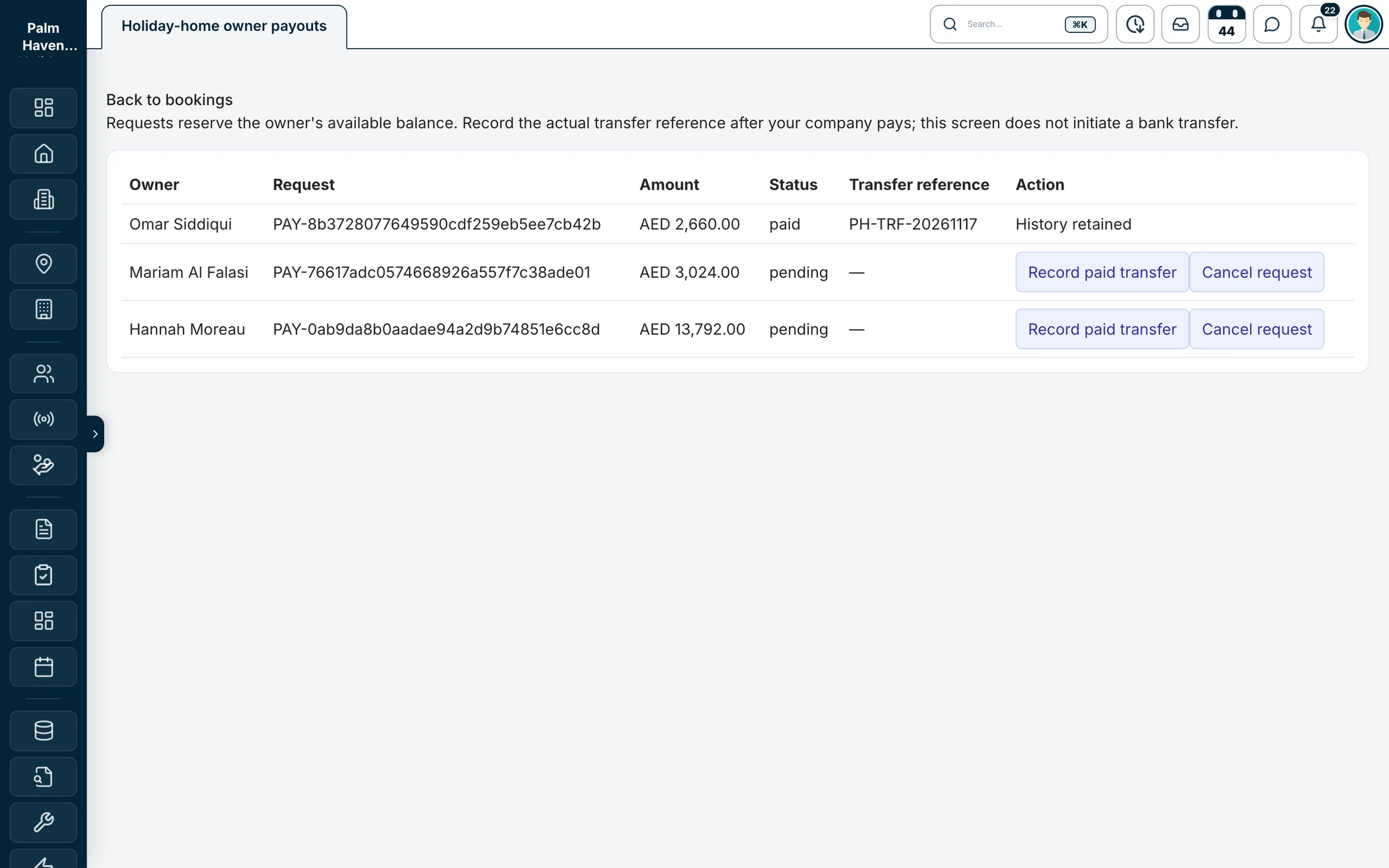
Owners check their share themselves
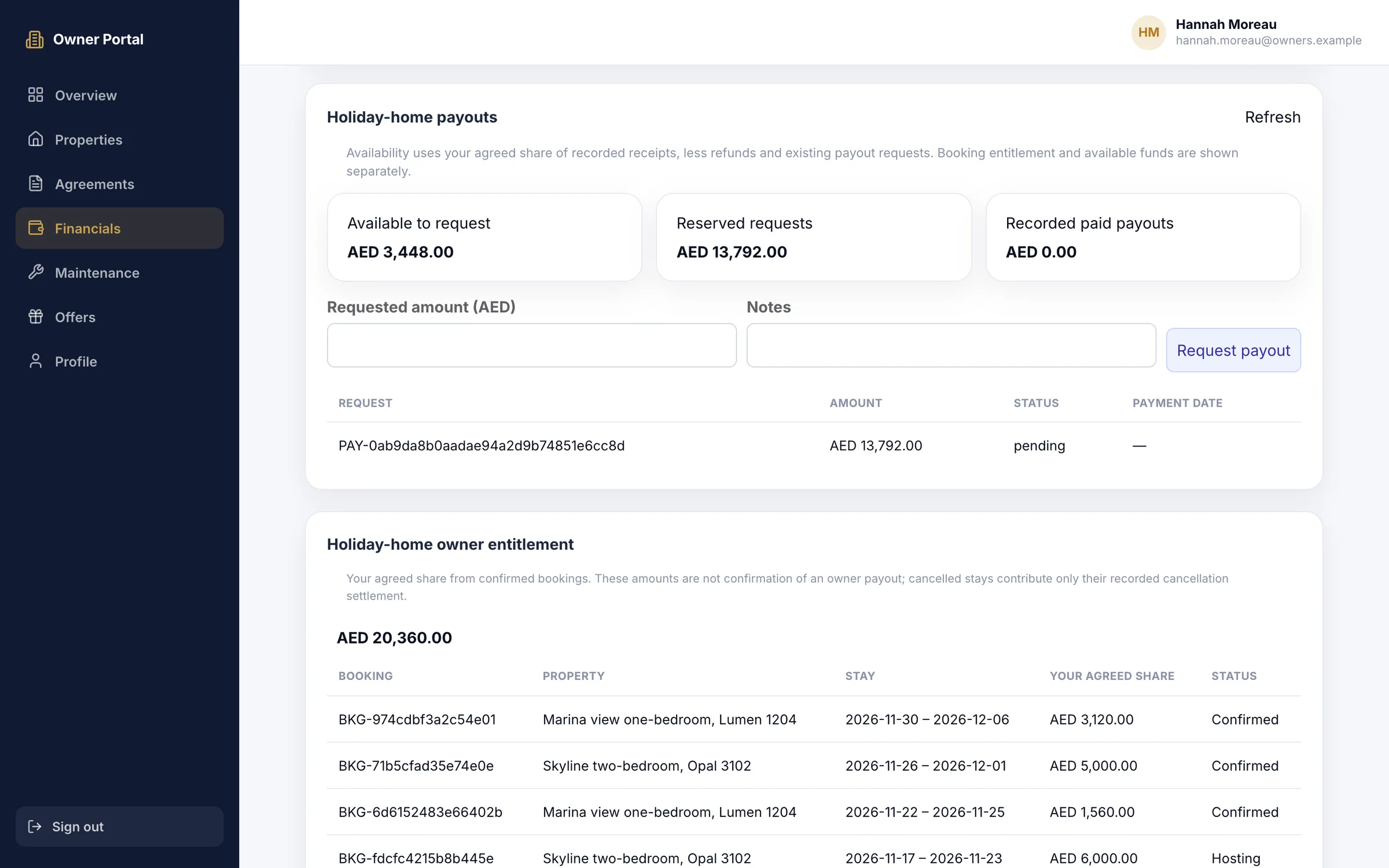
Their own login
Owners sign in to see their own units and money only.
Paid from receipts
Owners can request only what your recorded receipts cover, less refunds and earlier requests.
You stay in charge
Mark a request paid with the transfer reference and date, or cancel it. Propfusion never moves money.
Fictional operator, made-up numbers.
Want this for your owners?
A 30-minute live demo · No card, no commitment
Fees and upkeep
The DTCM fee, repairs and the jobs between stays
The admin around every stay, kept with the unit it belongs to.
The DTCM fee on every booking
Record the DTCM fee on each booking, kept apart from the rent and out of the owner's share.
Blocks with a reason
Block nights for a deep clean, a repair or an owner stay, and the reason stays on the calendar.
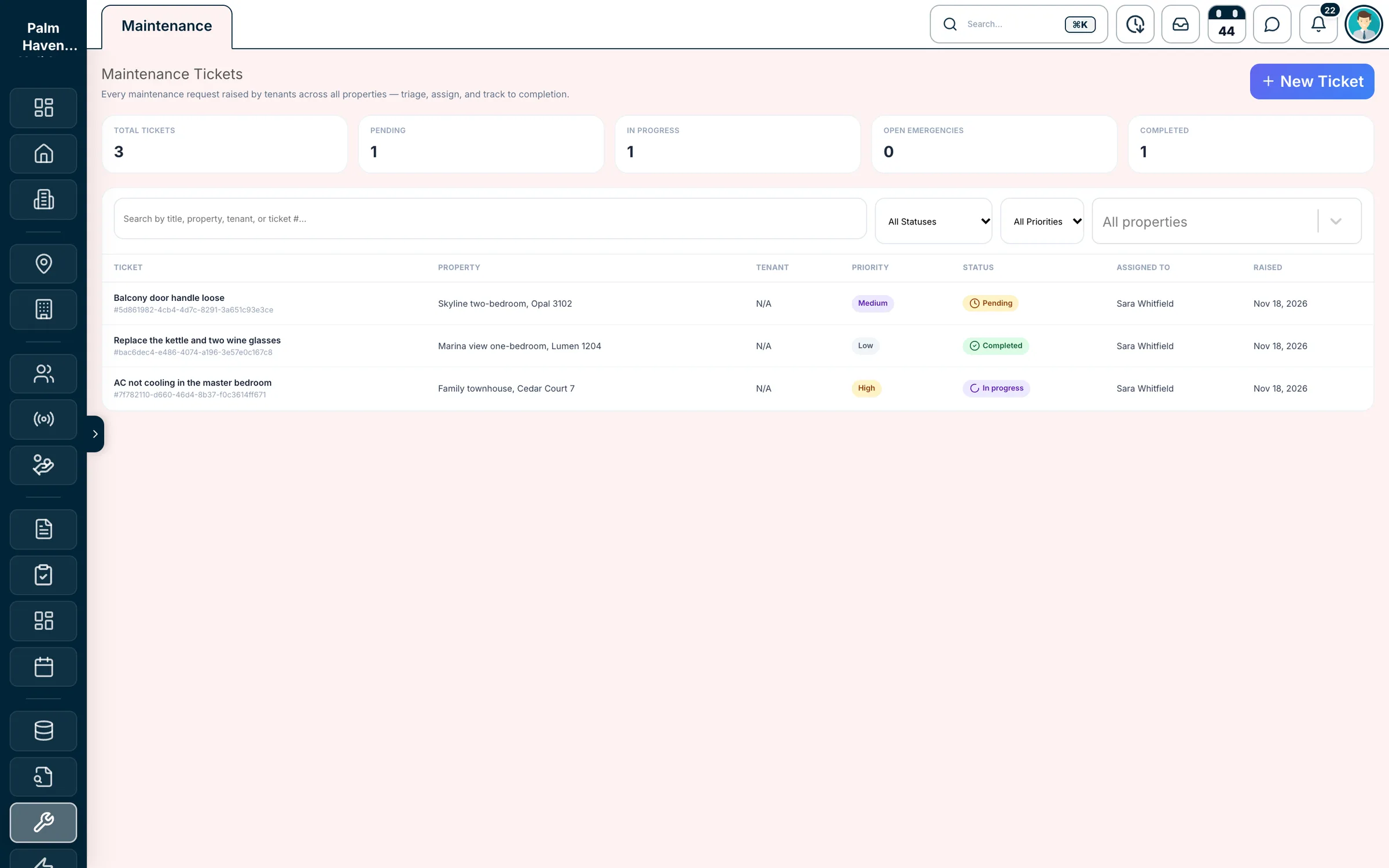
Maintenance tickets per unit
Priority, category and photos, a staff member in charge, a status from pending to completed, and the estimated and actual cost.
Roles for your team
Permissions decide who can see holiday homes and bookings, who can manage them, and who handles the money.
Enquiries
New owners and guests, from every place they find you
Holiday homes run inside the full Propfusion CRM, so the landlord who wants you to manage their flat and the guest who asks about a stay arrive as leads, next to your units and bookings.
- Owners who want you to manage their home, and guests who ask about a stay, land as leads in the same CRM
- Portal leads from Bayut, Dubizzle and Property Finder with your portal account, and Meta lead forms in real time
- A shared WhatsApp Business inbox with routing and auto-replies
- Round-robin lead distribution, follow-ups and reminders for the team
- Bayut
- Dubizzle
- Property Finder
- Meta lead forms
- WhatsApp Business
- Your website
Each source is connected with your own account or key
On the move
Your team and your owners, on their phones
The Propfusion app
Enquiries, WhatsApp chats, follow-ups, calls, tasks and attendance in every team member's pocket.
iPhone and Android
Owners on their phone
The owner portal works in the phone's browser: their share of each stay, and a payout request in a few taps.
Any phone browser
Calendars and bookings
The unified calendar and bookings run in the web CRM, where a month of units reads at a glance. The app has no booking screens yet.
Laptop or tablet
Is it a fit?
Built for operators who manage other people's homes
A good fit today
- Operators in the UAE who manage owners' apartments and villas
- Units listed on Airbnb or Booking.com, or booked direct
- Owner shares and payouts in AED
- Teams that want enquiries, WhatsApp and owners in the same CRM
Not in it yet
- A channel manager connection that pushes prices and availability
- Automatic cleaning jobs and check-in messages
- Monthly owner statements for short stays
- One inbox for Airbnb and Booking.com guest messages
- A booking website for your units, or dynamic pricing
- Damage deposits and card holds
Tell us in the demo what you need.
Run a hotel or a serviced-apartment building instead? See hotel management.
Getting started
Set up with you, unit by unit
Step 1: Book a demo
A live walkthrough on a sample portfolio, around your own units, owners and channels.
Step 2: Set up with our team
Short-term rentals and bookings are switched on for your company, and we add your units, owners and their terms with you.
Step 3: Connect the calendars
Paste each unit's Airbnb or Booking.com iCal link, give the channels your feed, and give owners their portal login.
Book a demo
See Propfusion run your holiday homes
Pick a time for a live walkthrough on a sample portfolio. Tell us how many units you manage and what you use today, and we'll shape the demo around it.
What we'll cover
- Your units, owners and nightly prices, set up on a sample portfolio
- Airbnb and Booking.com calendars in and out by iCal, on one calendar
- Bookings with their fees, check-in and check-out, and each owner's share
- The owner portal and payout requests, and how we get you started
Rather talk now?
Call +971 54 299 7582 or e-mail [email protected]. Our office is in Business Bay, Dubai.
No card and no commitment.
Questions
Holiday home questions, answered
- Does Propfusion sync with Airbnb and Booking.com?
- Yes, by iCal. Paste a unit's Airbnb or Booking.com iCal link and Propfusion reads it about every 15 minutes, or when you press Sync now; the booked nights show as blocked dates on that unit. Each unit also has its own iCal feed with your bookings and blocks, which you paste into the channels. iCal carries dates only, not prices or guest details.
- Is Propfusion a channel manager?
- Not today. Calendars are kept in step by iCal, and prices, stay rules and guest messages are managed on each channel. A channel manager connection is not part of the holiday-home tools yet; ask us in the demo where it stands.
- How does it stop double bookings?
- Propfusion refuses a booking that overlaps another booking, a blocked night or a long-term tenancy on the same unit. Nights booked on Airbnb or Booking.com arrive as blocked dates through iCal, so a direct booking over them is refused too.
- How is each owner's share worked out?
- From the terms you agree with the owner: a commission percentage, or a fixed owner amount per booking, per night or per month. The commission applies to the rent; cleaning and the DTCM fee stay separate. You can preview the owner's share before saving a booking, and each booking keeps its own copy of the terms.
- What do owners see, and how are they paid?
- Owners log in to the owner portal to see their agreed share of each confirmed stay and request a payout from the balance of receipts you have recorded. Your finance team pays the owner by bank transfer as usual and records the transfer reference and date in Propfusion; Propfusion itself never moves money.
- Do owners get a monthly statement?
- Not for short stays today. Owners see their share of each stay, their payout requests and paid payouts in the portal at any time. Monthly statements in Propfusion cover long-term tenancies.
- Does it handle the DTCM fee and cleaning fee?
- Yes. Every booking keeps rent, cleaning fee and the DTCM fee apart, and you enter the DTCM fee for the stay. Each unit has its own cleaning fee, and the owner's commission is worked out on the rent alone.
- Can my team work from their phones?
- The Propfusion app for iPhone and Android covers enquiries, WhatsApp chats, follow-ups, calls, tasks and attendance. Calendars and bookings run in the web CRM, best on a laptop or tablet; the app has no booking screens yet. Owners use the owner portal in their phone's browser.
- Can we run long-term rentals and sales in the same account?
- Yes. Holiday homes live in the same CRM as your rent and sale listings, tenancies, cheques, owners and leads, so a team that does both works from one place.
- How much does it cost, and how do we start?
- We share pricing in the demo, based on your team and your units. After the demo, short-term rentals and bookings are switched on for your company and we set up your units, owners and calendars with you.