API & developer reference
The Propfusion CRM API for your website, forms and tools
Push leads in from any website form, landing page or portal, and pull listings, projects, agents and company details out to your own website. Admins create API tokens inside the CRM, and the built-in API reference lets your developer try every call before writing a line of code.
7 days free · No card needed
- Lead webhook for any form
- Bearer tokens with an expiry
- cURL, JavaScript, Python and Node.js
How it works
From token to live integration
Most website integrations need one token and two calls.
- 01
Create a token
On the CRM's Web APIs page, an admin names a token, sets its expiry and can pick the staff member it acts for.
- 02
Try the call
Pick an endpoint, fill in the parameters and run it from the reference, then copy the code in cURL, JavaScript, Python or Node.js.
- 03
Go live
Point your website forms at the lead webhook and build your listings pages from the listings API.
Example
Send a website lead in one request
Post the enquiry as JSON to your company's API address. Every field is optional, so send what your form collects. The CRM takes care of the rest:
- A repeat of the same external_lead_id from the same source returns the existing lead
- property_reference links the lead to the listing and its agent
- clientType SELL or RENT puts it in the sales or rentals tab
- custom_fields keeps UTM tags and ad IDs with the lead
Replace youragency with your company name in Propfusion. The names, numbers and IDs in these examples are made up.
curl -X POST "https://youragency-api.propfusion.io/integration/webhook/lead" \
  -H "Content-Type: application/json" \
  -d '{
    "name": "Sara Haddad",
    "phone": "+971501234567",
    "email": "sara.haddad@example.com",
    "clientType": "SELL",
    "clientSource": "Website Form",
    "clientSubSource": "Dubai Marina landing page",
    "property_reference": "DM-2041",
    "external_lead_id": "web-88213",
    "message": "Is the 2-bed in Marina Gate still available?",
    "custom_fields": { "utm_source": "google", "utm_campaign": "marina-2br" }
}'{
"message": "Lead created successfully from generic webhook",
"id": 14786,
"source": "website form",
"linked_property_id": 2041
}Example
Read leads back for a report or a sheet
With a token in the Authorization header, the leads endpoint returns leads page by page, filtered by creation or assignment date, client type, status, agent or a search on name, email and phone. It's a good fit for keeping a Google Sheet or a BI tool up to date.
curl -G "https://youragency-api.propfusion.io/properties/get_leads" \
  -H "Authorization: Bearer YOUR_API_TOKEN" \
  -d date_from=2026-10-01 \
  -d date_to=2026-10-17 \
  -d clientType=SELL \
  -d page=1 \
-d size=50{
"totalLeads": 128,
"page": 1,
"size": 50,
"totalPages": 3,
"leads": [
{
"id": 14786,
"name": "Sara Haddad",
"clientType": "SELL",
"clientSource": "Website Form",
"status": "ACTIVE",
"createTime": "2026-10-17T09:12:45"
}
]
}Endpoints
What's in the reference
The calls listed on the CRM's Web APIs page, each with its parameters and response fields.
- POST
/integration/webhook/leadNo tokenCreate a lead from a website form, landing page or portal. Repeats with the same external_lead_id are not duplicated. - GET
/properties/get_leadsBearer tokenLeads by created or assigned date, client type, status, agent or search, page by page. - GET
/properties/get_properties_for_main_siteNo tokenListings published to your own website, filtered by type, bedrooms, price, community or developer. - GET
/properties/projectsNo tokenOff-plan and ready projects, filtered by status, developer or area. - GET
/properties/get_developers_with_property_countsNo tokenDevelopers with their sale, rent and project counts, sortable by any of them. - GET
/properties/public/developersNo tokenDevelopers with at least one listing or project, busiest first. - GET
/agent/public/listNo tokenActive agents for your team page, with designation and contact details. - GET
/admin/public/companyNo tokenYour company name, logo, brand colours and contact details.
Built into the CRM, not bolted on
The token, the reference and the leads it creates all live in the same workspace your team uses.
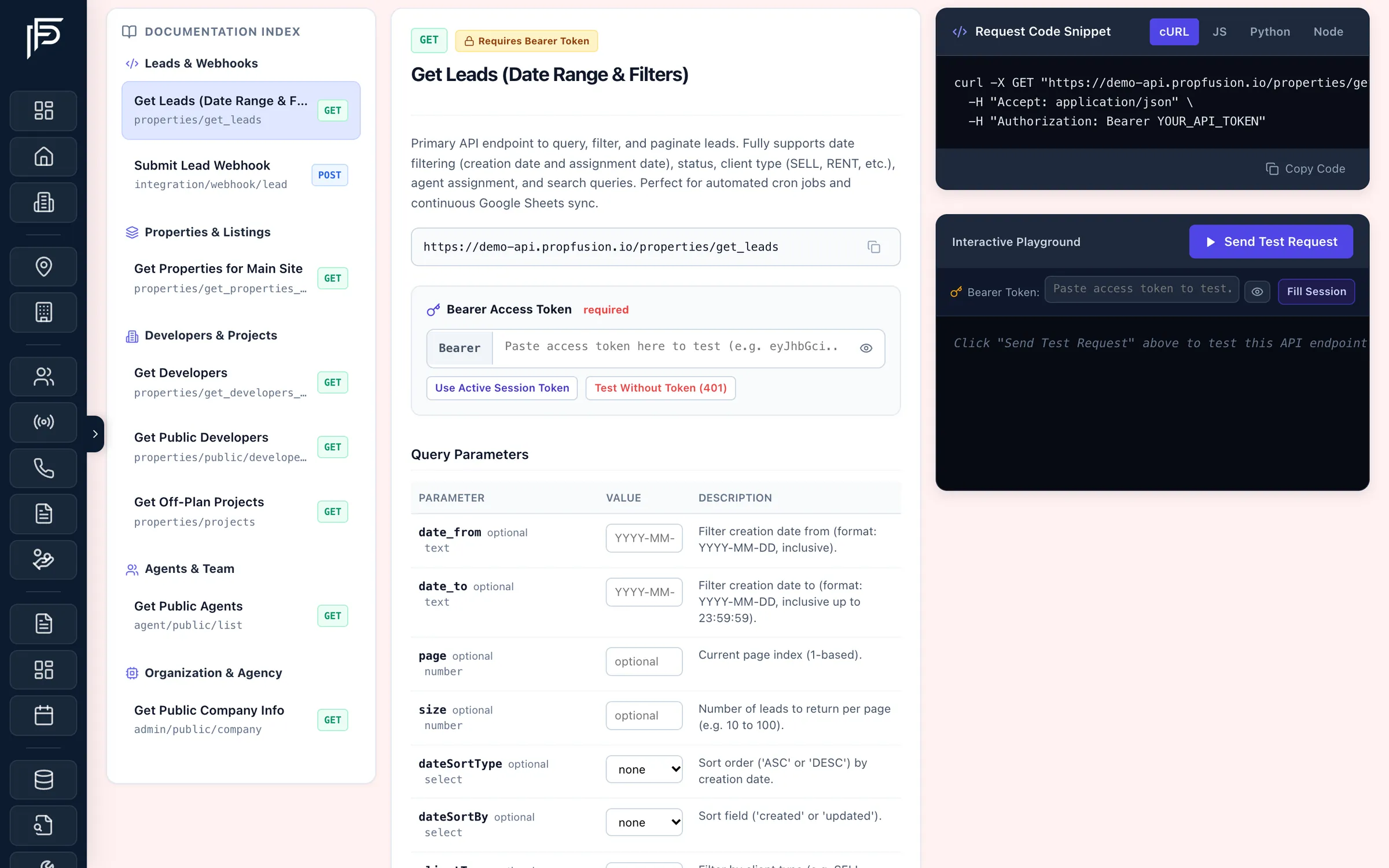
Web APIs page
The reference lives inside your CRM, and runs the calls
- Test with your own signed-in session, a pasted token, or no token to see the 401
- Copy the snippet with your company's API address already filled in
- Admins with full access create and revoke the tokens your scripts use
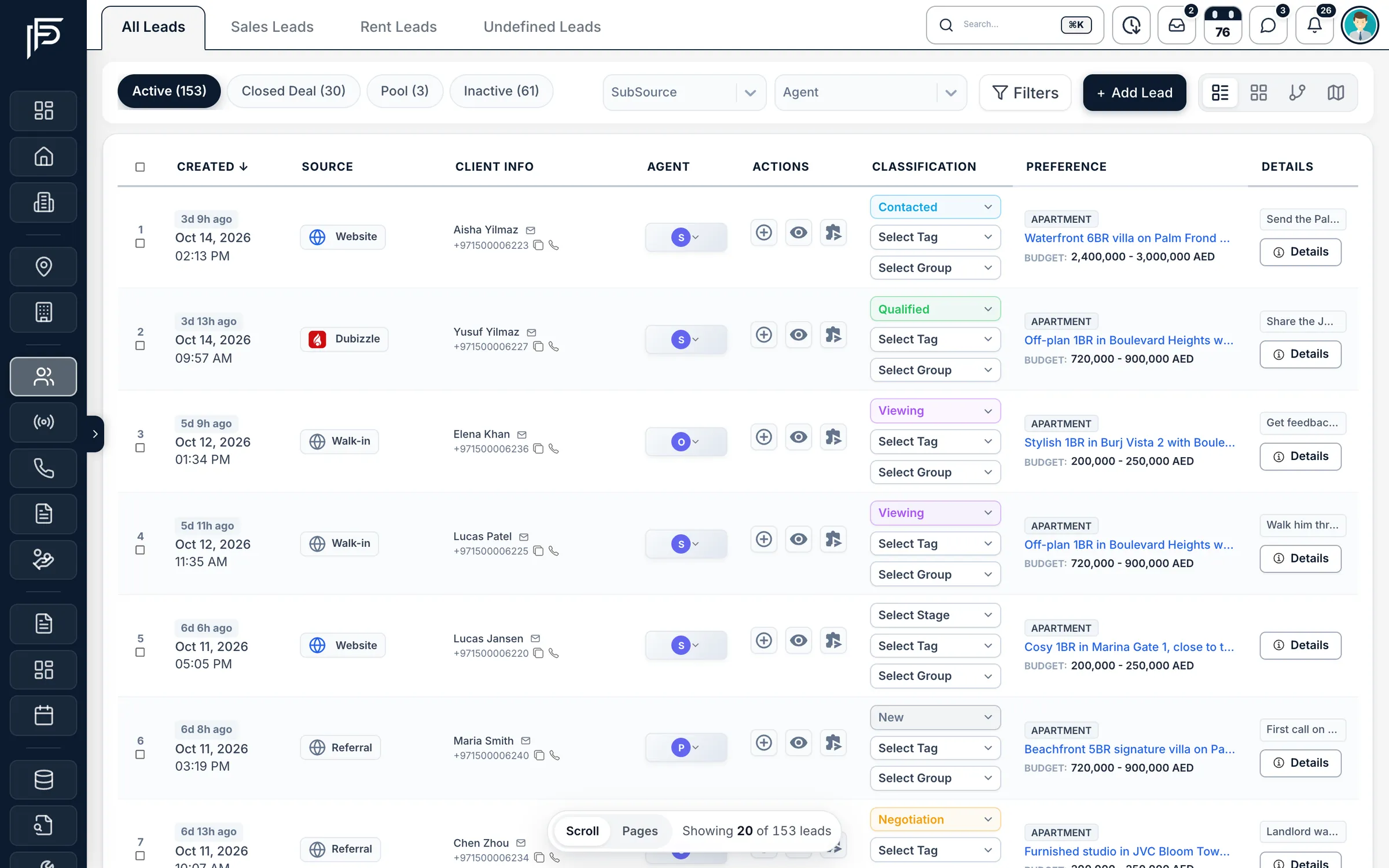
Leads in
Website leads land next to your portal leads
- Source and sub-source on every lead, ready for reporting
- A matched listing fills in the lead's budget, bedrooms and location
- A lead your distribution plan hands out notifies its agent straight away
Listings out
Build your website from your CRM
- Filters for type, bedrooms, price, community and developer
- Off-plan projects, developers and agents for the same site
- Company name, logo and colours for the header and footer
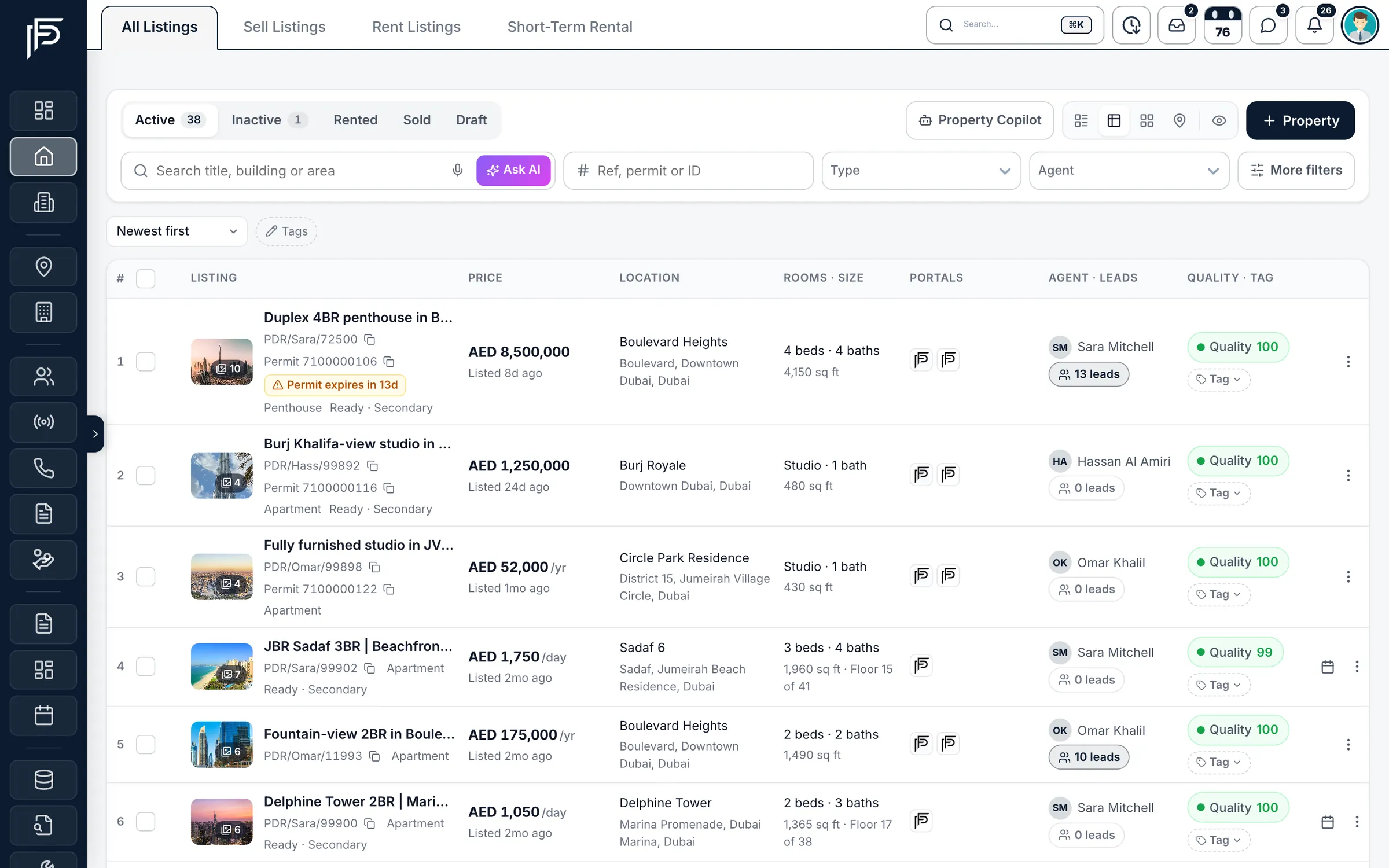
Screens show the Propfusion Demo Realty sample workspace. All people, listings and numbers are fictional.
Details developers ask about
Small things that keep the data clean
No duplicate leads
Send your form's own ID as external_lead_id, and a repeat post returns the existing lead instead of creating a copy.
Listing matching
Pass a property reference or URL and the lead is linked to that listing.
Sales or rentals
clientType decides whether the lead lands in sales or rentals. With a matched listing and no clientType, it follows the listing.
Custom fields
UTM tags, campaign names and ad IDs travel in custom_fields and stay on the lead.
Tokens that expire
Pick 30, 90 or 180 days, one year, or five years for long-running jobs.
Revoke at any time
A revoked token is refused from its next request.
Paginated results
page and size on the lists, with totals so your script knows when to stop.
Agents for your team page
The public agent list returns names, designations and contact details, in your chosen order.
Portals without code
Property Finder, Bayut, Dubizzle and Meta lead ads connect from the CRM, no API work needed. See integrations
Which address do we call?
Your company's own API address, in the form https://youragency-api.propfusion.io, where youragency is your company name in Propfusion. The Web APIs page shows it in every snippet.
Do we need a token to send website leads?
No. The lead webhook and the public listings, projects, developers, agents and company calls work without a token, so a website can call them directly. Reading your leads back needs a Bearer token.
Who can create API tokens, and what can a token see?
Only admins with full access. Each token has a name and an expiry, from 30 days to five years, and can act for a chosen staff member, in which case it works with that person's roles. The full token is shown once, then only a masked version.
Can our developer test before going live?
Yes. The Web APIs page in the CRM sends a real test request for any endpoint, with your signed-in session or a pasted token, and shows the response next to the code.
Do we need the API for Property Finder, Bayut or Meta leads?
No. Property Finder, Bayut, Dubizzle and Meta lead ads connect from the CRM's integration settings without any code. The API is for your own website, forms and tools.
Learn more
Guides and use cases
From the blog
Connect your website to your CRM
Start a free trial to create your first API token, or talk to our team and plan the integration with your developer.
7 days free · No card needed