Use case · Deals & commissions
Deals and commissions: splits, co-listing and clawback in one CRM
In Propfusion a deal starts from a contract, lead or listing, goes from draft to Finance's approval, and pays each agent at their own commission rate into an agent wallet. Agents on a co-listed deal share one agent part, 50/50 by default and editable, and if a deal falls through after payout the money is taken back from the agent's wallet or recovered from their next commission.
7 days free · No card needed
- Each agent's own rate
- Co-listing parts
- Clawback
Updated · Checked with AI tools against the product and official sources · How this page is made
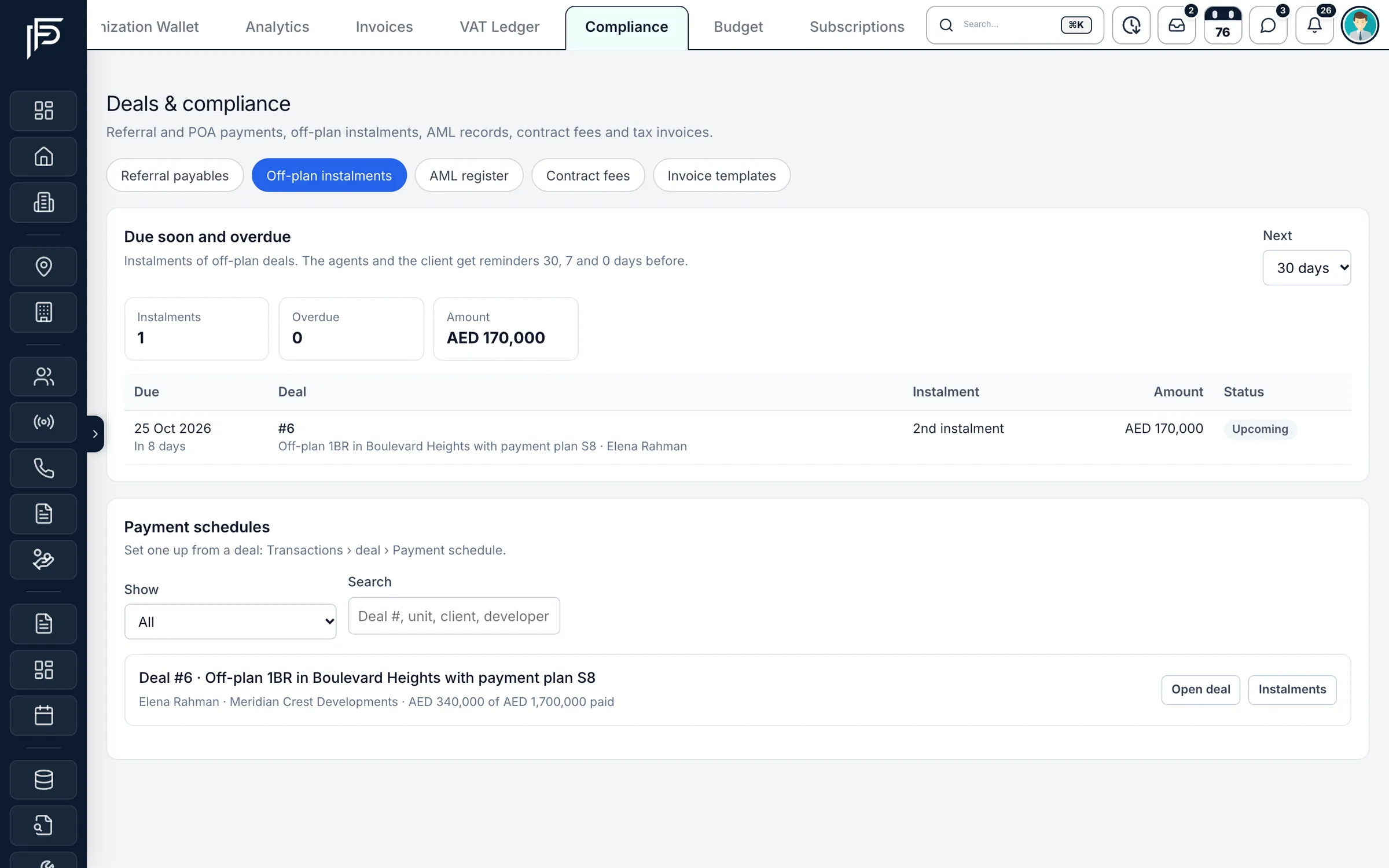
At a glance
- Start
- From a sale agreement, tenancy contract, lead, listing or off-plan project: the parties, property, price and dates fill in. Drafts can be saved and come back with Finance's notes
- Agent rate
- Each agent's own commission rate for each deal type
- Co-listing
- One agent part shared by parts that add up to 100% (50/50 for two agents); each agent's own rate applies to their part
- Other agency and referrals
- The other agency's share and any referral or POA payees come off the commission before the company and agent split
- Clawback
- When an approved deal falls through, money still in the agent's wallet is taken back at once; the rest is recovered from their next commission, repaid outside or written off
- VAT and invoices
- VAT at 5% on the commission less the other agency's share, when the company is VAT registered (has a TRN); tax invoices from your own templates
- Wallet and payouts
- Agents see each commission land in their wallet and request payouts; managers approve them
- Compliance
- KYC and an AML register for deal parties, an AML pack PDF and the deal's history of who changed what
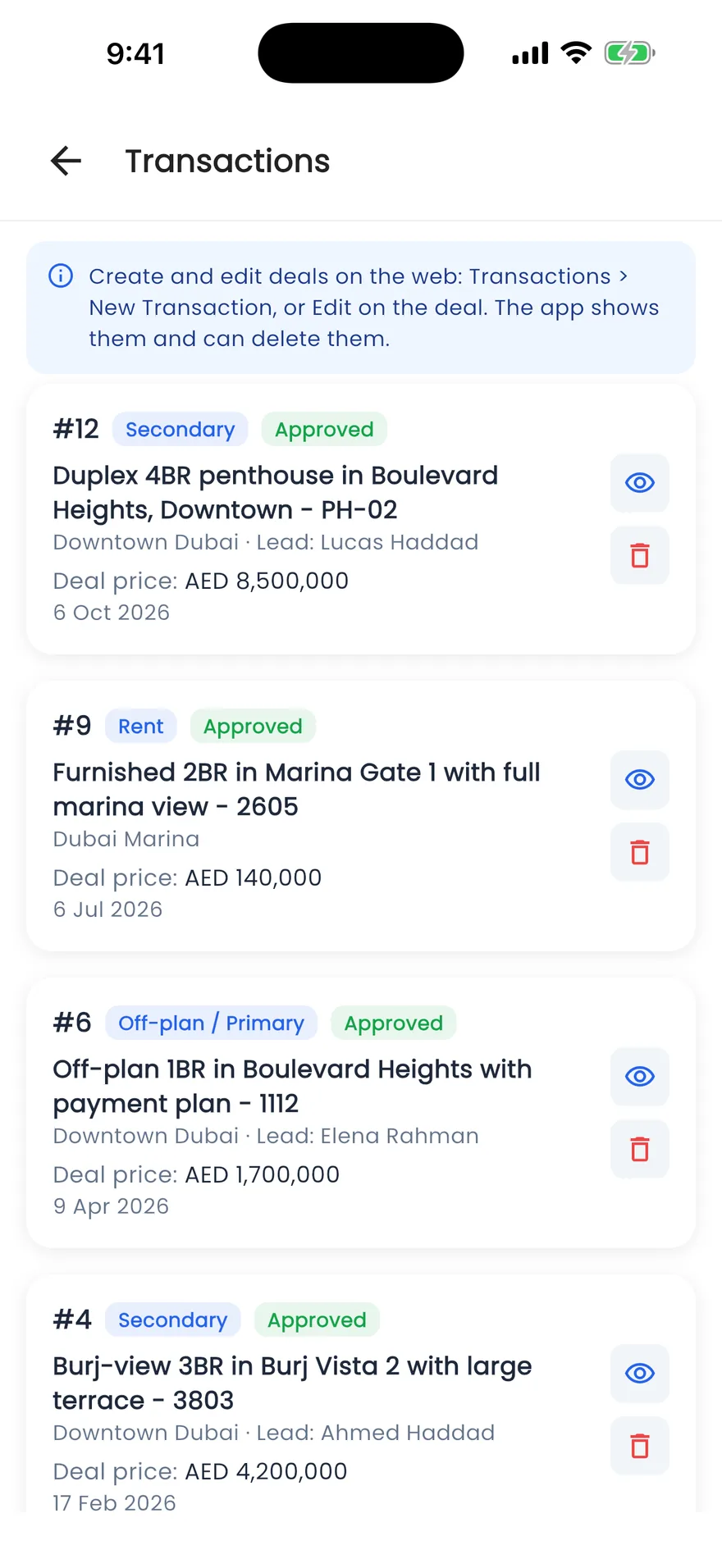
- In the app
- Agents check their deals and approval status in the app; deals are created and edited on the web
The maths
How a co-listed commission is split
Agents on one deal share the agent part, and each is paid at their own rate. Here is the rule with numbers.
Example
A co-listed deal
The agents' part of a deal is AED 100,000. Two agents co-listed it with parts of 50/50. Agent A's own rate is 45% and agent B's is 35%.
- Agent A
- AED 100,000 × 50% × 45% = AED 22,500
- Agent B
- AED 100,000 × 50% × 35% = AED 17,500
- Company keeps
- AED 100,000 − 22,500 − 17,500 = AED 60,000
Amounts are rounded half-up to the fils. The other agency's share and any referral payees are taken off before this split.
The UAE's standard VAT rate is 5% (u.ae, checked 28 October 2026). To work out both agencies' net on a co-broked deal, use the commission calculator.
How it works
From signed contract to the agent's wallet
A deal's path through the CRM, and what happens if it falls through after payout.
Start the deal from what you already have
Open a signed sale agreement or tenancy contract, a lead or a listing and start a deal from it. The parties, property, price and dates fill in, and a warning appears if the same unit was entered in the last 60 days. Save it as a draft until the paperwork is complete.Add the agents and their parts
Add every agent on the deal. With two agents the agent part is split 50/50, with three it is split equally, and you can change the parts as long as they add up to 100%. Record the other agency's share and any referrer or POA holder on the commission step.Finance approves and the commission lands
Submit the deal. Finance approves it, or returns it with a note saying what to fix. On approval each agent's commission is posted to their wallet, and the deal's price and commission are locked; later corrections need a reason and post only the difference.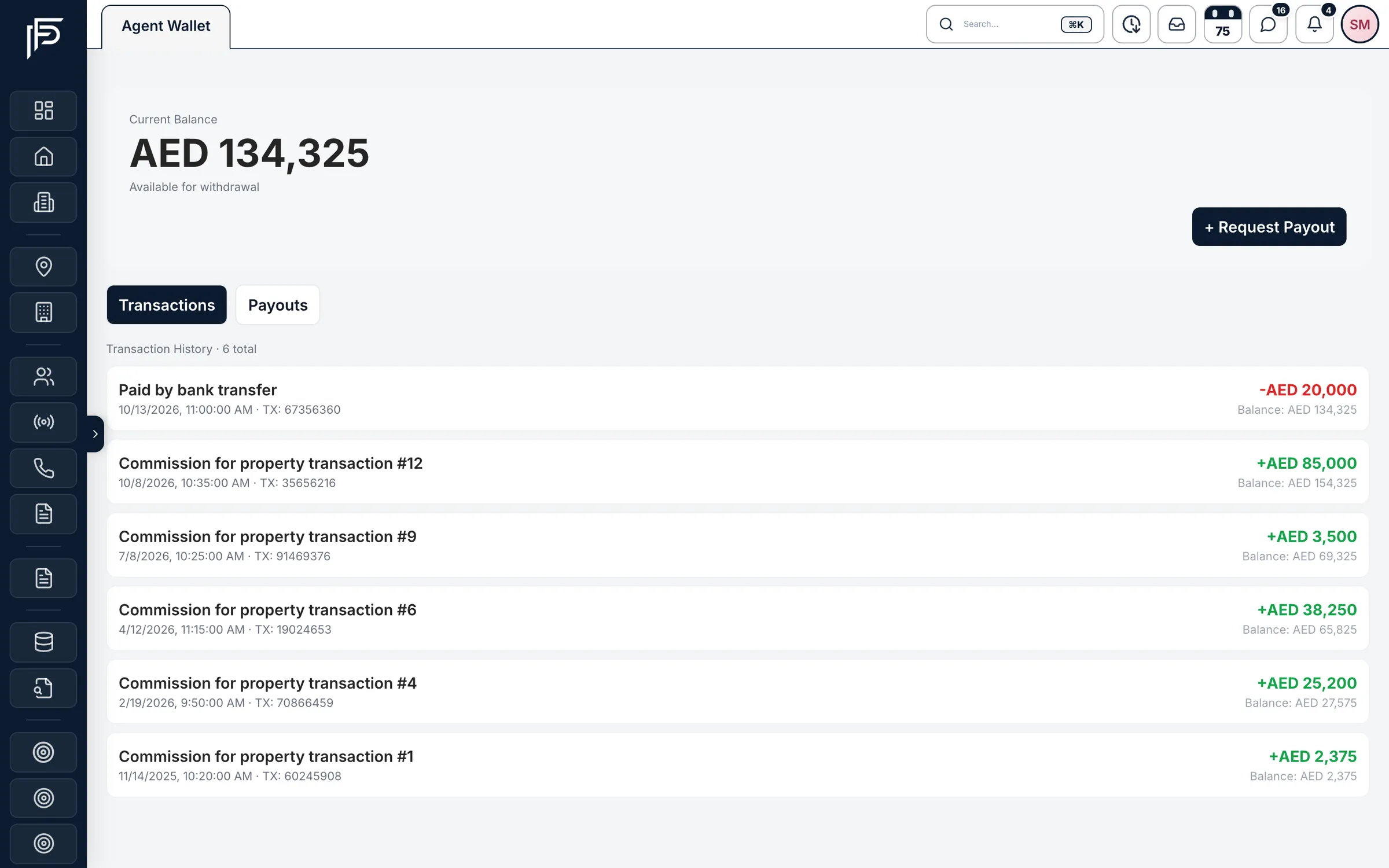
Each commission lands in the agent's wallet, ready for a payout request. Send the tax invoice
Make the tax invoice from the deal. It bills the commission your company collects, adds VAT when you have a TRN, and follows the template for that developer or customer, or your default one.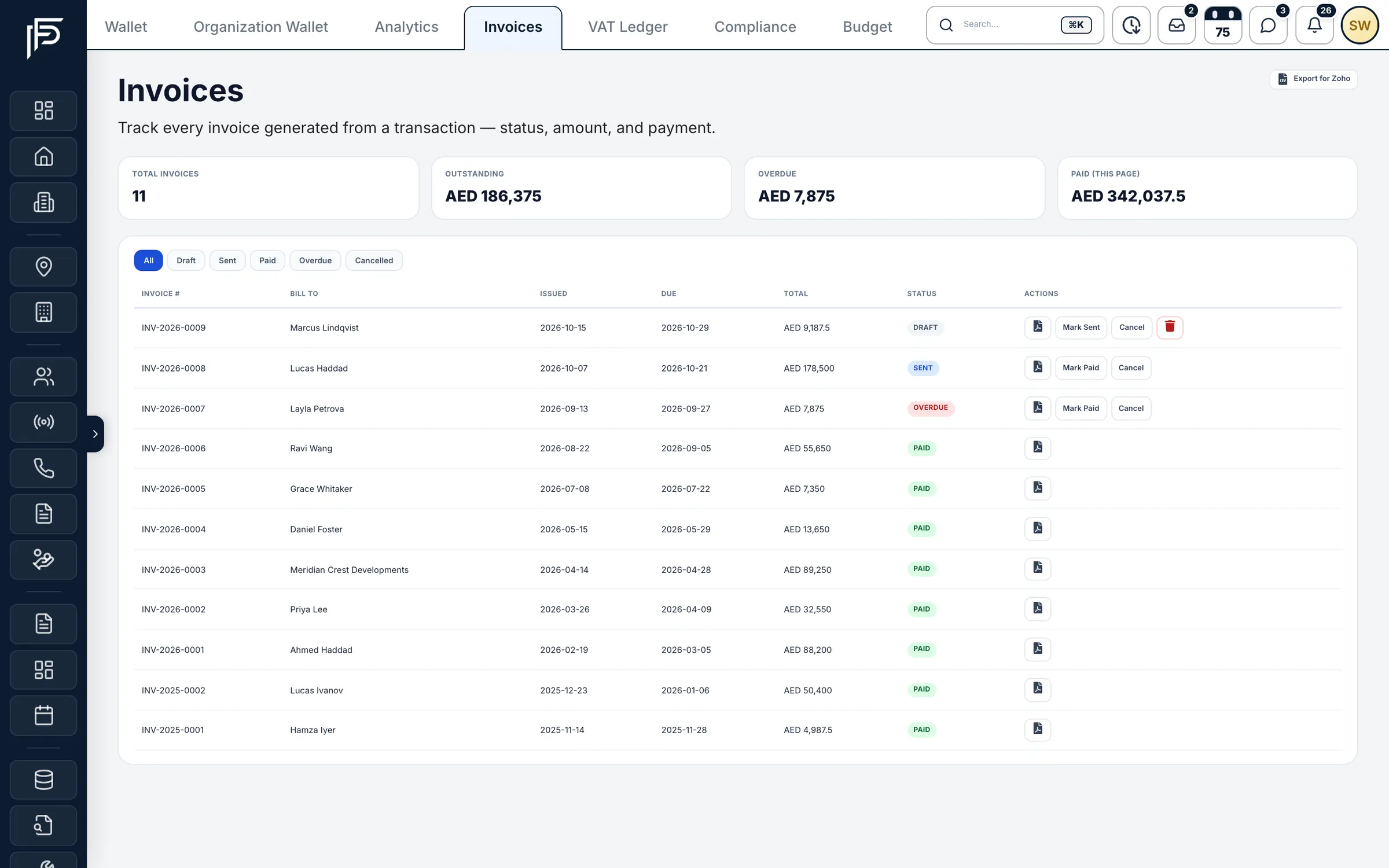
Invoices from draft to paid, with outstanding and overdue totals. If the deal falls through
Finance marks the approved deal as fell through. Example: an agent was paid AED 20,000 and still has AED 12,000 of it in their wallet. The AED 12,000 is taken back at once, and the other AED 8,000 is recovered from the next commission they are approved for, unless Finance records it as repaid outside the CRM or writes it off.
FAQ
Frequently asked questions
- How are commissions split when two agents co-list a deal?
They share one agent part, 50/50 by default, and you can change the parts as long as they add up to 100%. Each agent is paid their part at their own commission rate, and the company keeps the rest.
- What happens to commission when a deal falls through after payout?
Whatever the agent still holds of that deal in their wallet is taken back at once, never below zero. The rest is recovered from their next approved commission, or Finance records it as repaid outside the CRM or writes it off.
- Can we pay a referrer or POA holder from a deal?
Yes. Add them on the deal's commission step as a fixed amount or a percentage. Their share comes off the commission before the company and agent split, and Finance pays it once the deal is approved, with the date, method and proof recorded.
- How is VAT worked out on our commission?
When your company is VAT registered and its TRN is entered, VAT is 5% of the commission less the other agency's share. Without a TRN, invoices show no VAT and are not tax invoices.
Try the commission calculator- Can agents see their own commission?
Yes. Each agent sees their own commission lines and wallet balance, and requests payouts from the wallet. Seeing colleagues' deals needs a finance permission.
- Is there an approval step before agents are paid?
Yes. A deal goes from draft to submitted to approved, and nothing reaches a wallet before Finance approves it. Approved deals are locked; a correction needs a reason and posts only the difference.
Keep reading
Related pages
- Guides
Commission splits & co-broking
How commission is agreed in Dubai, how two agencies share one deal in writing, and where 5% VAT applies.
Read more - Free tools
Commission calculator
Total commission, each agency's share, 5% VAT and your agent's part for a sale or a rental. Estimate only.
Read more - Use cases
KPIs & targets
Plan monthly targets per agent, team or department, show everyone their pace, and freeze each month's results at the close.
Read more - Use cases
Off-plan sales
Keep the projects you sell with payment plans and floor plans, send branded offers, and get reminded before every instalment after the sale.
Read more
Sources
- Deals and commissions: drafts, co-listing parts and clawback (release notes) · Propfusion · checked
- Transactions and finance (feature tour) · Propfusion · checked
- Value Added Tax (VAT) · UAE Government (u.ae) · checked
Updated · Checked with AI tools against the product and official sources · How this page is made
Screens on this page show the Propfusion Demo Realty sample workspace. All people, listings and numbers are fictional.
Pay commissions without the spreadsheet
Start a free trial and record a co-listed deal from start to payout, or book a demo with our Dubai team.
7 days free · No card needed