Guide for Dubai brokers
Trakheesi listing permits: the checklist for Dubai agents
DLD's brokerage practice guide says every property ad in Dubai needs a RERA advertising permit, issued through the Trakheesi system, with the permit number shown on the ad. Since 24 April 2023 each permit also comes with a Madmoun QR code, which DLD asks companies to show on print and audiovisual ads so buyers can check the ad is approved. The application includes a copy of the marketing contract with the owner, which for a resale listing is normally Contract A.
7 days free · No card needed
- A permit for every ad
- Madmoun QR code
- One working day
Updated · Checked with AI tools against the product and official sources · How this page is made
Ad permits at a glance
- Which ads need a permit
- Any property ad or marketing material. DLD's list has 14 kinds, from electronic, classified and print ads to SMS, billboards, open days and exhibitions.
- Where to apply
- Trakheesi, DLD's licensing system for brokers, on DLD's website.
- What a broker sends
- The ad itself and a copy of the marketing contract with the owner (for a resale listing, normally Contract A).
- How long it takes
- One working day, according to DLD's service page. Fees depend on the permit type and are listed there.
- On every ad
- The permit number; on print and audiovisual ads, the Madmoun QR code as well (since 24 April 2023).
- How a buyer checks
- Scan the QR code, or check the licence or permit number with DLD's validation service.
- In Propfusion
- The permit number on the listing, checked when a connected portal account offers permit checks, with expiry alerts and portal ads switched off once it lapses.
The checklist
Six checks before a listing ad goes live
In the order you meet them, from the licence to the day the permit runs out.
Licence and broker cards in Trakheesi
Check the brokerage licence is registered in Trakheesi and that every agent who will advertise holds a current broker card.Marketing contract signed with the owner
Get the marketing contract with the owner signed before anything is published: DLD's permit service asks for a copy of it. For a resale listing that is normally Contract A; for an off-plan project, it is the marketing contract between the developer and your brokerage.Apply for the permit in Trakheesi
Attach the ad and the contract, then pay once the request is approved. Allow at least one working day before the ad is due to go live.Permit number and QR code on the ad
DLD's guide asks for the permit number on every ad. Put the Madmoun QR code on print and audiovisual ads, sized so a phone can scan it.Watch the expiry
Keep the expiry date with the listing. Renew before it lapses, or take the ad down everywhere it runs: portals, social posts and your own website.Check before you trust
Before you share a listing from another agency, scan its QR code or check its permit with DLD's validation service.
What the official sources say
DLD's rules for property ads, in plain words
Each point links to the DLD page it comes from, with the date we last read it.
DLD's practice guide says a brokerage needs a permit, issued through Trakheesi, for any property advertisement or marketing material, and that the permit number is shown on the ad.
Real Estate Brokerage Practice Guide (2nd edition, November 2024) · Dubai Land Department · checked
On the ad permit service page, a broker applying for most ad types attaches the ad and a copy of the marketing contract with the owner. An employee reviews the request, the broker pays, and the e-permit is issued. The stated service time is one working day.
Real Estate Ad Permit (e-service) · Dubai Land Department · checked
DLD announced Madmoun on 18 April 2023: every ad permit gets a QR code, and from 24 April 2023 companies are expected to show it on print and audiovisual ads so customers can confirm the ad was approved by RERA.
Madmoun: verifying real estate ads with QR codes (news, 18 April 2023) · Dubai Land Department · checked
Anyone can check a real estate licence or permit with DLD's validation e-service.
Validate real estate licences and permits (e-service) · Dubai Land Department · checked
The guide says a brokerage licence is registered in Trakheesi and broker cards are applied for there.
Real Estate Brokerage Practice Guide (2nd edition, November 2024) · Dubai Land Department · checked
To market an off-plan project, the guide asks brokers to make sure the project is licensed and registered with RERA, has an escrow account, and that there is a marketing contract between the developer and the brokerage. The project can be checked in Dubai REST.
Real Estate Brokerage Practice Guide (2nd edition, November 2024) · Dubai Land Department · checked
How to do it in Propfusion
Permits tracked on every listing
Propfusion does not issue permits: you apply in Trakheesi. It keeps each permit with its listing and acts before it lapses.
Add the permit on the listing
Type the permit number on the listing form. With a connected portal account that offers permit checks, and your company's licence number in the settings, Propfusion checks the permit, fills in the property details and records the expiry; otherwise type the expiry yourself. DTCM holiday-home and ADREC (Abu Dhabi) permit numbers work too.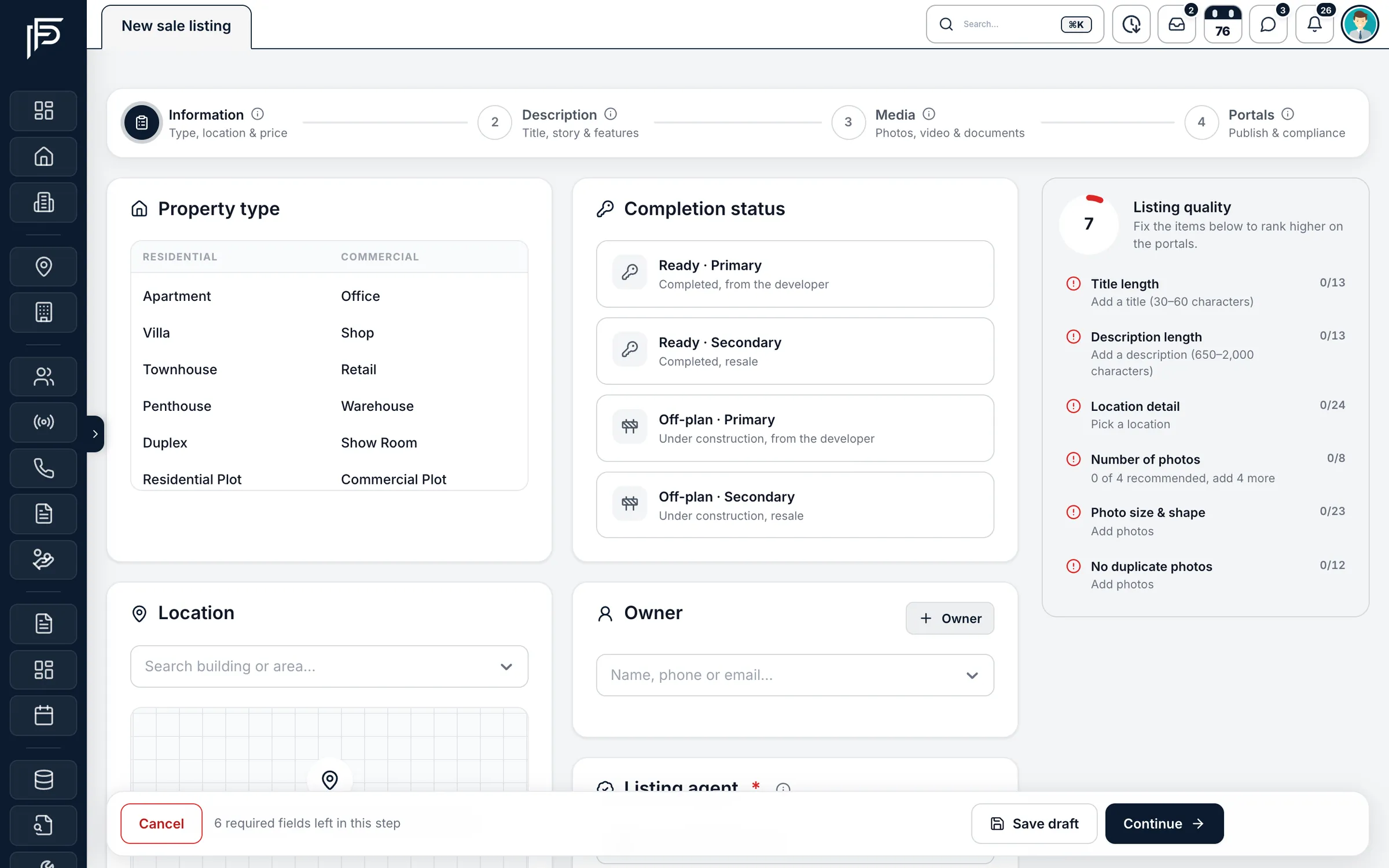
Add a listing in guided steps, ready for the portals. See which permits are running out
Listings show the permit and an expiry warning, and a "permit expiring" filter lists every listing that needs a renewal. With such an account connected, permits close to expiry are re-checked daily.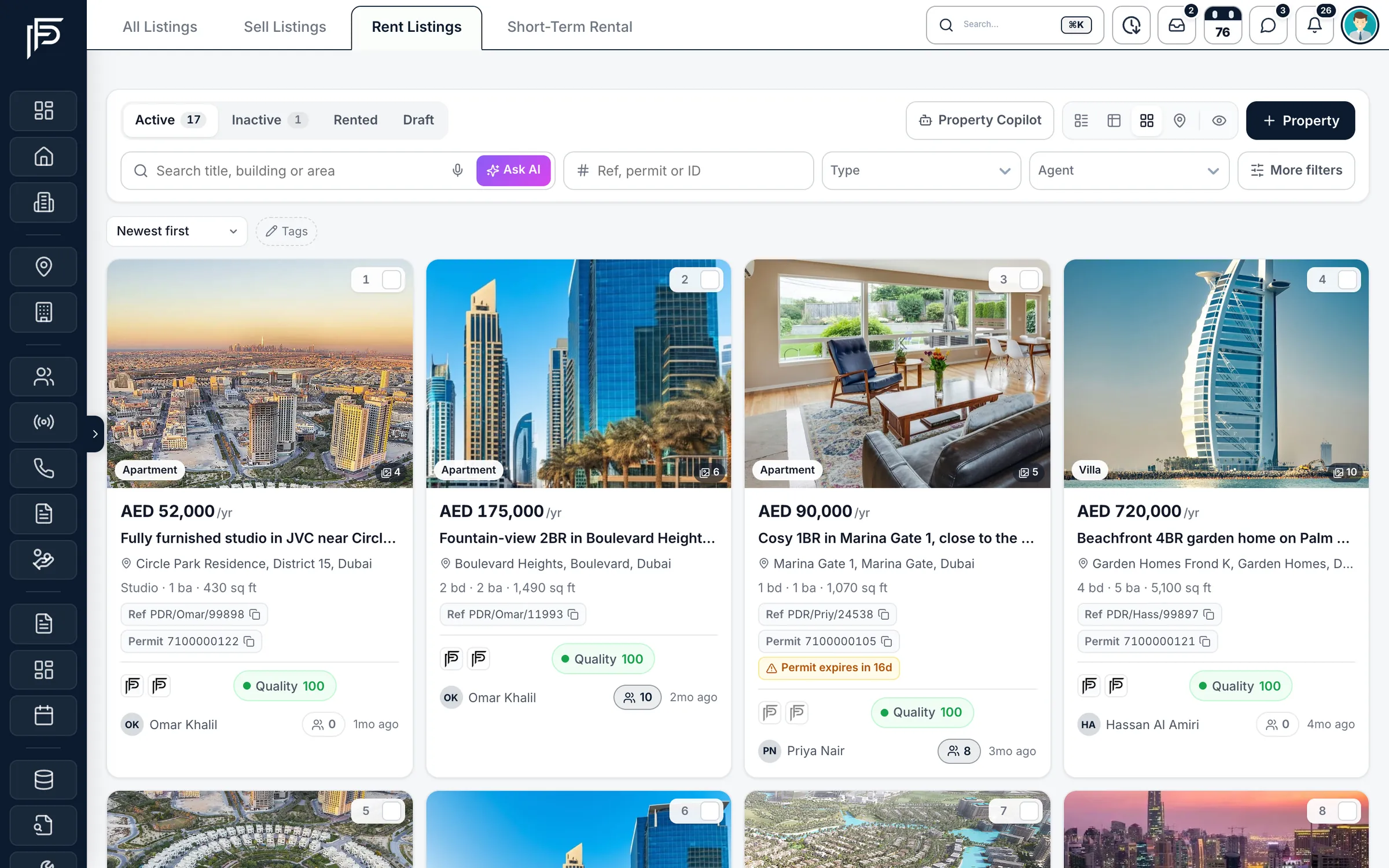
Rentals with yearly price, permits and portal status. Alerts before it expires
The listing agent gets an alert 30, 14 and 7 days before the expiry, and once more when it has expired, in the inbox and on the phone.Ads come down when the permit lapses
Once a permit has expired, the listing's Property Finder, Bayut and Dubizzle ads are switched off automatically. When the permit is renewed, the automatic switch-off is lifted.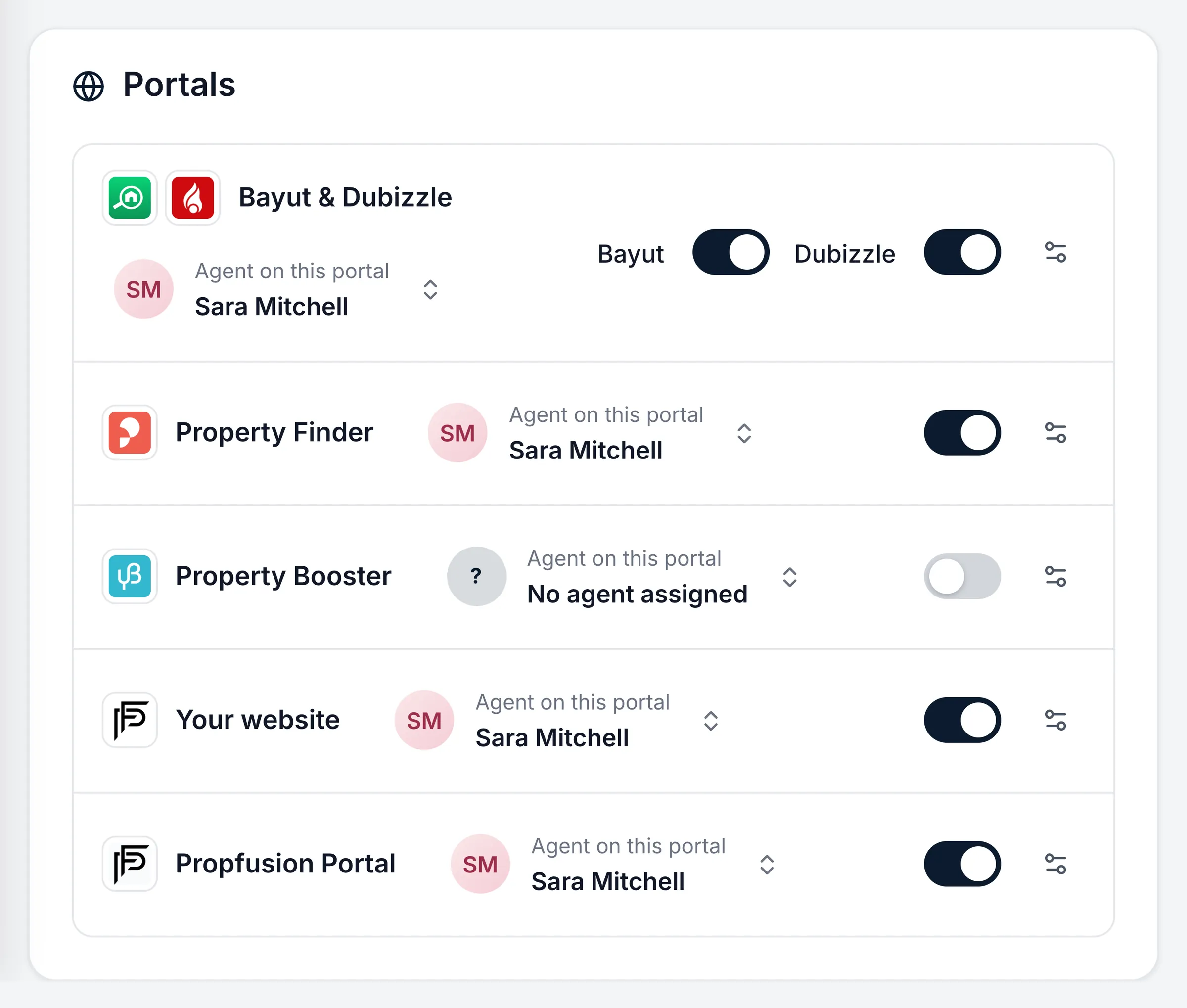
Switch each portal on or off per listing and pick the agent shown.
FAQ
Questions about listing permits
- Do I need a separate permit for each listing ad?
DLD's brokerage guide says a permit is needed for any property advertisement or marketing material, and its number has to appear on the ad. How permits map to listings and channels is set in Trakheesi, so check the current rule there when you apply.
- Where does the QR code have to appear?
DLD's April 2023 announcement says that from 24 April 2023 real estate companies should show the Madmoun QR code on their print and audiovisual ads. Show the permit number on every ad as well, as DLD's guide asks.
- How long does a permit take?
DLD's service page gives one working day. You apply in Trakheesi, a DLD employee reviews the request, and once you pay the e-permit is issued.
- What documents does a broker need?
For most ad types, the ad itself and a copy of the marketing contract with the owner. Exhibitions, launch events, seminars and promotion platforms need extra papers, such as a venue booking; DLD's service page lists them.
- How can a buyer check an ad is real?
By scanning the ad's Madmoun QR code, which shows the approved ad's details on DLD's website, or by checking the licence or permit number with DLD's validation service.
- How does Propfusion help us keep permits from lapsing?
It alerts the listing agent 30, 14 and 7 days before the expiry, and the "permit expiring" filter shows every listing due for renewal. If a permit does lapse, the listing's Property Finder, Bayut and Dubizzle ads are switched off automatically, and the listing stays in Propfusion so you can renew the permit and publish again.
Listings and portals in detail
Keep reading
Related pages
- Integrations
Property portals
Publish each listing to the portals you choose from your own accounts, and receive their enquiries in your leads list as they happen.
Read more - Guides
RERA forms A, B, F, I
What DLD's brokerage guide says about Contracts A, B and F, who signs each one, and where Form I stands today.
Read more - Guides
Answer leads in 5 minutes
Set one response target, route every lead the moment it arrives, move it on after a deadline, and measure the first real reply.
Read more
Sources
- Real Estate Brokerage Practice Guide (2nd edition, November 2024) · Dubai Land Department · checked
- Real Estate Ad Permit (e-service) · Dubai Land Department · checked
- Madmoun: verifying real estate ads with QR codes (news, 18 April 2023) · Dubai Land Department · checked
- Validate real estate licences and permits (e-service) · Dubai Land Department · checked
- Trakheesi system (sign-in page for licensed brokers) · Dubai Land Department · checked
- Property portals · Propfusion · checked
Updated · Checked with AI tools against the product and official sources · How this page is made
Screens on this page show the Propfusion Demo Realty sample workspace. All people, listings and numbers are fictional.