Guide for Dubai brokers
How to answer portal leads in 5 minutes: a lead-routing playbook for Dubai agencies
Set one response target for the whole team, route every lead to an agent the moment it arrives, and give each lead a deadline after which it moves to someone else. Then measure the first real reply (a call, WhatsApp or e-mail), not the assignment, and review the slowest agents every week.
7 days free · No card needed
- A written target
- A deadline on every lead
- A weekly review
Updated · Checked with AI tools against the product and official sources · How this page is made
The playbook at a glance
- Is 5 minutes a rule?
- No. It is a target your company chooses. We know of no DLD or RERA rule that sets a reply time for portal enquiries.
- What to measure
- The time from assignment to the agent's first real action on the lead, not the time the lead was assigned.
- Ways to route
- Round robin (in turn), single pass (offered once down a list) or a shared pool any free agent can claim.
- A deadline per lead
- When nobody replies in time, the lead moves to the next agent or the pool, or the team leader is alerted.
- Nights and missed calls
- Decide whether the target runs outside business hours; turn every missed call into a call-back task.
- Weekly review
- Median reply time per agent, the share answered on time, leads nobody touched and overdue follow-ups.
- In Propfusion
- A response target from 5 minutes to 4 hours (15 minutes by default), routing plans with a pool guard, and a response report per agent.
Why it matters
A portal enquiry cools quickly
A 2011 Harvard Business Review study of web leads found that many companies take far too long to answer them. A portal enquiry is the same kind of lead: the client filled in a form while the listing was on their screen, and they can send the same form to several similar listings in one evening.
The agency that calls back while the client still remembers the unit is more likely to win the conversation. That is why the playbook below starts with a written target and ends with a weekly review: speed only improves when it is measured the same way every week.
The playbook
Six rules for answering every lead fast
They work with any CRM, or none. Write them down once and share them with every new agent.
Pick one target and write it down
Choose 5, 15 or 30 minutes, and say whether it counts around the clock or only in business hours. One number for the whole team makes the weekly review fair. Start where most of the team can be on time, then tighten it.One routing rule per lead source
Portal enquiries, Meta lead forms and website forms can each follow their own plan. Give new agents a lower weight, and cap how many open leads one person can hold so nobody sits on a pile they can't call.Put a deadline on every lead
Decide what happens when the agent misses it: the lead moves to the next agent or a shared pool, or it stays and the team leader is told. Write down who may take a lead back once it has moved.Agree what counts as a reply
Count the agent's first real action: a call, a WhatsApp message, an e-mail, a note, a stage change or a booked follow-up. Assignment alone is not a reply, and neither is an automatic message or a call the client made to you.Cover missed calls and nights
A missed call from a client should become a call-back task straight away, and alert the team leader if nobody calls back. Leads that arrive at night should be at the top of someone's list when the day starts.Review every week
Rank agents by median reply time, and look at the share answered on time and at leads nobody has touched. Coach the slowest; move leads away from anyone who keeps missing the deadline.
How to do it in Propfusion
The same playbook, set up in the CRM
Each step uses a feature that is live for clients today.
Set the response target
In General settings, under Lead Response, choose a target from 5 minutes to 4 hours. Until you change it, the target is 15 minutes. The lead's "Seen by" card and the response reports measure against it.Build a routing plan
In Lead Distribution, create a plan for a lead category and its sources, and choose Round Robin, Single Pass or Leads Pool. The plan's Pool Prevention Guard sets the response deadline and what happens on a breach: Move to Pool or Escalate Only.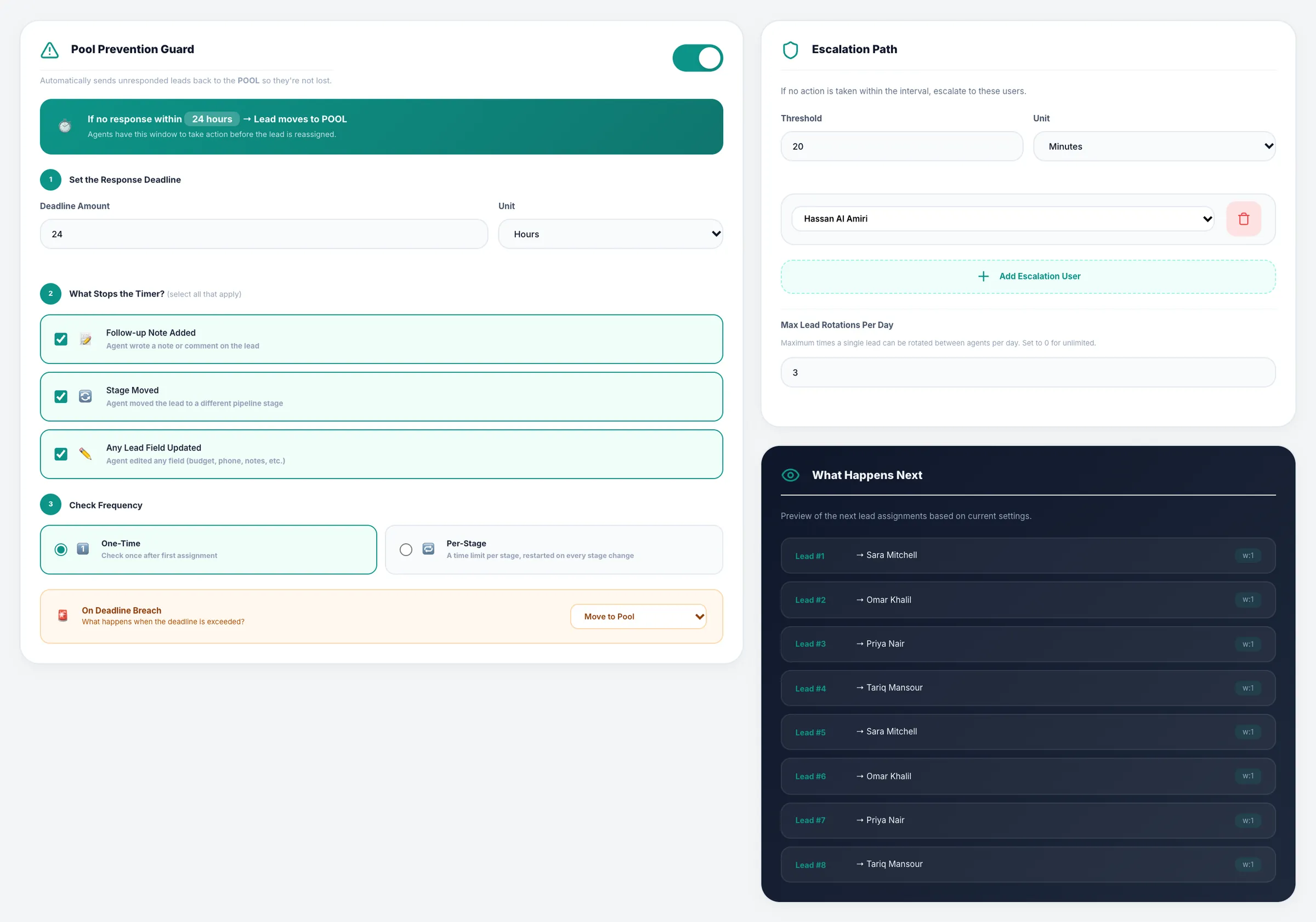
Set the response time, daily rotations and the hard deadline for each plan. Weight each agent
Give each agent on the plan a weight and a maximum number of open leads, and preview who gets the next leads before you save.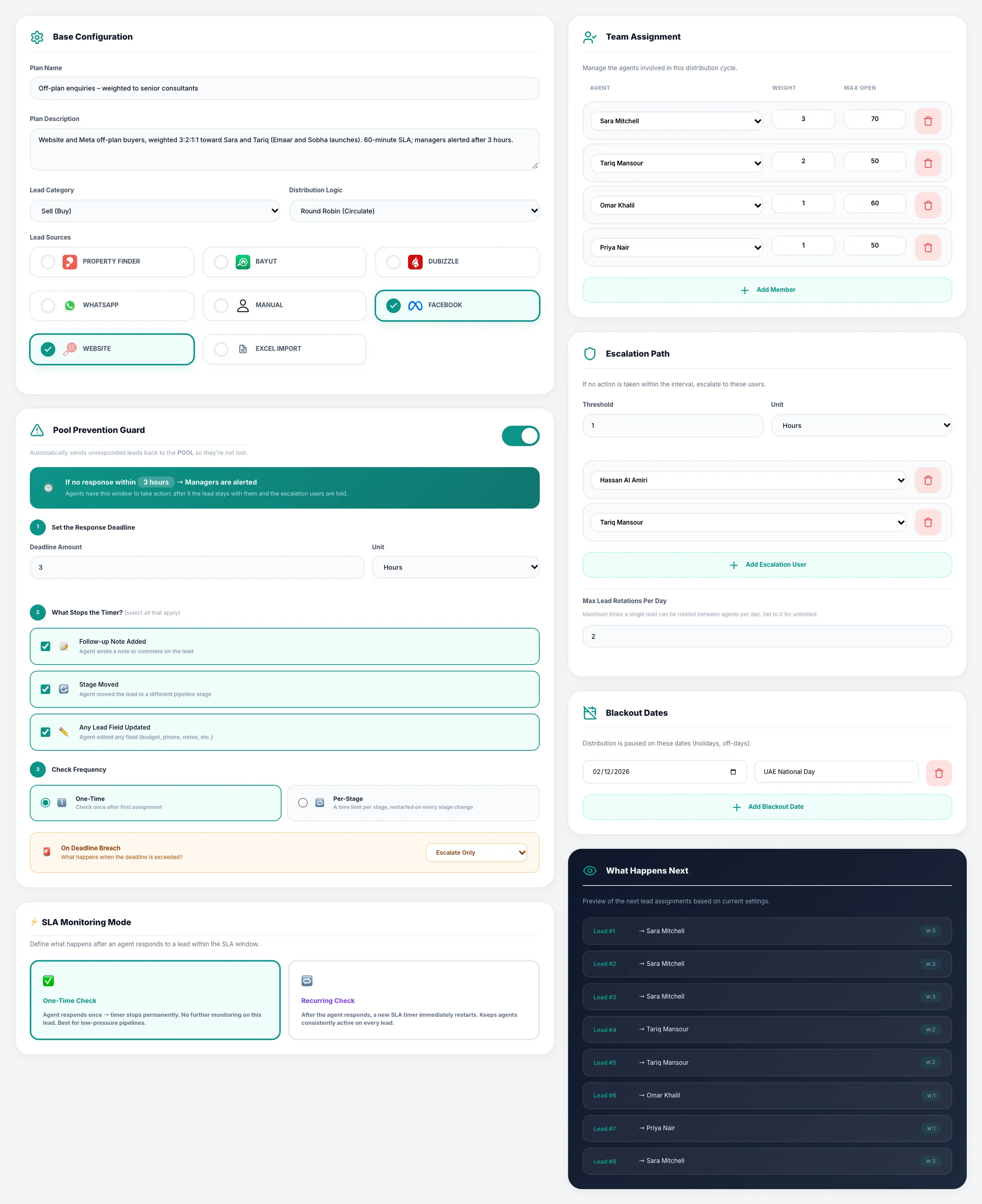
Weight each agent, cap their open leads and preview who gets the next eight. Check every assignment
The distribution audit lists each assignment and rotation with the strategy used and the response time, so a disputed lead can be traced.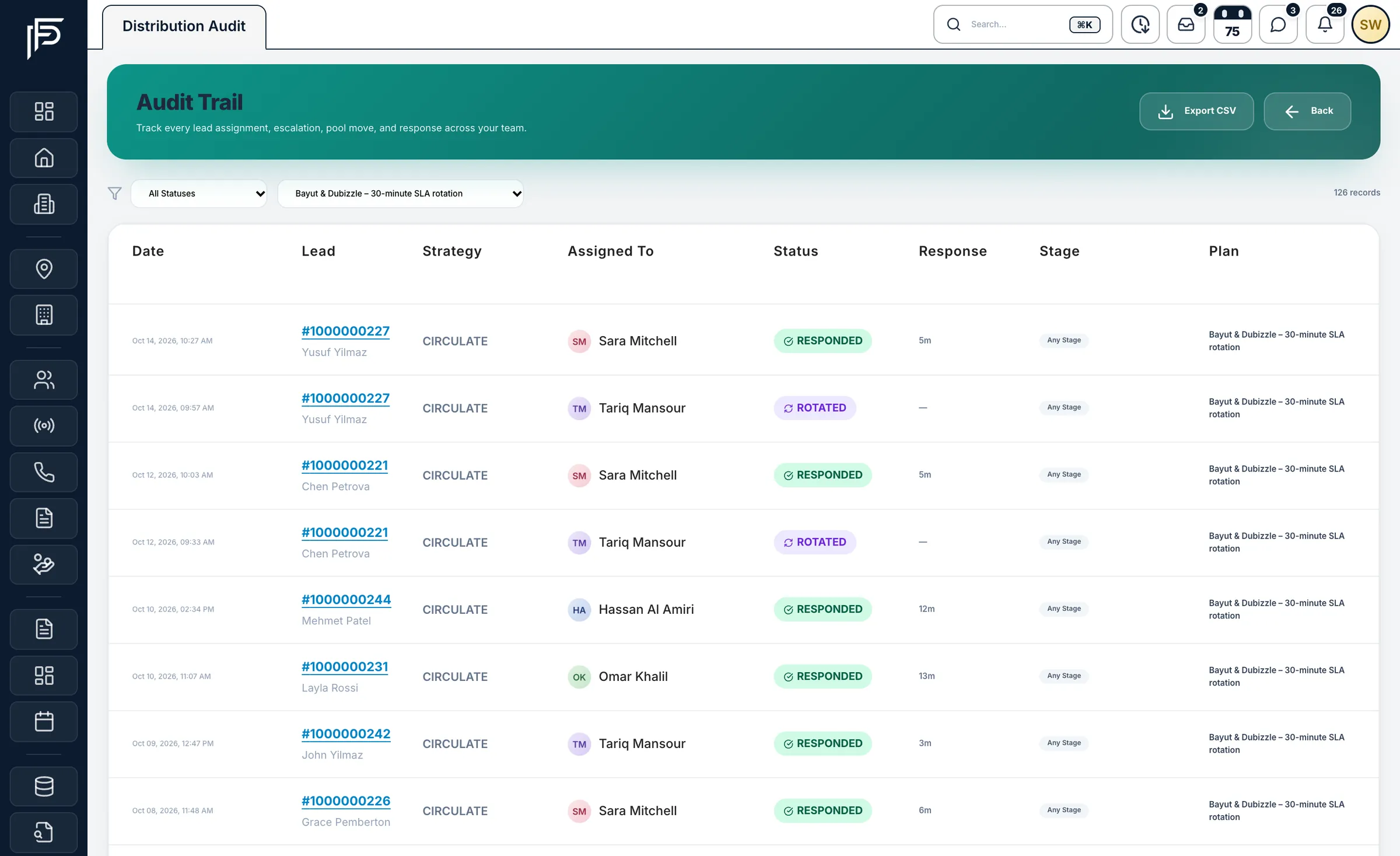
Every assignment and rotation, with its response time, on the record. Review response times each week
The Response & Health report ranks agents by median response against your target, with the share on time, untouched leads, and a health score from 0 to 100 graded A to D.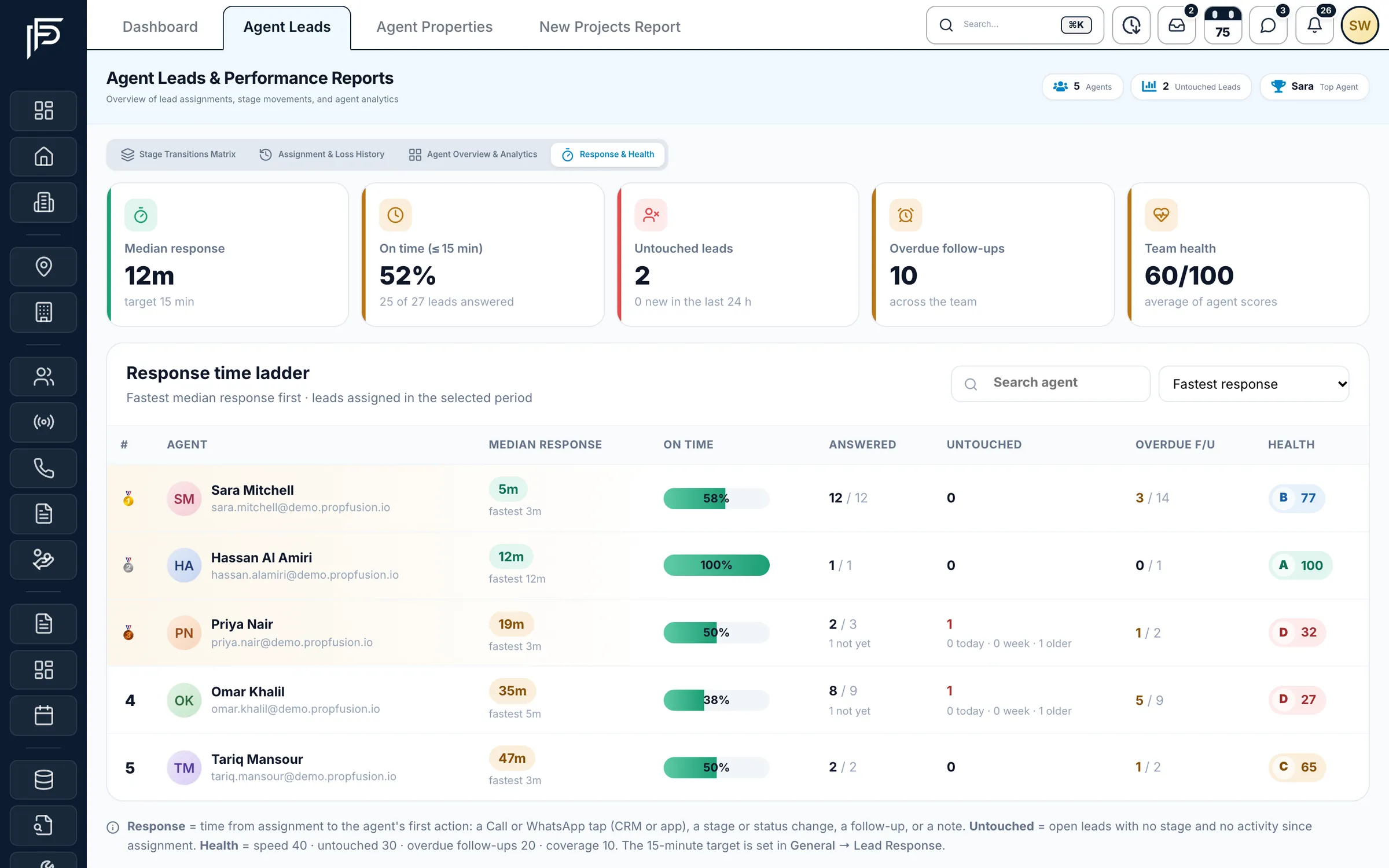
Rank agents by how fast they respond, against your own target. Let free agents claim pool leads
Leads in the shared pool show in the app with area, budget and beds, and an agent claims one with a tap. An agent who let a lead slip to the pool by missing the deadline can't claim it back.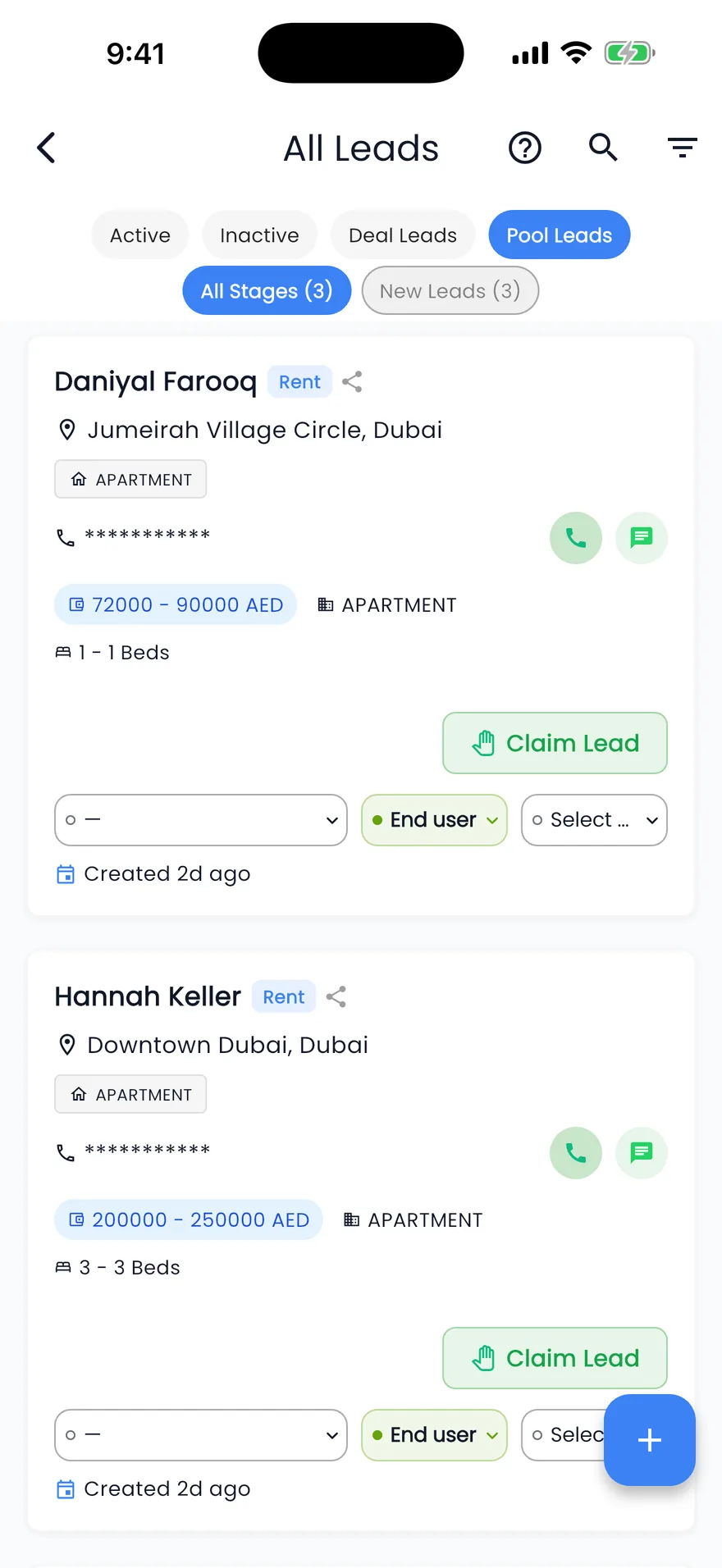
Claim open pool leads in one tap. Repeat leads and missed calls
Switch on Assign Repeat Leads to Existing Agent so a returning client reaches the agent who knows them. With a company phone line connected, a missed call creates a call-back follow-up and alerts the team leader if nobody calls back in time. Lead stages can also move on their own when the agent calls, starts a WhatsApp chat or books a viewing.
FAQ
Questions about lead response
- Is there a rule that says how fast an agent must answer a lead?
We know of no DLD or RERA rule that sets a reply time for portal enquiries. Five minutes is a goal a company sets for itself. Pick a target your team can meet, write it down, and measure it the same way every week.
- What should count as a first reply?
Something the assigned agent did for the client: a call, a WhatsApp message, an e-mail, a note, a stage change or a booked follow-up. Do not count the assignment, an automatic message or a call the client made to you. In Propfusion, response time runs from the assignment to that first action.
- Should leads go round robin or to a pool?
Round robin is fair when agents have similar skills and the same hours. A pool suits a team where some agents work evenings or weekends, because whoever is free can claim the lead. You can combine them: round robin first, and the pool for leads nobody answered by the deadline.
- What happens to a lead nobody answers?
Decide it before it happens. Either the lead moves on, to the next agent or a shared pool, or it stays with the agent and the team leader is alerted. In Propfusion this is the plan's Pool Prevention Guard: a deadline, then Move to Pool or Escalate Only.
- How do we handle leads that arrive at night?
Agree whether your target counts outside business hours and put it in the team's rules. Make sure every overnight lead is at the top of someone's list in the morning. In Propfusion, each agent can get a morning brief with new leads, due follow-ups and the day's events at a time you choose.
- How do we see which agents reply slowest?
Use a report that ranks agents by median reply time against your target, with the share answered on time and the leads nobody has touched. Propfusion's Response & Health report does this and gives each agent a health score from 0 to 100, graded A to D.
Lead distribution in detail
Keep reading
Related pages
- Use cases
WhatsApp CRM
One shared inbox for your company's WhatsApp Business number inside the web CRM, with templates, campaigns, hand-overs and chats that stay when an agent leaves.
Read more - Use cases
Calls & recordings
Click to call from a lead on a company number, with every call and recording saved on the lead and missed calls turned into call-backs.
Read more - Integrations
Property portals
Publish each listing to the portals you choose from your own accounts, and receive their enquiries in your leads list as they happen.
Read more - Integrations
Meta lead ads
Connect your Facebook pages, match each lead form to CRM fields, and send lead-quality events back to Meta.
Read more
Sources
- The Short Life of Online Sales Leads (Oldroyd, McElheran and Elkington, March 2011) · Harvard Business Review · checked
- Lead distribution · Propfusion · checked
- Smart lead stages (release notes, 24 October 2026) · Propfusion · checked
Updated · Checked with AI tools against the product and official sources · How this page is made
Screens on this page show the Propfusion Demo Realty sample workspace. All people, listings and numbers are fictional.