Use case · PropFusion AI
AI CRM for Dubai real estate: what PropFusion AI does
PropFusion AI is the assistant built into the Propfusion web CRM. Agents ask about their own leads, listings and deals by typing or on a live voice call, in English, Arabic, French or Russian, and it can open screens and fill in forms for them. It saves nothing until the user says yes, it sees just what that user's role allows, and it comes with the CRM, within a monthly AI allowance, so no separate AI subscription or key is needed.
7 days free · No card needed
- Text or live voice
- English, Arabic, French, Russian
- Saves after your yes
Updated · Checked with AI tools against the product and official sources · How this page is made
At a glance
- Where it is
- The AI button at the bottom right of every page in the web CRM, and a full-page chat for longer work
- Languages
- Answers in English, Arabic, French or Russian (Arabic right to left). The CRM's screens stay in English
- Voice
- Dictate a message, or start a live voice call: it listens, answers aloud and listens again
- On your screen
- Opens pages, tabs and filters straight away, and fills in forms while you watch
- Saving
- Asks once on a card before any save. One “Create all” can cover up to 10 saves of the same form on that page, for 10 minutes
- Risky steps
- Deleting, sending to a client, paying, approving, roles and company settings need your exact word, such as “delete”. A batch never covers them
- Permissions
- Sees the records the user's role can see, nothing more. Each approved save is logged with who approved it and how
- Lead help
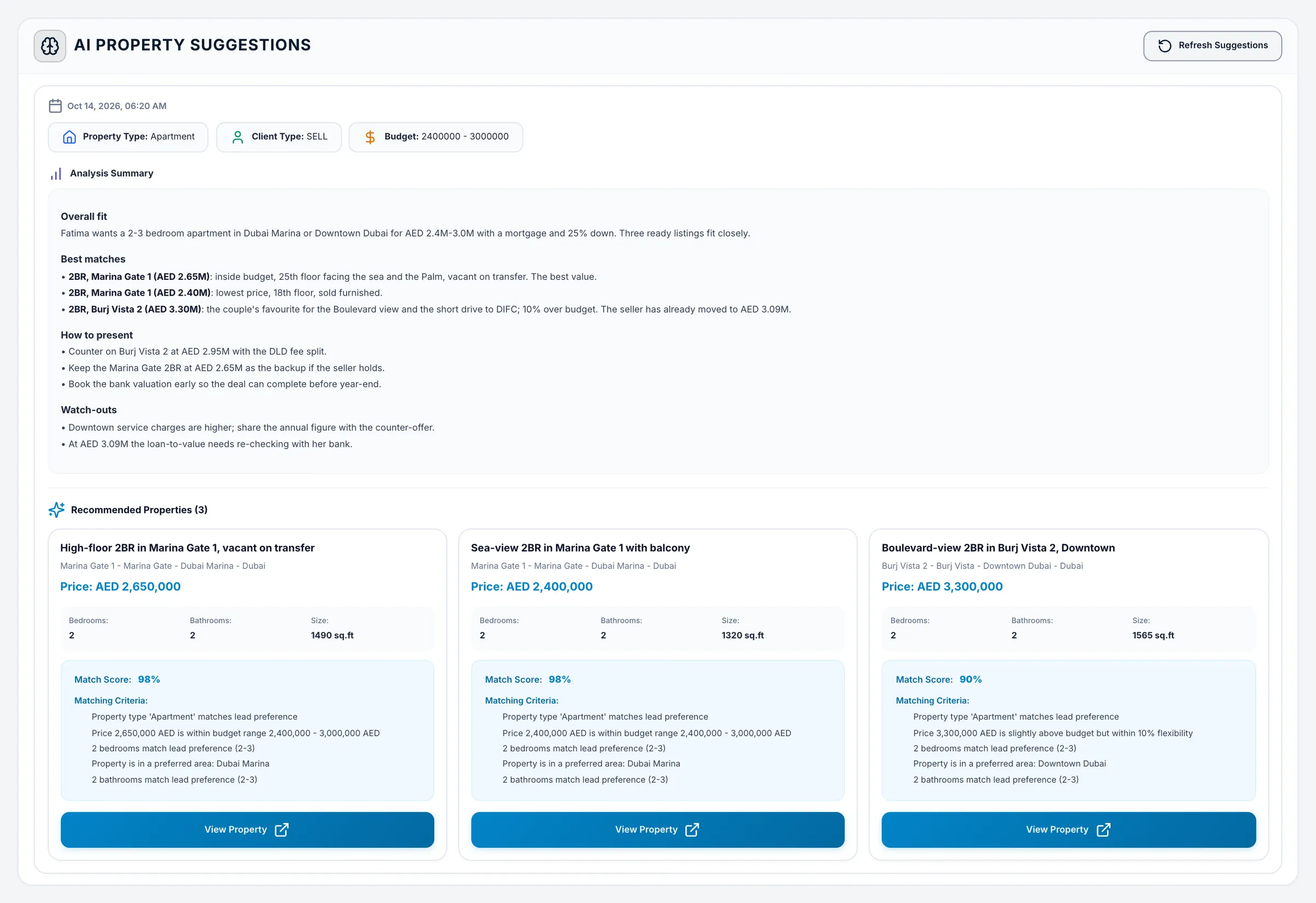
- Lead summaries, and matching listings with the reasons they fit
- AI key
- Runs on Propfusion's servers and is included up to a monthly AI allowance. No AI subscription or key of your own is needed; a company can add its own AI key to use more
- In the app
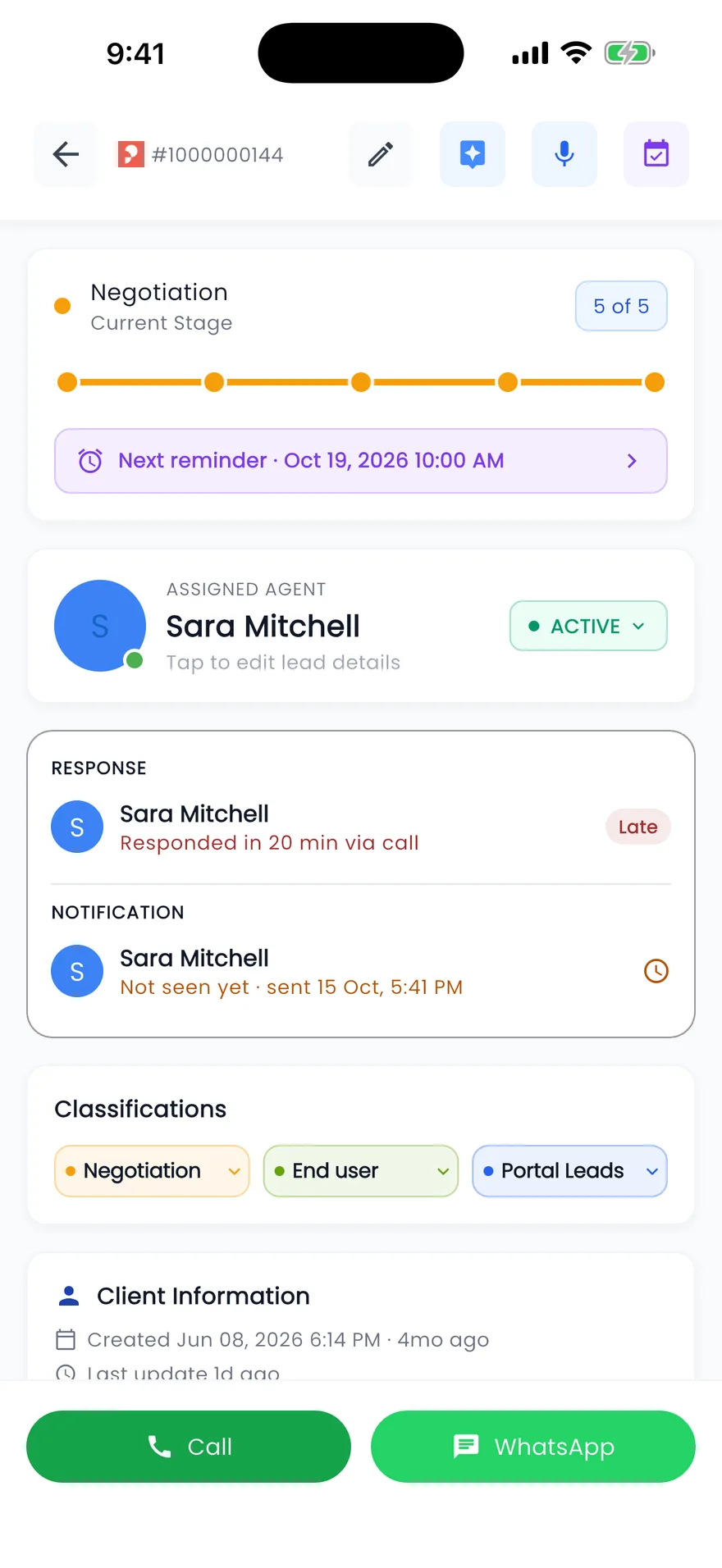
- Not as a chat. The iPhone and Android app has AI Summary on leads and AI writing on the listing form
What you can ask
Questions, help, lessons and the clicking
PropFusion AI has three jobs: it answers questions about your own CRM data, explains how to do something, and teaches your team. It can also work the page you are on.
- Your data
“Which of my leads have overdue follow-ups?”
It looks through the leads your role can see and lists the ones waiting on you, each with a link that opens the lead.
- This record
“Summarise this lead”
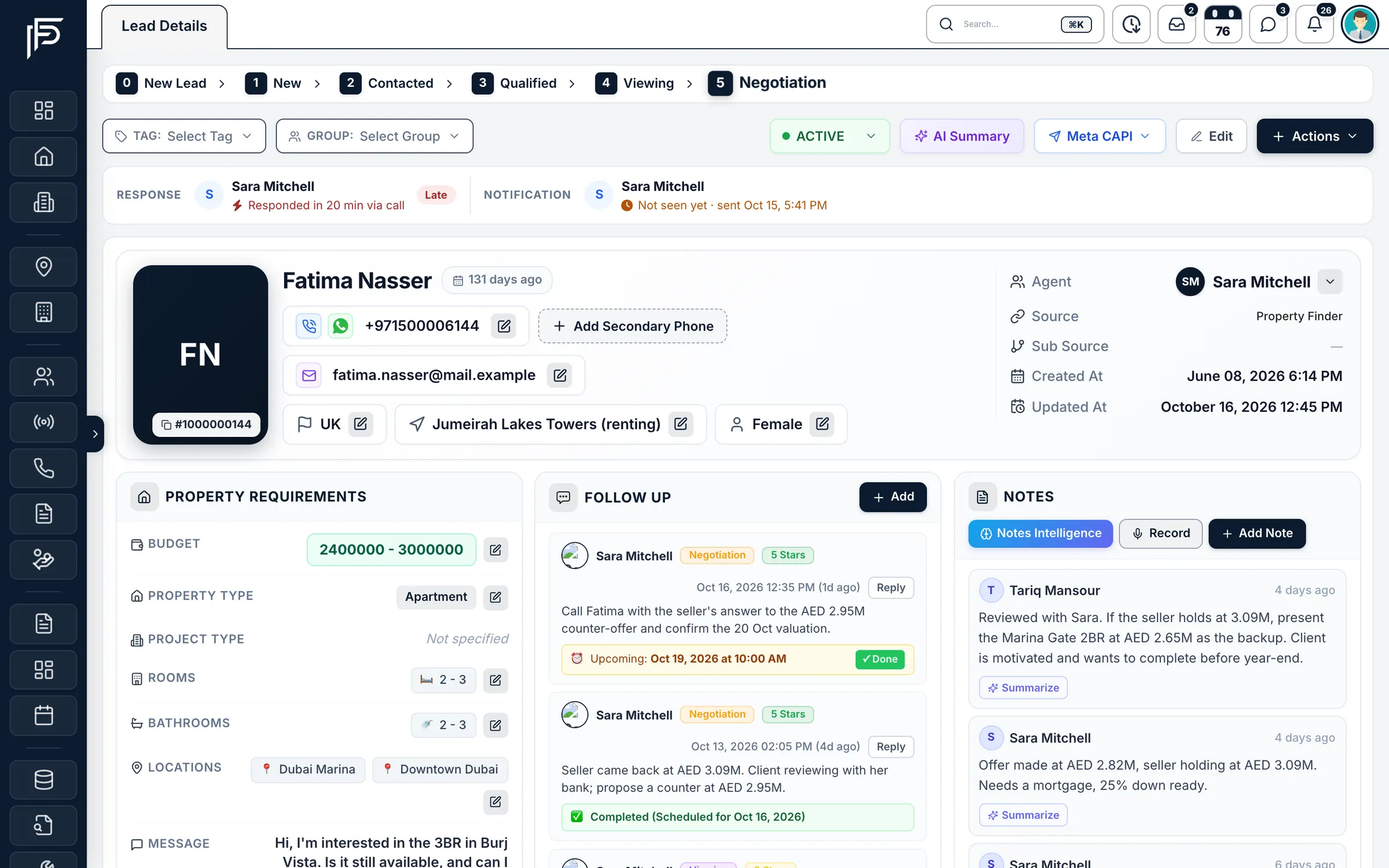
A short summary of the lead you have open, built from what is on the record, before you call the client.
- How do I
“How do I publish a listing to Bayut?”
Help written from the CRM's own help pages, and it can open the right screen so you can follow along.
- Train me
“Train me on follow-ups”
A short lesson for your role, a quick check and what to learn next. It can also start a guided tour of the real screens.
- Do it for me
“Add 5 follow-up templates for viewings”
It opens the page, fills in each form and stops at the save button until you say yes.
- Team
“Who is behind pace this month?”
Managers ask about targets and results for the people they manage, with the same visibility as the KPI screens.
Each person can save their preferred tone, language and signature under My Profile › AI Custom Instructions.
Saving
How a save works
Opening and viewing happen at once. Anything that saves waits for your yes.
You ask
Type or say what you need, for example “Add 5 follow-up templates for viewings”. It works in a chat and on a live voice call.It opens the page and fills in the form
Opening a page, a tab, a filter or an Add button happens at once. The chat shows a line for each step, such as “Opened Add New Template” or “Filled 2 fields”, so you can see what it did.A card asks before anything is saved
Before it clicks Save or Create, a card asks once, for example “Create the template Viewing Reminder?”. Tap Yes, or type or say “yes”; “Not now” cancels. For several similar items it asks “Create all 5?”, and you can choose one at a time instead.Saved, and your approval is logged
The step then reads “Saved (you approved)”. The save goes through the normal screen with your own permissions, and the CRM records who approved it and whether by tap, typed word or voice. Say “stop” at any point to end a batch.
Lead help
A summary and matching listings for every lead
Open a lead and ask for a summary of it, or look at the listings the CRM suggests for that client, each with a match score and the reasons it fits.
- Summaries built from what is on the lead
- Suggested listings with the reasons they match
- In the app: AI Summary on leads and AI writing on the listing form
Honest limits
What PropFusion AI will not do
The same rules as the screens, and a few more.
- Show you records your role can't see. It follows the same rules as the screens.
- Type passwords, PINs, API keys or other secrets. You do those yourself.
- Read or change another company's data.
- Follow instructions written inside a document, a record or a web page. That text is treated as data and can never approve a save.
- Save without your yes, or delete, send, pay or change settings without your exact word.
- Work for owners or tenants. It is for agency staff.
FAQ
Frequently asked questions
- Can PropFusion AI change records in our CRM?
Yes, through the normal screens and with the user's own permissions. It fills in the form, then asks before it saves. Deleting, sending to a client, paying, approving and changing settings need the exact word, such as “delete”, and a batch approval never covers them.
- Which languages does PropFusion AI speak?
It answers and talks in English, Arabic, French or Russian. The CRM's screens stay in English. Choose the language in the AI panel, or simply ask, for example “answer in Arabic”, or save it in your AI Custom Instructions in My Profile.
- Can I talk to PropFusion AI instead of typing?
Yes. In the web CRM you can dictate a message or start a live voice call: it listens, answers aloud and listens again, and during a call the confirm card shows what it heard. For voice typing, use Chrome and allow the microphone.
- Does PropFusion AI see other agents' leads?
Just the ones your role lets you see on the screens. It follows the same visibility rules as the rest of the CRM, so an agent who sees their own leads gets answers about their own leads, and a manager gets answers about their team.
- Is PropFusion AI available in the mobile app?
Not as a chat. The iPhone and Android app has AI Summary on leads and AI writing on the listing form. The full assistant, with voice and help on your screen, is in the web CRM.
- Do we need an OpenAI or other AI account to use it?
No. PropFusion AI runs on Propfusion's servers and is included up to a monthly AI allowance, so there is no separate AI subscription to buy and no key to paste in. A company that uses more can add its own AI key.
Keep reading
Related pages
- Use cases
WhatsApp CRM
One shared inbox for your company's WhatsApp Business number inside the web CRM, with templates, campaigns, hand-overs and chats that stay when an agent leaves.
Read more - Use cases
KPIs & targets
Plan monthly targets per agent, team or department, show everyone their pace, and freeze each month's results at the close.
Read more - Guides
Answer leads in 5 minutes
Set one response target, route every lead the moment it arrives, move it on after a deadline, and measure the first real reply.
Read more - Use cases
Leasing & property management
Tenancy contracts filled from the CRM, rent cheques from due to cleared, Ejari details and documents kept on each rental, renewals and owner payouts.
Read more
Sources
- PropFusion AI saves for you, after your yes (release notes) · Propfusion · checked
- PropFusion AI: chat, live voice and the CEO Strategy Studio (release notes) · Propfusion · checked
- AI-powered insights (feature tour) · Propfusion · checked
- Propfusion company facts · Propfusion · checked
Updated · Checked with AI tools against the product and official sources · How this page is made
Screens on this page show the Propfusion Demo Realty sample workspace. All people, listings and numbers are fictional.
Try PropFusion AI on your own leads
Start a free trial and ask it about your pipeline in English, Arabic, French or Russian, or book a demo and we'll show you a voice call.
7 days free · No card needed