Use case · WhatsApp
WhatsApp CRM for Dubai real estate teams
Propfusion connects your company's WhatsApp Business number through Meta's official platform and gives your team one shared inbox inside the web CRM. Each agent sees the chats of the contacts they own or are tagged for, chats can be handed to a colleague, and approved templates, campaigns and welcome and away messages all run from the same number.
7 days free · No card needed
- One company number
- Shared inbox
- Templates & campaigns
Updated · Checked with AI tools against the product and official sources · How this page is made
At a glance
- Number
- Your company's WhatsApp Business number, through Meta's official Cloud API
- Inbox
- A shared inbox in the web CRM: text, files, photos, documents, location, reply buttons and lists
- Who sees what
- Agents see the chats of contacts they own or of tags assigned to them, unless their role may view all contacts
- Hand-over
- Transfer a chat to another agent; the conversation stays with the contact
- 24-hour window
- Outside WhatsApp's 24-hour window, Meta-approved templates can still be sent
- Templates
- Create a template, submit it to Meta and track its approval; send it to one number, by tags or to all contacts
- Campaigns
- A template sent to tags or a list of numbers, now or on a schedule, with sent, delivered, read and failed counts
- Auto-replies
- A welcome message, an away message outside your business hours, and keyword replies
- Opt-outs
- STOP and START keywords handled for you; campaigns skip unsubscribed numbers
- Reports
- First-reply times per agent, and message and conversation counts
- On the phone
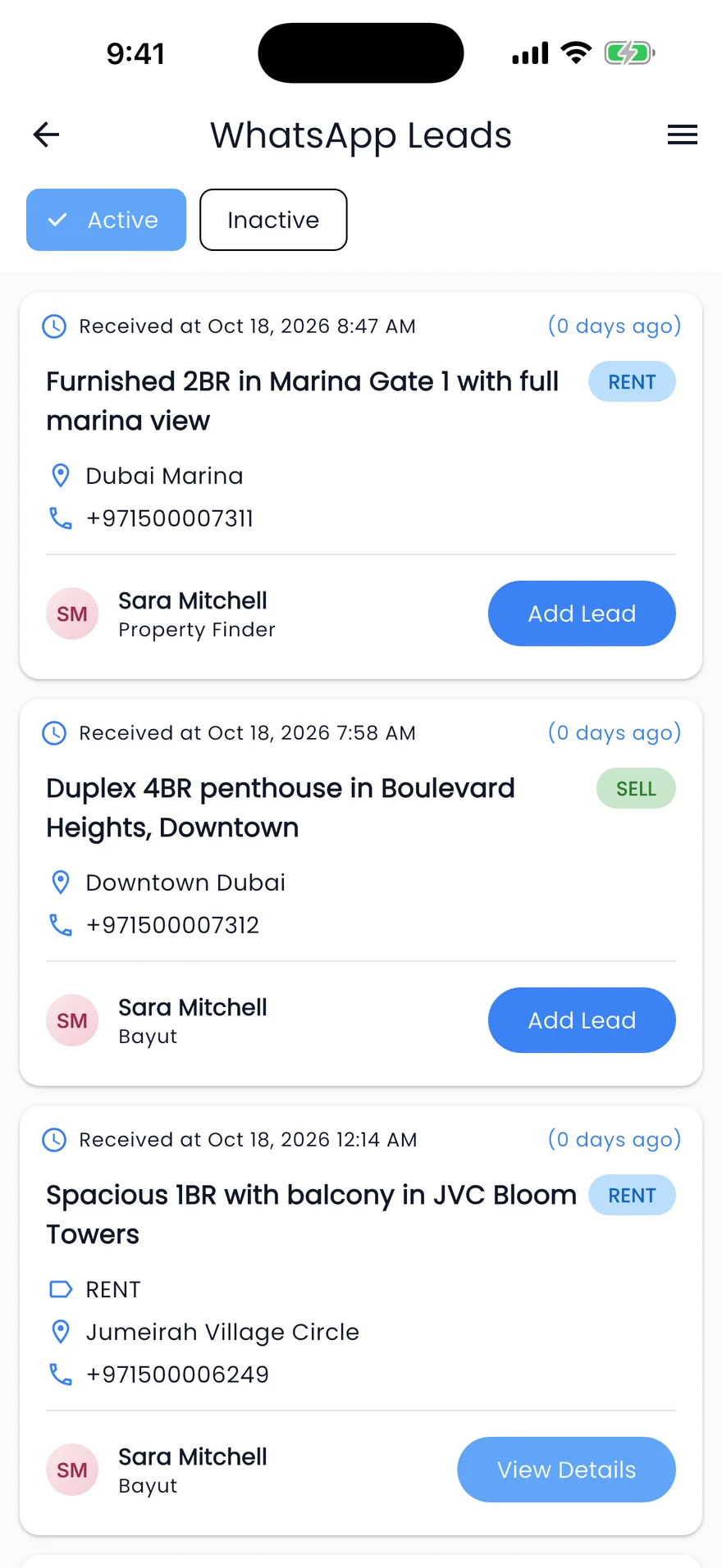
- The company inbox is in the web CRM, not in the app. The app's WhatsApp button opens the agent's own WhatsApp
A day in the inbox
How your team works WhatsApp in the CRM
Connecting the number is a one-time job for an admin. This is the daily work that follows.
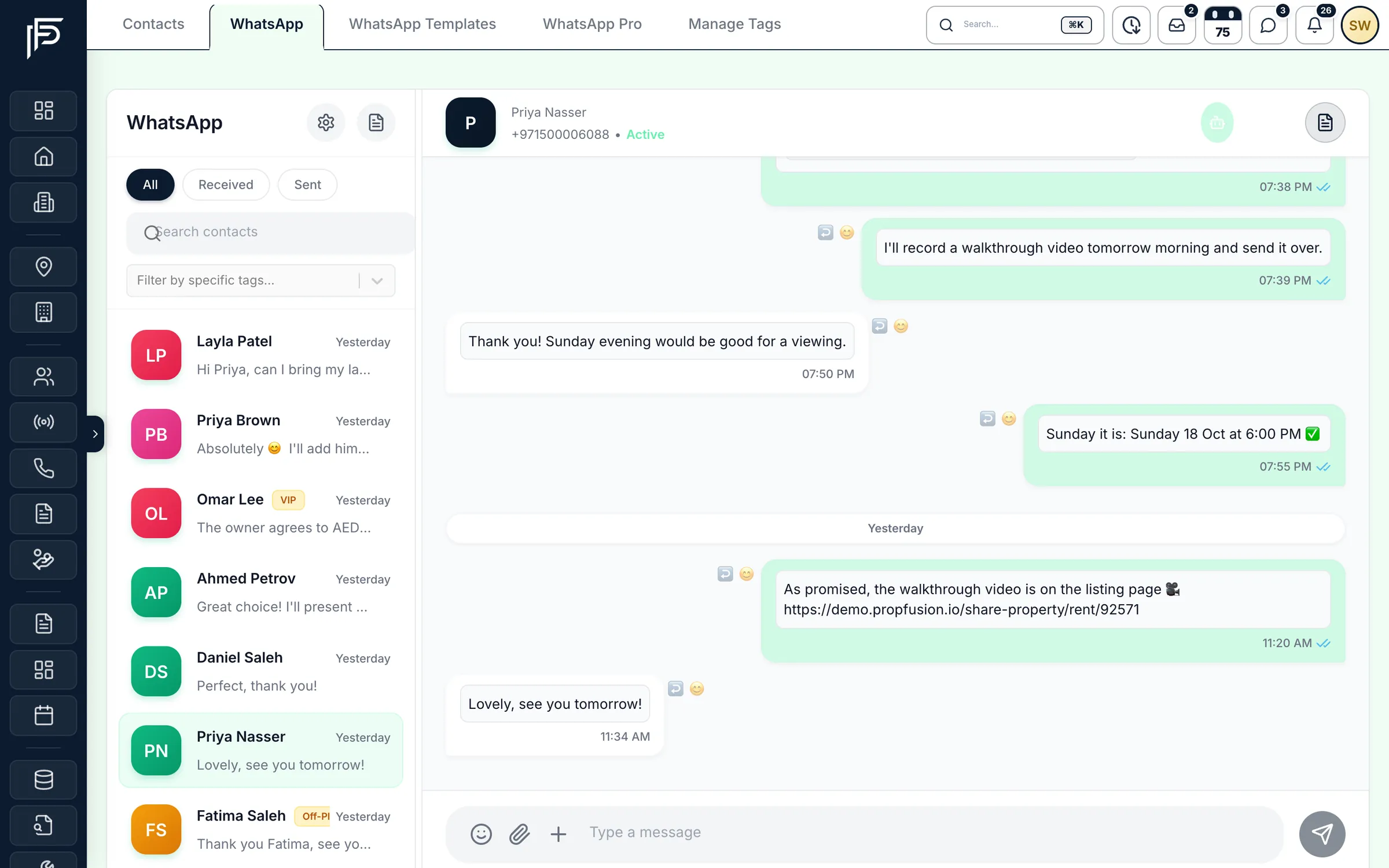
A new chat arrives in the inbox
Messages to the company number land in the shared inbox. Filter by received or sent, or by tag, and reply with text, a file, a photo, a location request, reply buttons or a list.Answer from the lead's own page
The same thread sits inside the lead, next to its follow-ups and notes, so the agent who picks up the lead tomorrow sees what was promised today.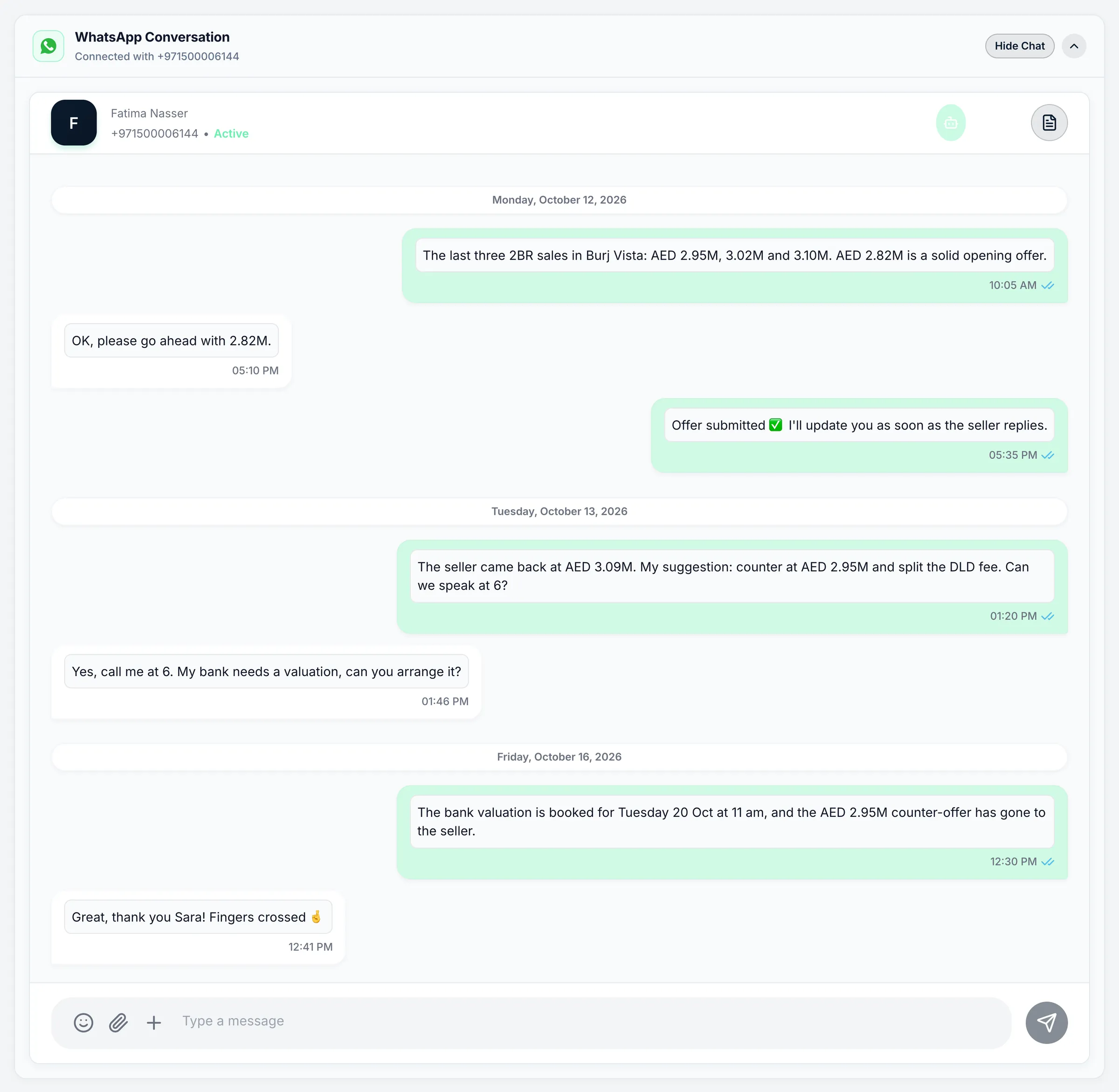
The WhatsApp thread inside the lead. Window closed? Send a template
When the reply box says the 24-hour window is closed, pick an approved template instead. The templates list shows which ones Meta has approved, which are waiting and which were rejected.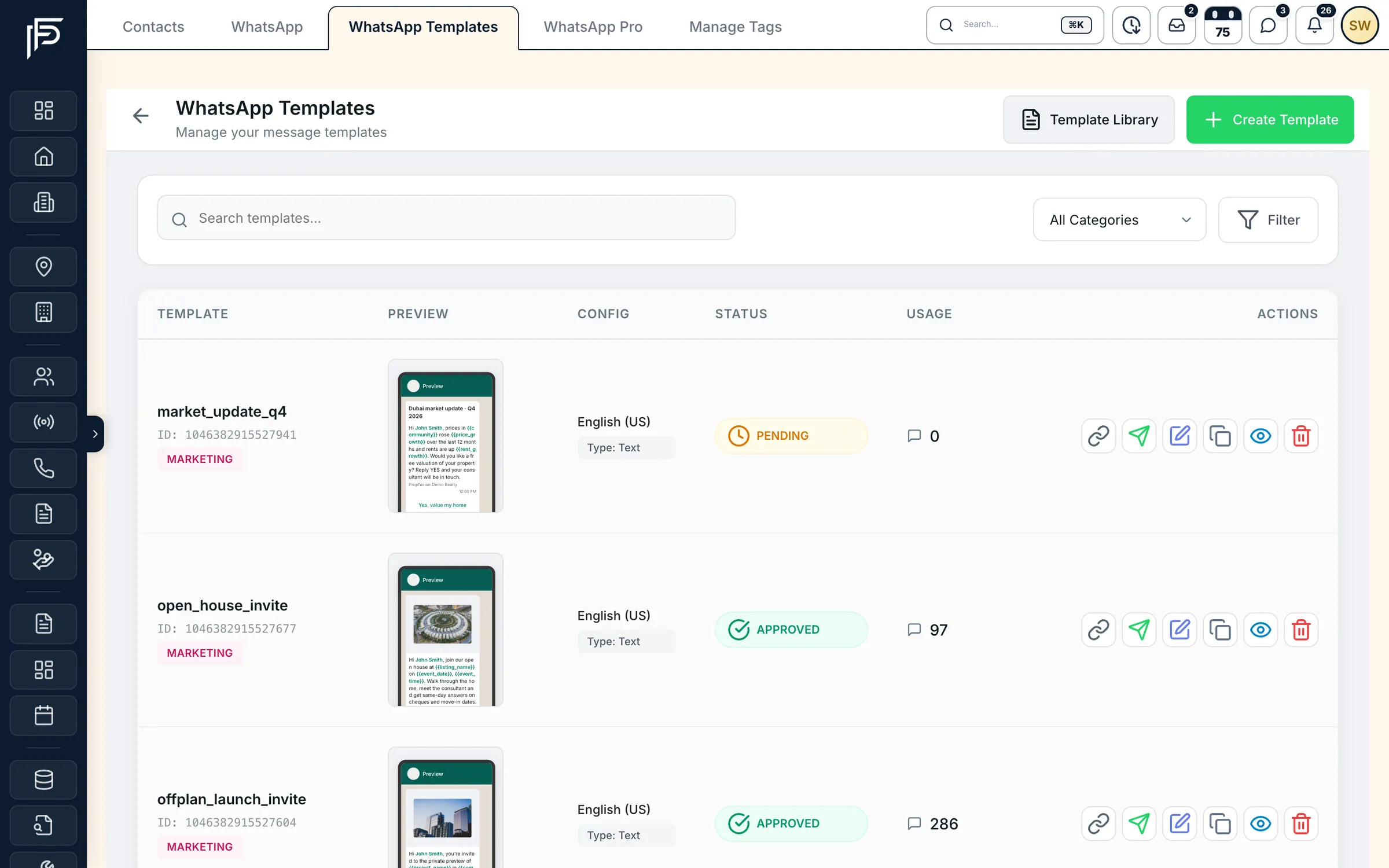
Templates with their category, approval status and how often each is used. Run a campaign to a tag
Choose an approved template and a tag or a list of numbers, then send now or schedule it. The campaign shows how many messages were sent, delivered, read and failed, and skips anyone who replied STOP.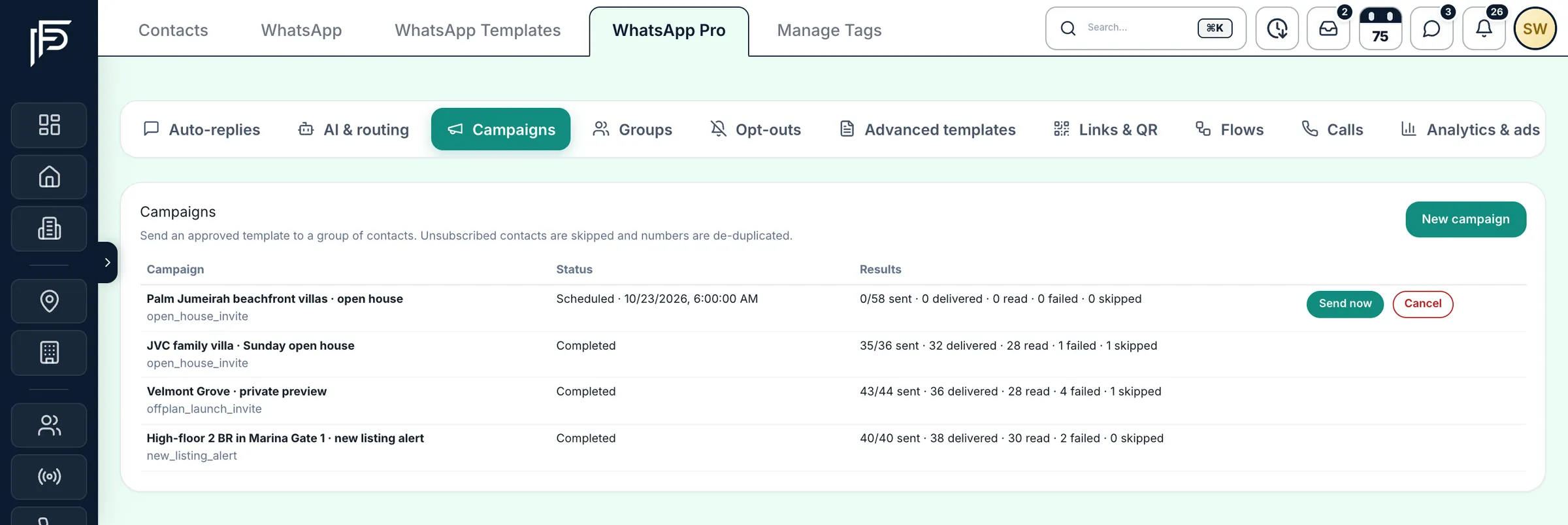
Scheduled and finished campaigns with delivered and read counts. Set welcome and away messages
A welcome message greets a new contact, and an away message answers outside the business hours you set for each day. Keyword replies send a set answer when a message contains a word you choose.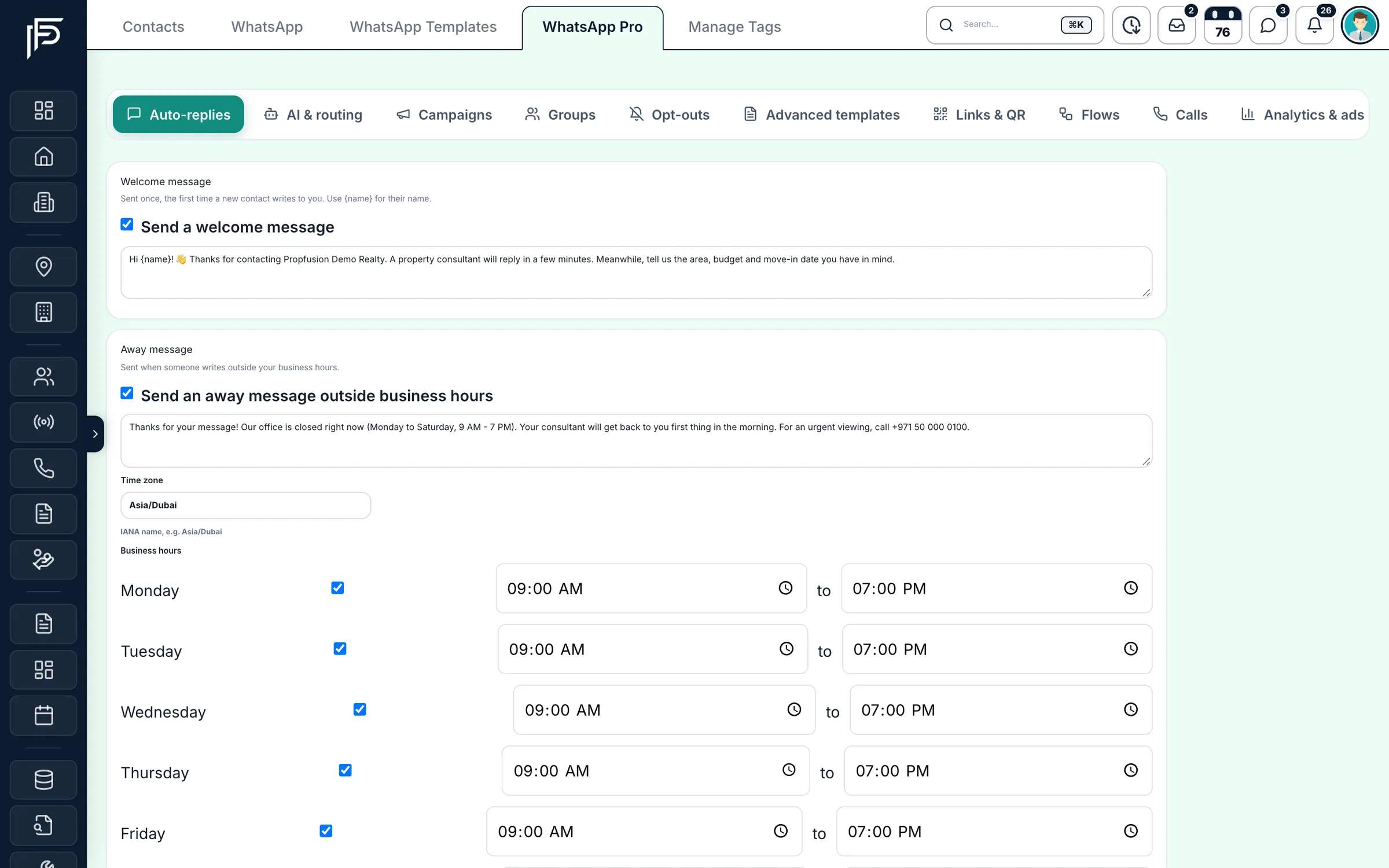
Welcome and away messages with business hours for each day. Watch reply times
Managers see each agent's messages, chats and first-reply time, so slow replies show up in the numbers, not in a client's complaint.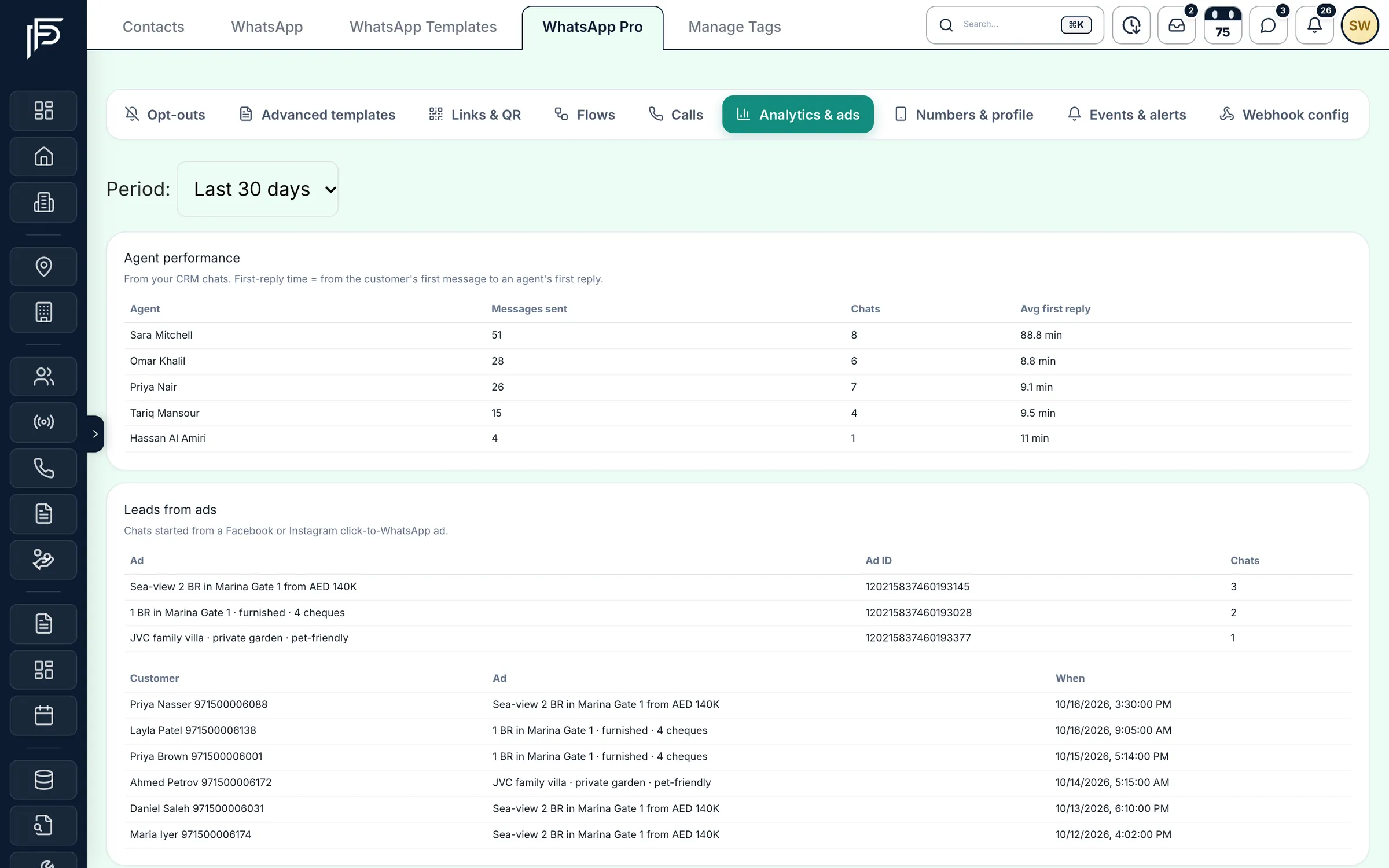
Messages, chats and first-reply time for each agent.
Good to know
How the company number fits your team
A few rules decide who sees which chat and what can be sent.
- One company number feeds the shared inbox. If your WhatsApp Business account has several numbers, the default one sends and receives.
- A chat belongs to the contact, not to the agent's phone, so it survives holidays, hand-overs and resignations.
- Agents see the chats of their own contacts and of tags assigned to them. Give a colleague a tag in Manage Tags to share a group of chats.
- WhatsApp's 24-hour window applies to every business number: after it closes, the next message has to be an approved template.
- The shared inbox is a web CRM screen. On the phone, agents message clients from their own WhatsApp through the lead's WhatsApp button.
Setting up the number, templates and opt-outs is covered in Connect your company's WhatsApp Business number.
FAQ
Frequently asked questions
- Can several agents share one WhatsApp number?
Yes. The company number feeds one shared inbox in the web CRM. Each agent sees the chats of their own contacts and of tags assigned to them, and managers with the right permission see every chat.
- What happens to WhatsApp chats when an agent leaves?
The chats stay with the contact on the company number, not on the agent's phone. Reassign the contact or transfer the chat, and the next agent sees the whole conversation.
- Why can't I type a reply to some WhatsApp chats?
WhatsApp allows free-form replies within 24 hours of the client's last message. After that the reply box closes and you can send an approved template; once the client answers, the window opens again.
- Can we send WhatsApp broadcasts to clients?
Yes, as campaigns built from Meta-approved templates, sent to tags or a list of numbers now or on a schedule. Each campaign shows delivered and read counts, and people who opted out are skipped.
- Do clients who reply STOP still get campaigns?
No. A client who sends STOP is unsubscribed from marketing messages, and campaigns and marketing templates skip their number; START subscribes them again. You choose the keywords and the reply they get on the Opt-outs page.
- Is the WhatsApp inbox in the mobile app?
No, the company inbox is in the web CRM. In the app, the WhatsApp button on a lead opens the agent's own WhatsApp, so they can still message a client between viewings.
Keep reading
Related pages
- Integrations
WhatsApp Business
How an admin connects the company number through Meta's official sign-up, and what you manage from the CRM afterwards.
Read more - Use cases
Calls & recordings
Click to call from a lead on a company number, with every call and recording saved on the lead and missed calls turned into call-backs.
Read more - Guides
Answer leads in 5 minutes
Set one response target, route every lead the moment it arrives, move it on after a deadline, and measure the first real reply.
Read more - Use cases
AI CRM
PropFusion AI answers questions about your own leads, listings and deals by text or voice, and opens screens or fills forms once you say yes.
Read more
Sources
- WhatsApp Pro, team chat on the web and a smarter listing form (release notes) · Propfusion · checked
- Communication tools (feature tour) · Propfusion · checked
- About the WhatsApp Business Platform (Cloud API) · Meta · checked
Updated · Checked with AI tools against the product and official sources · How this page is made
Screens on this page show the Propfusion Demo Realty sample workspace. All people, listings and numbers are fictional.
Bring your team's WhatsApp into the CRM
Start a free trial and connect your company number, or book a demo and see the shared inbox with a lead's history beside it.
7 days free · No card needed