Use case · Calls
Company phone calls inside your real estate CRM
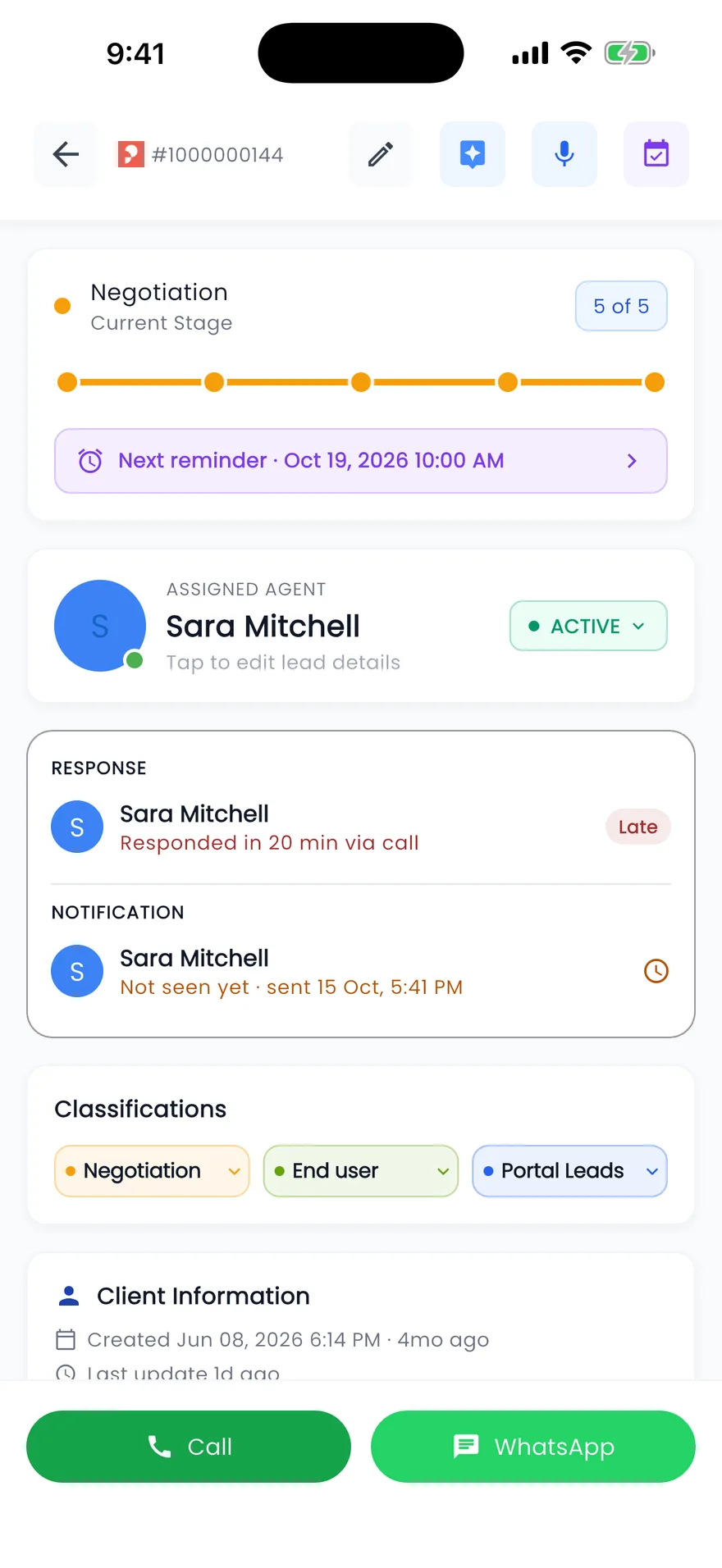
With your phone system connected, the Call button on a lead in the Propfusion web CRM rings the agent's phone and then the client, who sees a company number. Every call, answered or missed, is saved on the lead with its recording, and a missed call creates a call-back follow-up that alerts the team leader if nobody calls back in time.
7 days free · No card needed
- Agent rung before the client
- Recording on the lead
- Missed-call follow-up
Updated · Checked with AI tools against the product and official sources · How this page is made
At a glance
- Click to call
- Rings the agent's phone, then the client, who sees a company caller ID
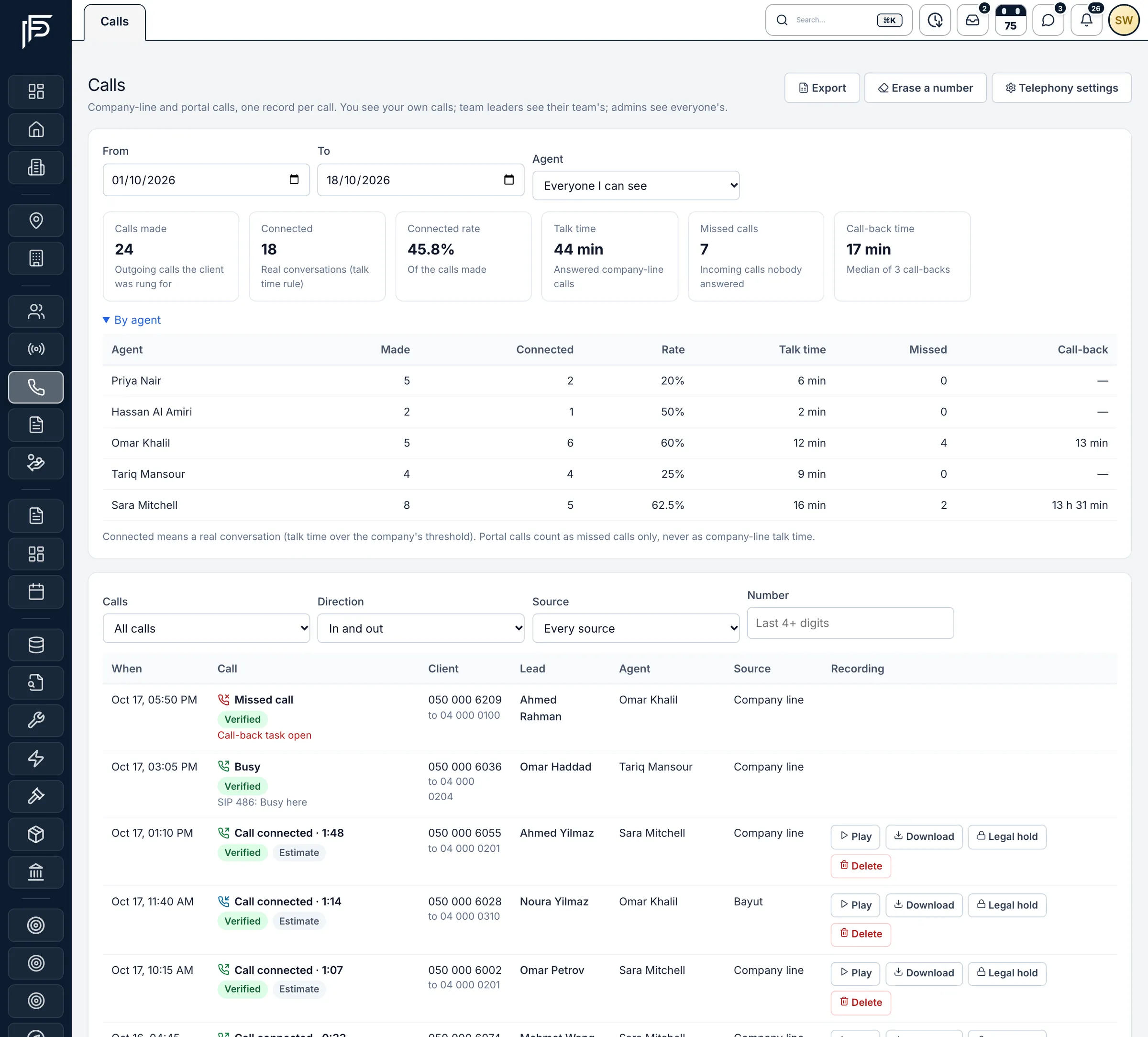
- Calls list
- Company-line and portal tracking-number calls, one record per call, filtered by direction, status, agent, lead and dates
- On the lead
- The lead's Calls tab, with recordings to play or download through links that expire after 10 minutes
- Missed calls
- A call-back follow-up for the lead's owner, due within business hours; the team leader (or the admins) alerted if nobody called back
- Who listens
- Agents hear their own calls, team leaders their team's, and admins or people allowed to hear all calls everyone's. Downloading and deleting are separate permissions
- Retention
- Recordings kept for 30 to 730 days (180 by default), set by the company, with legal hold and erasure of a client's data
- Figures
- Calls made, connected, talk time, missed calls and call-back time
- Do-not-call
- An internal do-not-call list, and “Refused - don't call again” on a lead
How it works
A call, from the Call button to the recording
What the agent, the client and the team leader each see.
Call from the lead
Press Call on the lead. Before dialling, the CRM checks the call can go out now, for example that the number is not on your do-not-call list. Your own phone or extension rings first; when you answer, the client is called and sees the company's number, not your mobile.Every call stays on the lead
Answered, voicemail and no-answer calls appear on the lead's Calls tab with their length and recording. The next agent on the lead can listen back instead of asking the client to repeat themselves.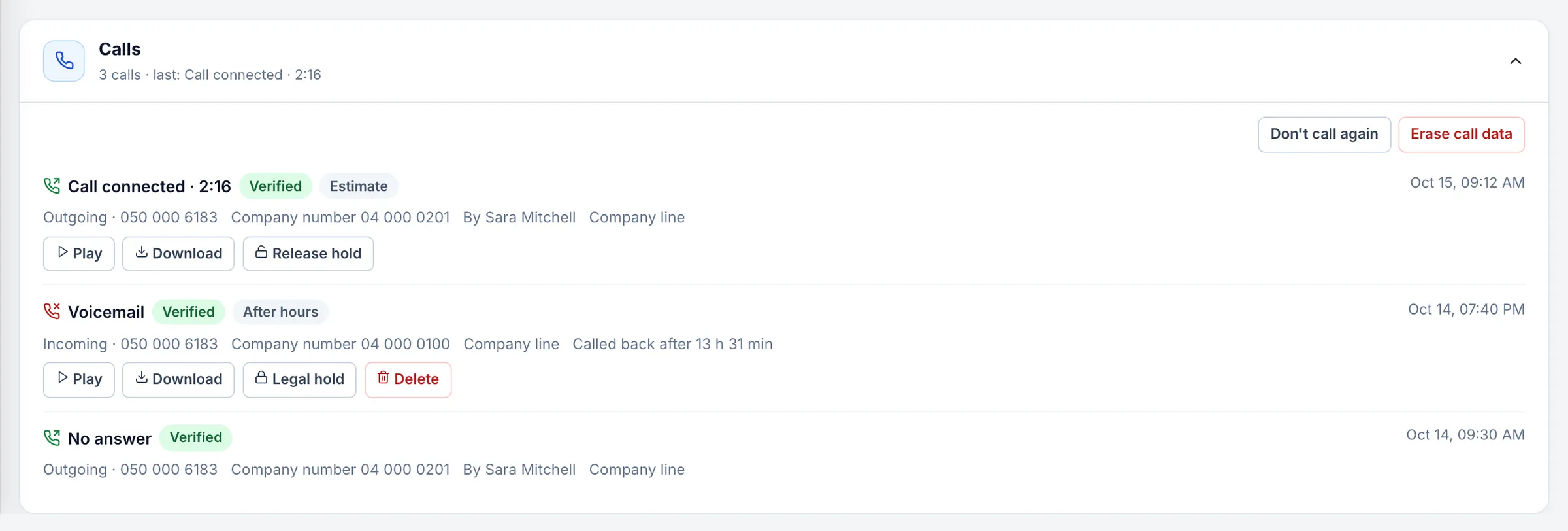
A lead's calls with recordings to play or download. A missed call becomes a call-back
When a client calls and nobody answers, the agents who were rung get an alert, and a Call back follow-up is added for the lead's owner, due within business hours. If nobody has called back when the time runs out, their team leader is alerted. A connected call later closes the follow-up and records how long the call-back took.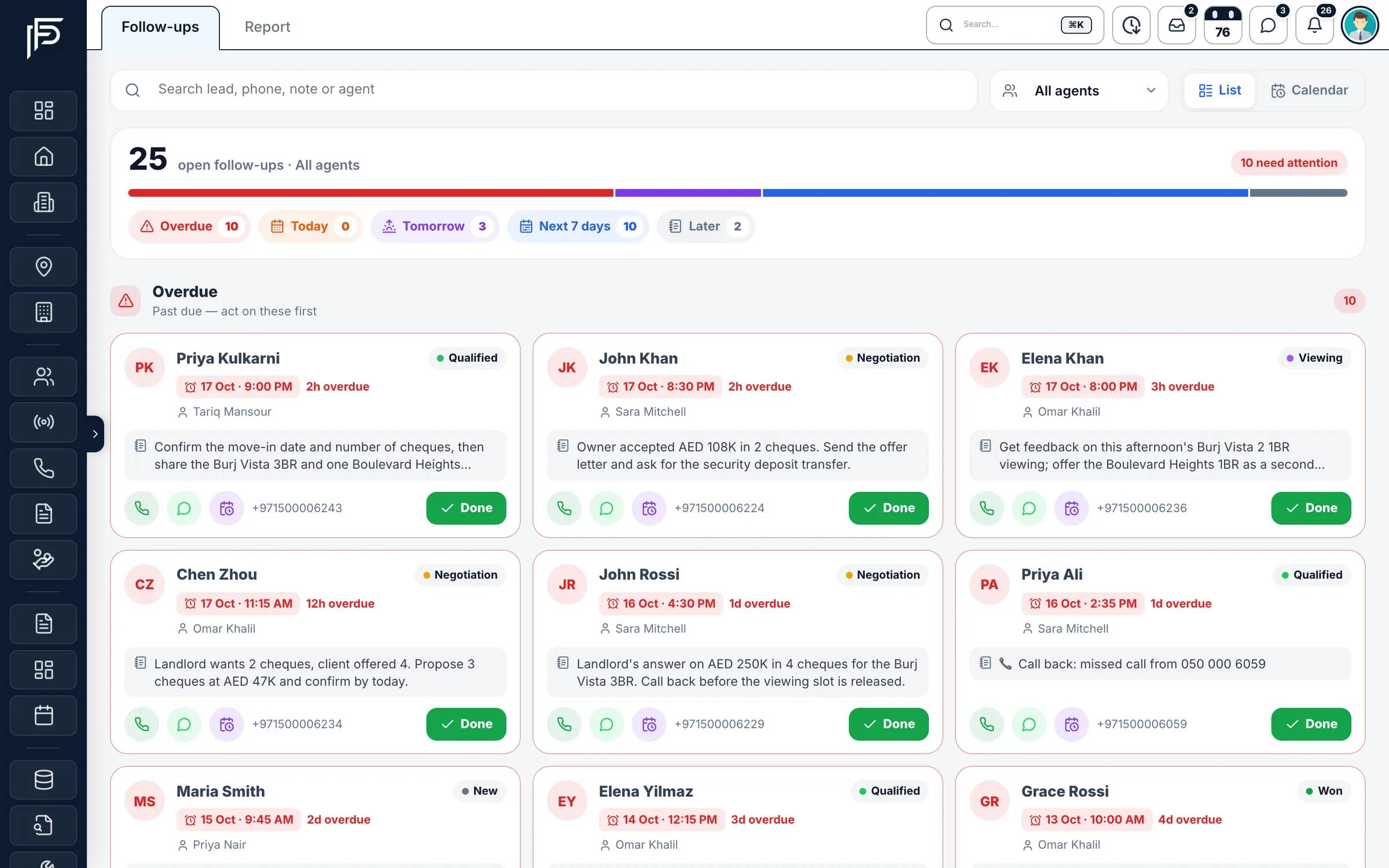
Call-backs sit with the rest of the team's follow-ups. Decide who may listen
Each role hears its own, its team's or all calls. Every play, download, deletion and legal hold is written to the recording access log, with who did it, when, and on which lead.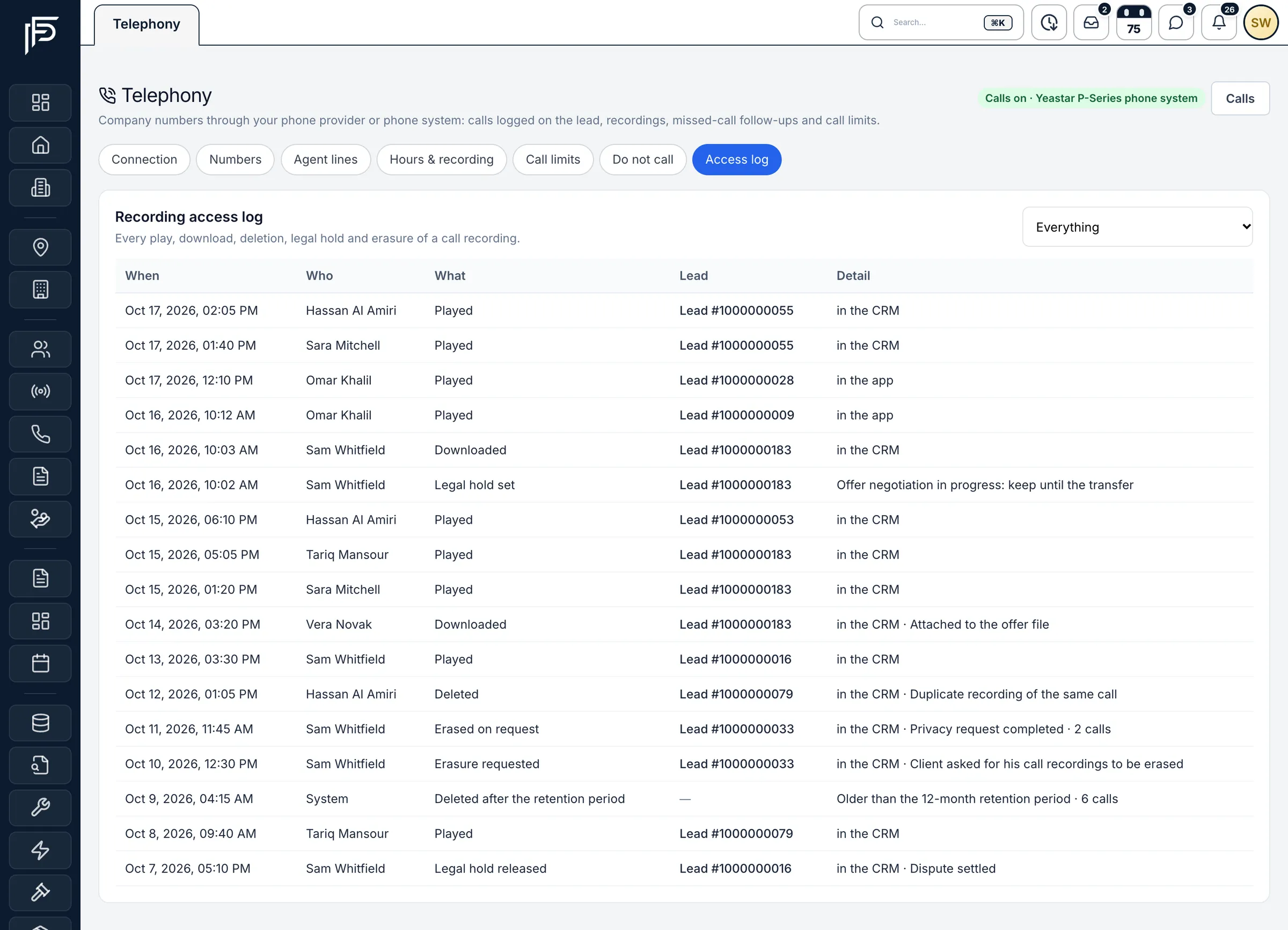
Every recording play, download and deletion, logged.
On the lead's timeline
What each call leaves behind
Every finished call writes one line on the lead, confirmed by your phone system, with the call's own start time.
- “Call connected”, with the talk time and the number the client saw or called.
- “Answered, no conversation”, when a call was picked up but too short to count, likely a voicemail.
- “No answer”, “Busy” or “Call failed” for outgoing calls that did not connect.
- “Your phone did not answer: the client was not called”, when the agent missed their own ring.
- “Missed call from …” or “Voicemail from …” for incoming calls nobody answered; portal calls add the portal's name.
Connecting the phone system, numbers and recording rules is covered in Connect your phone system.
FAQ
Frequently asked questions
- Do clients see the agent's mobile number?
No. A click-to-call rings the agent's own phone or extension first, then calls the client from a company number, so the agent's mobile stays private.
- Are portal tracking-number calls logged too?
Yes. Calls to your Property Finder, Bayut and Dubizzle tracking numbers appear in the same Calls list and on the lead's Calls tab, one record per call. A missed portal call creates the same call-back follow-up, even if you have not connected a phone system.
- How long are call recordings kept?
Between 30 and 730 days, as your company chooses; 180 days by default. A daily job deletes older recordings unless the call is on legal hold, and each deletion is logged.
- Who can listen to call recordings?
Agents can play their own calls, team leaders their team's, and admins or staff allowed to hear all calls everyone's. Downloading and deleting recordings need their own permissions, and every play is logged.
- What happens when a client calls and nobody answers?
The agents who were rung get an alert, and a call-back follow-up is created for the lead's owner. If nobody calls back in time, counted in business hours, the team leader is alerted, or the admins when there is no team leader.
- Can agents call through the company line from the mobile app?
Today company-line calls start from the web CRM. In the app, the Call button opens the phone's own dialer.
Keep reading
Related pages
- Integrations
Phone systems
One settings page for the company's phone system, company and tracking numbers, and the line each agent's calls ring first.
Read more - Use cases
WhatsApp CRM
One shared inbox for your company's WhatsApp Business number inside the web CRM, with templates, campaigns, hand-overs and chats that stay when an agent leaves.
Read more - Guides
Answer leads in 5 minutes
Set one response target, route every lead the moment it arrives, move it on after a deadline, and measure the first real reply.
Read more
Sources
- Company phone lines in the web CRM (release notes) · Propfusion · checked
- Calls (feature tour) · Propfusion · checked
Updated · Checked with AI tools against the product and official sources · How this page is made
Screens on this page show the Propfusion Demo Realty sample workspace. All people, listings and numbers are fictional.
Every client call, on the lead
Start a free trial and connect your phone system, or book a demo and hear how a missed call turns into a call-back.
7 days free · No card needed