Use case · Payment plans
Payment plan proposals for Dubai property buyers
Propfusion builds a payment plan proposal for one client on any of your company's off-plan projects or sale listings: up to three plans side by side, each with its schedule, amounts, buyer fees and an optional mortgage estimate. Describe a plan in plain words and AI drafts it for you to check, watch the live preview, then send the client a private page in your company's brand or a PDF.
7 days free · No card needed
- Up to 3 plans per client
- AI drafts, you check
- Private link and PDF
Updated · Checked with AI tools against the product and official sources · How this page is made
At a glance
- Works on
- Your company's off-plan projects (one unit, or “Not a set unit”) and your sale listings, ready or off-plan. Not rentals
- Plans
- Up to three per proposal, starting from ready-made plans (60/40, 50/50, 1% monthly, post-handover, cash, mortgage-ready), the project's own plans or your company's templates
- Payment types
- On booking, instalments every 1 to 12 months, construction-linked, lump sum, on a date, on handover and after handover, each as a percentage or a fixed AED amount
- Buyer fees
- Default fees for off-plan, ready and mortgage purchases, such as the 4% DLD registration fee and the title deed fee, with 5% VAT where it applies. Admins set the defaults and agents can change them on a proposal
- Mortgage
- An optional estimate: loan share, rate and years give the monthly payment, the loan and the total interest. Loan shares are capped by buyer type, and the rate shows the date it was set
- AI help
- Describe a plan in plain words, or ask for three suggested plans from the client's cash, monthly budget and mortgage. Every draft is marked “AI draft, check before sending”
- Client page
- A private page in your company's brand, with a plan switcher, the schedule, fees, total cost, the plans side by side and the agent's WhatsApp and call buttons. No sign-in, and hidden from search engines
- The listing or project brochure first, then the plan pages
- Link and versions
- Valid 14 days by default (up to 90). Saving again makes a new version on the same link, and you can turn the link off
- Opened?
- How many times the client opened it, when they last did, and how many times the PDF was downloaded
How it works
From a sentence to a plan the client can open
Five steps in the web CRM. The agent checks every number before the client sees it.
Start from a project, a listing or a lead
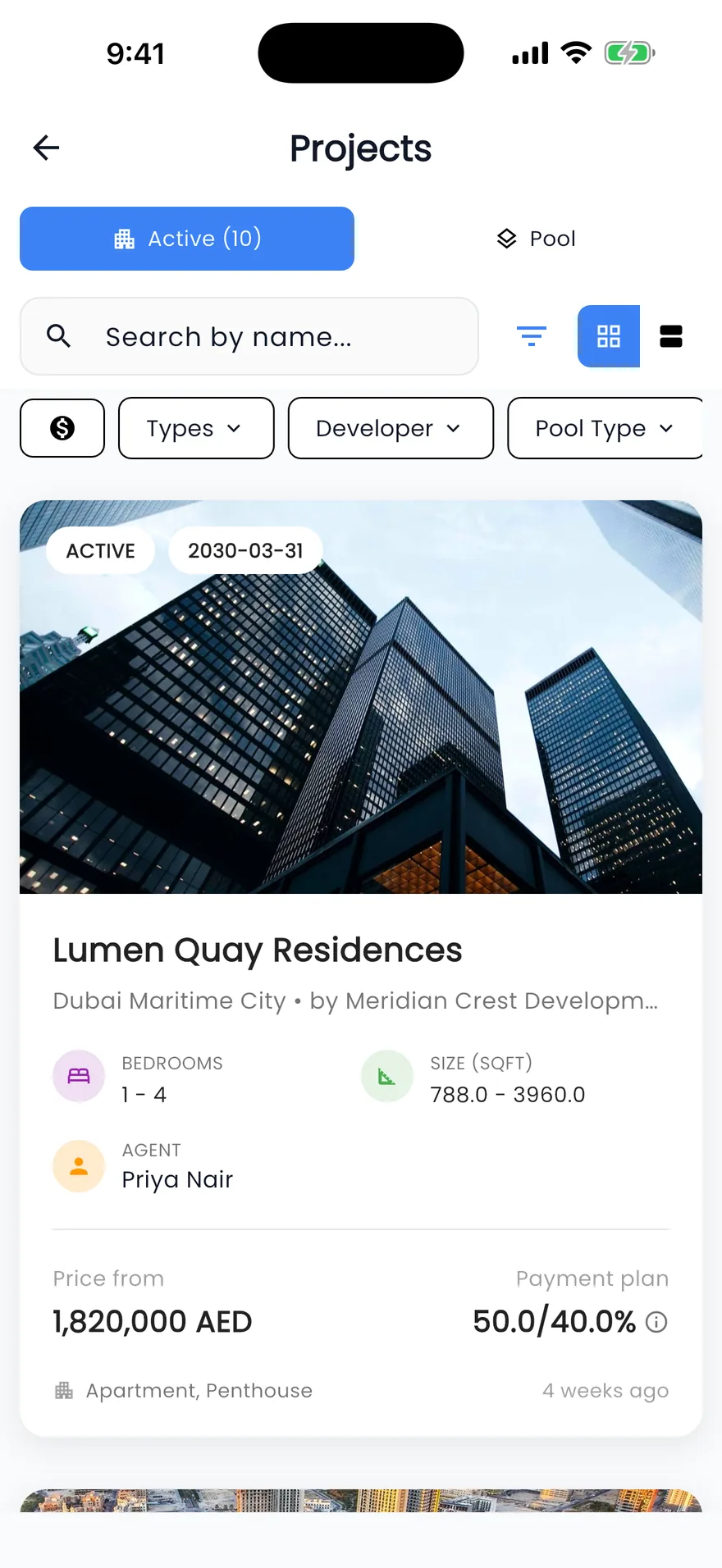
Click Payment plan on a project page or a sale listing, choose Payment plan proposal in a listing's menu, or start from the Payment plan proposals card on a lead. You can also ask PropFusion AI to open the editor.Pick a plan, or describe it
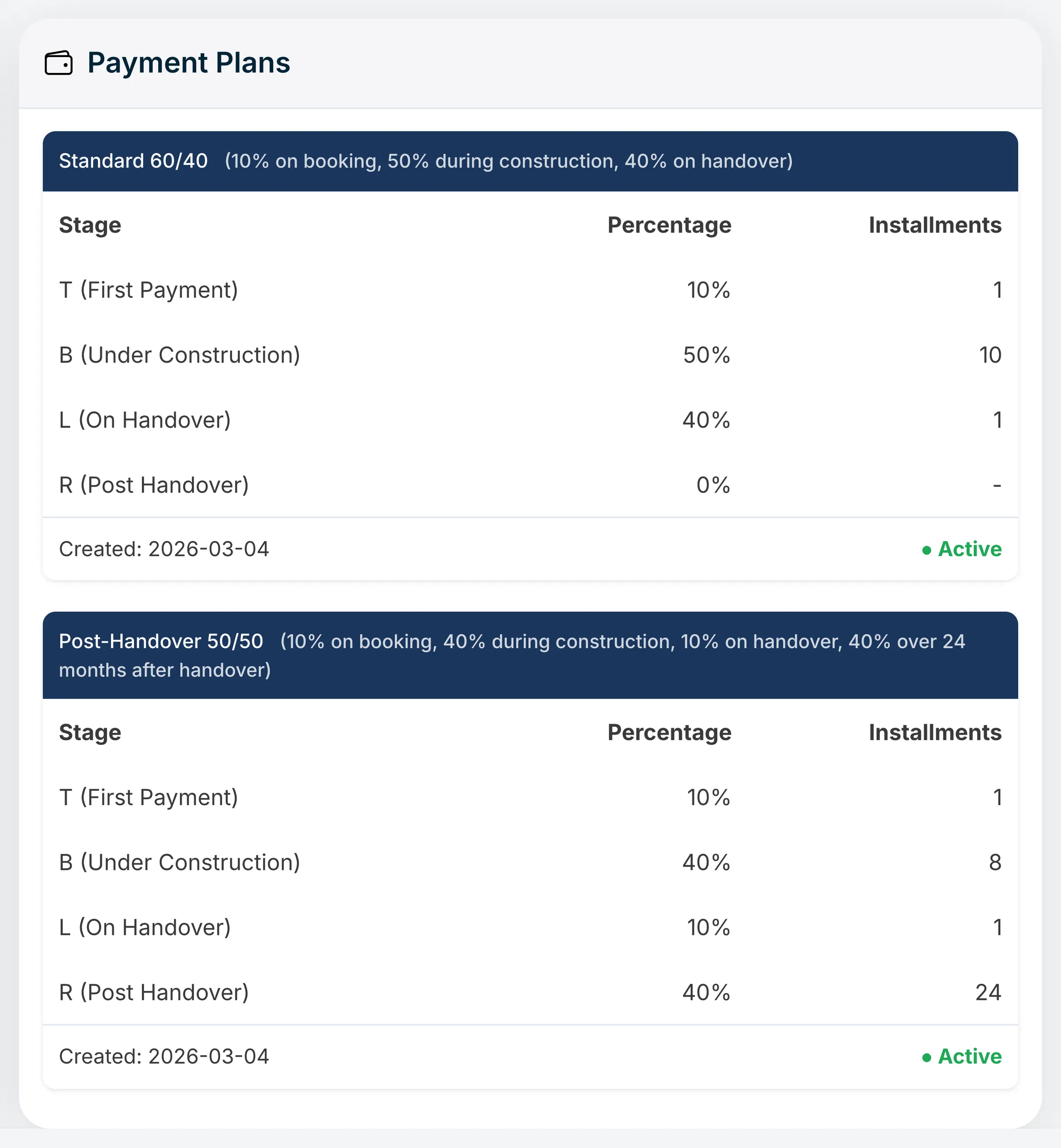
Start from a ready-made plan, the project's own plan or a company template. Or type the plan the way you would say it, for example “20% on booking, 40% in monthly instalments during construction and 40% on handover”, and AI drafts it. For a client who is still deciding, enter their cash now, monthly budget or mortgage and ask for three suggested plans.A project's own payment plans, one of the starting points for a proposal. Check the numbers in the live preview
Each plan shows its dates, amounts, buyer fees with VAT and the total cost. Add a mortgage estimate if the client will borrow. The preview shows the client page at phone or desktop width, or the PDF pages. An AI draft is saved only after you click Looks right.Send the link or the PDF
Save, then copy the client's link and send it on WhatsApp or by e-mail, or download the PDF: the brochure, then the plan pages. Nothing is sent to the client automatically, so the agent decides when and how.Follow up and revise
The proposal stays on the lead with how often it was opened and when. Change a plan and save, and the client sees the new version on the same link. Turn the link off when the offer no longer stands.
Before you send
A proposal shows a plan; the developer sets the terms
A proposal helps a buyer compare ways to pay. The booking itself, and any money, go through the developer. To record EOIs and bookings in the CRM, see off-plan sales.
For admins
Company defaults, set once
Payment plan defaults sit in the company settings, for admins and anyone allowed to manage settings.
- Default buyer fees for off-plan, ready and mortgage purchases, each with or without 5% VAT.
- The default mortgage terms and the date the rate was set.
- How much discount agents may give on their own (0% unless you change it). Managers have no limit.
- How long client links stay valid: 14 days by default, up to 90.
- The disclaimer text, and whether the permit number shows.
- Company templates: save a plan for one project or listing, or for every listing and project.
Honest limits
What a proposal does not do
- Take payments, collect signatures or reserve a unit. The proposal shows a plan; the booking happens with the developer.
- Send proposals by itself. Agents share the link or the PDF.
- Work for rentals, or for projects your company has not added as its own.
- Show more than three plans in one proposal, or keep a link open longer than 90 days.
- Write the plan pages in other languages or currencies. They are in English, with amounts in AED.
For a buyer who also wants the market picture, pair the proposal with a market report or a CMA.
FAQ
Questions about payment plan proposals
- What is a payment plan proposal?
A page and a PDF made for one client, showing up to three ways to pay for one property: the schedule of payments, the amounts in AED, the buyer fees, the total cost and, if they will borrow, a mortgage estimate. The client opens it from a private link without signing in.
- Can AI write a payment plan from a description?
Yes. Type the plan in plain words and AI turns it into the plan's lines, or ask for three suggested plans from the client's cash, monthly budget and mortgage, each with a one-line reason. Drafts must add up to 100% and use only your company's default fees, every draft is marked “AI draft, check before sending”, and nothing is saved until you click Looks right. No client personal details are sent to the AI.
- Which buyer fees can a proposal show?
The defaults your admin sets for off-plan, ready and mortgage purchases, for example the 4% DLD registration fee, the title deed fee, a registration trustee fee, agency commission and, with a mortgage, the mortgage registration, bank processing and valuation fees. 5% VAT is added where it applies, and agents can change fees on a proposal.
- Can a payment plan proposal include a mortgage?
Yes, as an estimate. Enter the loan share, the rate and the term, and the plan shows the monthly payment, the loan and the total interest. The loan share is capped by the buyer type and stage, terms run up to 25 years, and the rate is shown with the date it was set.
- Does the client need to log in to see the proposal?
No. The client opens a private link that is hidden from search engines and shows only your company's brand and the agent's contact buttons. The link expires on the date you set, and you can turn it off at any time.
- Is a payment plan proposal a binding offer?
No. By default the proposal says it is an illustration, not an offer, a reservation or a contract, and that fees and mortgage figures are estimates. The developer's documents and the sale agreement set the real terms.
Keep reading
Related pages
- Use cases
Off-plan sales
Keep the projects you sell with payment plans and floor plans, record EOIs and bookings from token to deal, and get reminded before every instalment.
Read more - Use cases
Market reports & CMA
A market report for a building, area or community, or a CMA with a suggested price range, sent to the client as a branded link or a PDF.
Read more - Use cases
AI CRM
PropFusion AI answers questions about your own leads, listings and deals by text or voice, and opens screens or fills forms once you say yes.
Read more - Free tools
Commission calculator
Total commission, each agency's share, 5% VAT and your agent's part for a sale or a rental. Estimate only.
Read more
From the blog
Sources
- Payment plan proposals, off-plan bookings, client reports and metro maps (release notes) · Propfusion · checked
- New projects (feature tour) · Propfusion · checked
- Off-plan sales CRM for Dubai brokerages · Propfusion · checked
Updated · Checked with AI tools against the product and official sources · How this page is made
Screens on this page show the Propfusion Demo Realty sample workspace. All people, listings and numbers are fictional.
Send your next buyer a plan they can read
Start a free trial and build a proposal on one of your own projects, or book a demo and see the AI draft a plan from one sentence.
7 days free · No card needed