Three of Meta's rules shape how a UAE brokerage uses WhatsApp: you can reply freely for 24 hours after a client's last message, after that you can send only a template Meta has approved, and you may message only people who opted in and haven't asked you to stop. The rest is your own set-up: campaigns from the company number, one-to-one chats on each agent's number, and chats that stay with the brokerage when an agent leaves.
WhatsApp, the Business app or the platform
WhatsApp offers three routes, and they are not interchangeable for a brokerage.
- WhatsApp, the ordinary app. Made for personal use. Its terms rule out non-personal use unless WhatsApp authorises it, and they ban bulk messaging and auto-messaging. Client chats on an agent's personal phone also leave when the agent does.
- The WhatsApp Business app. A separate app that WhatsApp built for the small business owner, with greeting and away messages and a place to show products and services. It suits one person; in a team, each agent's chats stay in their own app, out of the brokerage's sight.
- The WhatsApp Business Platform. Meta's APIs for businesses, used by your own developers or through a partner such as a CRM. This is the route for approved templates, campaigns and one inbox for the whole team.
The last two can work together. Meta lets a number already used in the WhatsApp Business app connect to the platform and keep the app on the phone: WhatsApp keeps the messages in sync between the two, and the last six months of chats can be shared when it connects. After that, the app's broadcast lists are switched off and group chats don't sync. Partners often call this coexistence, and it is how agents connect their own numbers in Propfusion, as the guide to connecting WhatsApp Business explains step by step.
The 24-hour window
When a client messages or calls your WhatsApp number, Meta opens what it calls a customer service window: 24 hours in which you can send anything, from text and photos to a PDF brochure, a location pin or reply buttons. Each new message or call from the client starts the 24 hours again. When the window closes, you can send only a pre-approved template.
Three things follow for agents:
- Leads who never wrote to you need a template. Without a message from the client there is no open window, so your opening WhatsApp to a lead from a web form, an e-mail enquiry or an ordinary phone call has to be a template.
- The clock runs from the client's message, not yours. If you promise to send options tomorrow afternoon, check when the client last wrote. Send while the window is open, or have a template ready.
- Automation needs a way out. WhatsApp's policy allows automated replies inside the window, but asks for a prompt, clear way to reach a person: a hand-over to an agent, a phone number or an e-mail address.
In Propfusion the reply box closes with the window and the chat shows that a template is needed; when the client answers, the box opens again (see WhatsApp in the CRM). A client who has just asked about a listing is inside the window, so a quick answer can be an ordinary message: the playbook on answering portal leads in 5 minutes covers that part.
Templates: categories, approval and sample texts
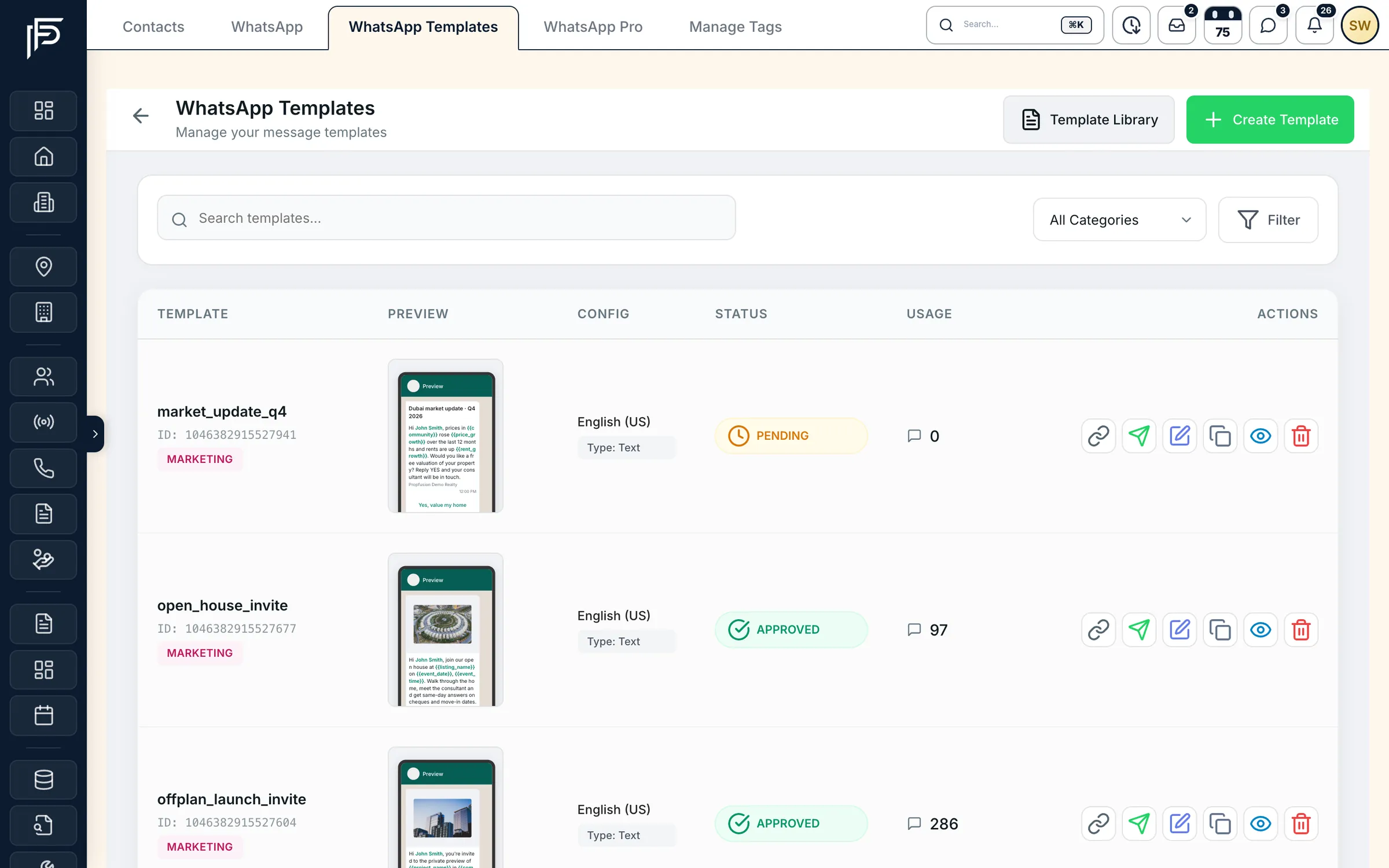
A template is a message you write in advance and submit to Meta. It can be sent once its status is Approved; Meta says review can take up to 24 hours, and it can reject a template. Templates that draw repeated negative feedback from customers can later be paused or disabled.
Every template has one of three categories, and Meta prices each category differently:
- Marketing: anything that promotes, from awareness to a sale. New listings, price drops, launch invitations and open days are marketing.
- Utility: messages set off by something the client did or asked for, with no promotion in them: a viewing confirmation, a changed viewing time, a reminder about a document the client agreed to send.
- Authentication: one-time passcodes that confirm who someone is. A brokerage rarely needs them.
Pick the category honestly. If you submit a utility template that Meta judges to be marketing, it is approved as marketing. An approved template can also be moved to marketing later, normally with a day's notice, and repeated misuse brings further restrictions.
Here are sample texts we wrote for this post. The words in square brackets are the variables you fill in for each client:
- Utility, viewing confirmation: “Hi [Name], your viewing at [Building] is booked for [Day] at [Time] with [Agent]. Reply YES to confirm, or send us a better time.”
- Utility, changed time: “Hi [Name], the owner has asked to move your viewing at [Building] to [Day] at [Time]. Does that still suit you?”
- Marketing, a new match: “Hi [Name], a [Bedrooms]-bedroom home in [Community] has just come on the market at [Price], within the budget you gave us. Would you like the photos and a viewing slot? Reply STOP to stop these messages.”
- Marketing, a quiet chat: “Hi [Name], it's [Agent] from [Brokerage]. Are you still looking in [Area]? Two new homes came in this week that fit your brief. Reply STOP to opt out.”
In Propfusion, you start from ready-made templates or write your own, choose Marketing, Utility or Authentication, and submit them to Meta from the CRM. The templates list shows which ones Meta approved, which are waiting and which were rejected, with Meta's reason on a rejected one.
Opt-in and opt-out
WhatsApp's Business Messaging Policy lets you contact people on WhatsApp only when they gave you their number and you have their opt-in: permission confirming they want to hear from you. Meta's opt-in guide adds the detail. The opt-in must say clearly that the person is agreeing to receive messages from your business, and name the business. It can be general rather than WhatsApp-specific, as long as you comply with local law, and you can collect it on a website, by SMS, by phone or on paper.
In practice, for a brokerage (our suggestions, not Meta's):
- Add one line to every web form and landing page, such as “I agree to receive messages from [Brokerage] about properties, including on WhatsApp.”
- Use the same words on open-day and launch sign-in sheets.
- Note on the lead where and when the client agreed.
- Read what a portal or ad form actually told the client before you treat the number as opted in to marketing.
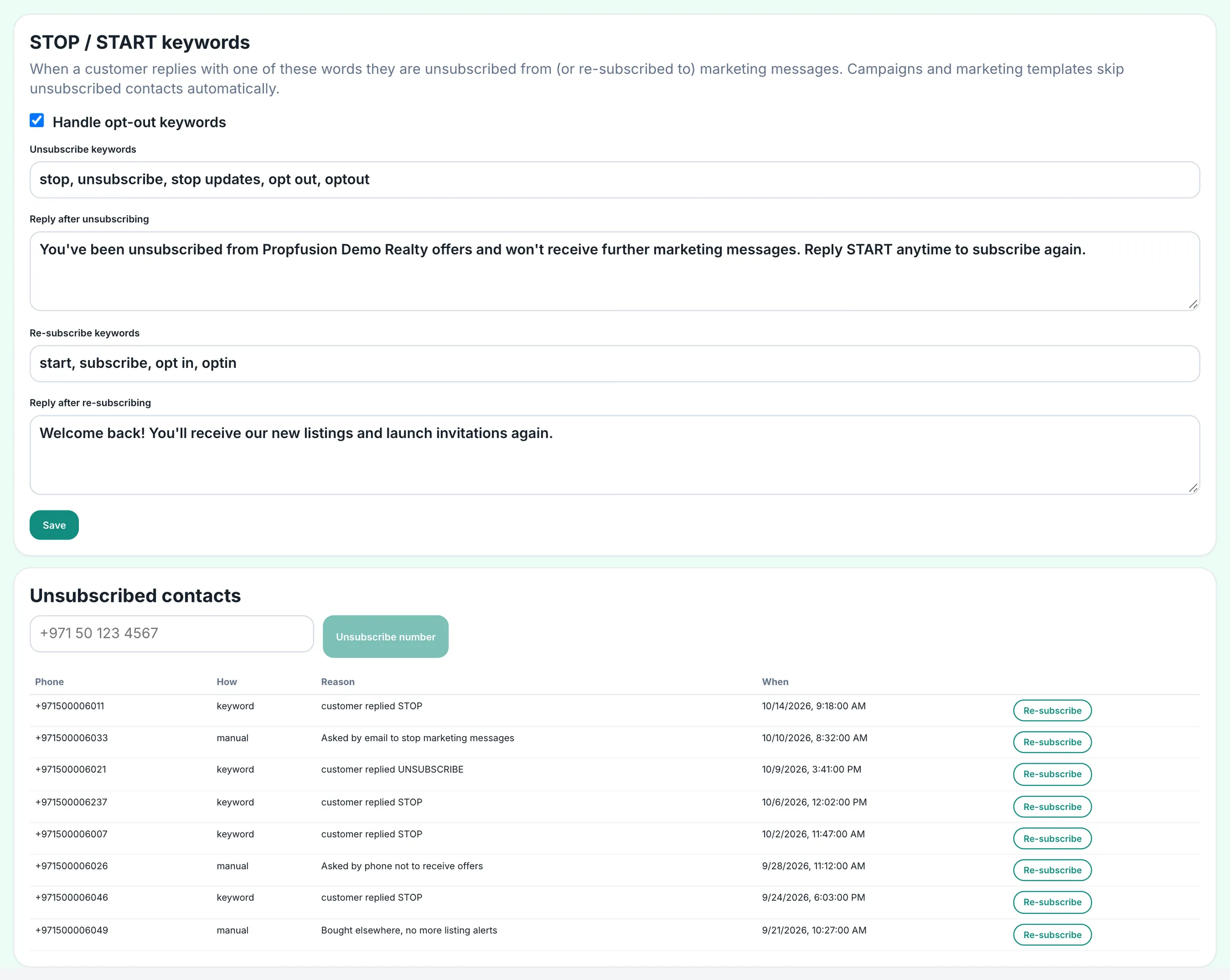
Leaving should be as easy as joining. The policy says to respect every request to block, stop or opt out, whether it arrives on WhatsApp or anywhere else, including taking the person off your contact list, and Meta recommends clear instructions for opting out of specific kinds of messages. Clients can also block or report a business at any time. Meta rate-limits a business whose quality stays low, and a template that keeps drawing negative feedback can be paused.
In Propfusion an admin sets the STOP and START words and the reply the client gets each time. Every opted-out number is listed with how and when it opted out, admins can add a number by hand when a client asks by phone, and campaigns and bulk marketing sends skip every number on the list.
The company number and each agent's own number
A brokerage can run both: a company number on the website, adverts and signboards, and agents who want to keep their own WhatsApp Business numbers for the clients they know. Connected through Meta's official sign-up, both sit in one inbox in Propfusion, with different jobs.
- Connected by
- Company numberAn admin, with or without the WhatsApp Business app on a phone
- Agent's own numberThe agent, once an admin approves, unless the company turns approval off
- Sends
- Company numberCampaigns, marketing templates, welcome and away messages, keyword replies
- Agent's own numberOne-to-one messages and the agent's approved templates
- On the phone
- Company numberThe app is optional
- Agent's own numberThe agent keeps using the WhatsApp Business app, and must open it regularly or Meta may disconnect the number
- Chats that come in
- Company numberEvery chat to the number
- Agent's own numberChats with your leads and contacts by default; group chats never
- When the agent leaves
- Company numberNothing changes
- Agent's own numberDeactivating the agent disconnects the number, and the chats stay with the company
How the two kinds of number work in Propfusion.
The split protects both sides. Bulk sends stay on a number the brokerage controls, so if a campaign draws blocks or reports, they land on the company number rather than on an agent's. And clients who have dealt with one agent can keep talking to that agent, while the brokerage keeps the record.
Hand-overs without losing history
Agents leave, go on holiday and swap areas. The client shouldn't have to tell their story twice.
- Keep business chats on the lead, not on a phone. In Propfusion each number the client wrote to has its own tab on the lead, next to the follow-ups and notes, and the lead's timeline counts the messages.
- Deactivate, don't delete. When an agent is deactivated, their number disconnects from the CRM, the chats stay with the company and the lead's new owner can read them. Deleting them is left to an admin.
- Hand over in one click. On the company number, any chat can be passed to a colleague.
- Let managers step in openly. Team leaders can read their agents' chats, read-only. Every view is logged, and by default agents can see who looked.
Before the new agent writes, tell the client who is taking over and why. If the client hasn't written to the number you are writing from in the last 24 hours, that introduction has to be a template. From there, carry on with a follow-up plan. If your team uses WhatsApp AI, it suggests up to three replies in the agent's own style and the client's language, but it never sends: the agent edits the text and presses Send, and it stays off until an admin turns it on (more on AI in the CRM).
What WhatsApp messages cost
WhatsApp messages are not part of a Propfusion subscription: Meta charges for them, per message delivered. Messages clients send to you are free. The rate depends on each message's category and on the client's country calling code, which Meta calls the market, so a message to a UAE number and one to an investor abroad can cost different amounts.
- Templates are charged per delivered message at the rate for their category and market.
- Ordinary replies inside the window are charged again since 1 October 2026, after a free tier of 1,000 a month for each business number; unused free messages don't roll over. Utility templates sent inside the window are charged again from the same date.
- Click-to-WhatsApp ads come with a free spell: if a client writes from such an ad on their phone and you answer within the 24-hour window, Meta opens a free entry point window of up to 7 days in which it doesn't charge for marketing, utility, authentication or service messages.
Meta publishes its rates by market on its pricing page. Check them there before you plan a campaign, rather than relying on a figure from a blog, this one included. In Propfusion, the WhatsApp billing page shows messages sent, delivered and failed with their cost, and our guide to what a CRM costs in Dubai puts message costs next to the rest of the monthly bill.
Where Propfusion fits
Company and agent WhatsApp numbers in one inbox
Propfusion connects the company's WhatsApp Business number and each agent's own number through Meta's official sign-up. Agents keep the WhatsApp Business app on their phones, every business chat sits on the lead, and the chats stay with the company when someone leaves.
The reply box follows the 24-hour window, each template shows whether Meta approved it, campaigns skip anyone who replied STOP, and suggested replies never send themselves: the agent always presses Send.
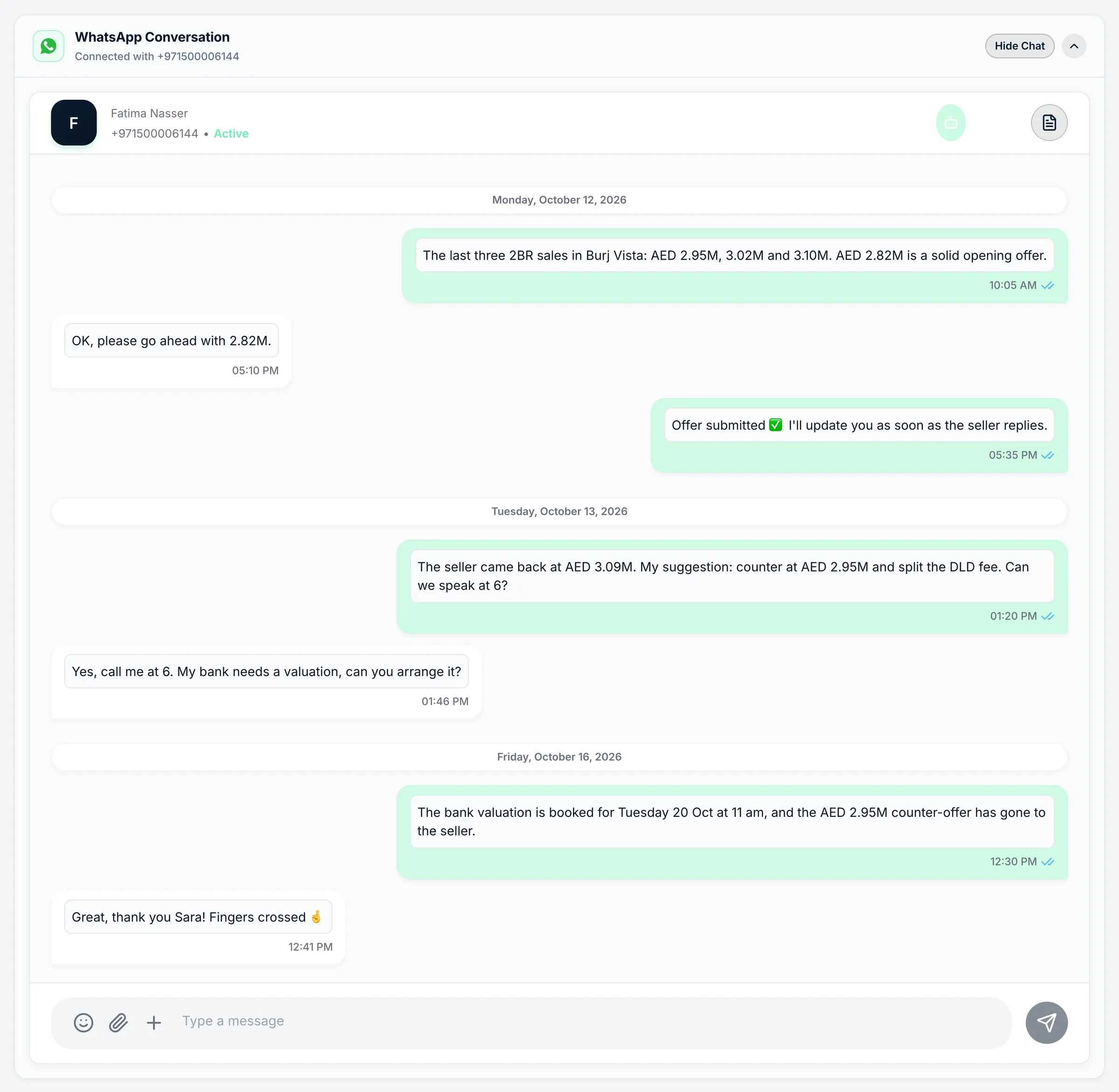
Screens show the Propfusion Demo Realty sample workspace. All people, listings and numbers are fictional.
Frequently asked questions
Is the ordinary WhatsApp app allowed for client work?
WhatsApp's terms for the ordinary app rule out non-personal use unless WhatsApp authorises it, and they ban bulk messaging and auto-messaging. For client work, use the WhatsApp Business app or, for a team, the WhatsApp Business Platform, directly or through a CRM.
How long does WhatsApp's customer service window last?
24 hours from the client's last message or call to your WhatsApp number, and each new message or call from them starts the 24 hours again. While it is open you can send any normal message; once it closes, you can send only a template Meta has approved.
Is a WhatsApp viewing reminder a utility or a marketing template?
Utility, as long as it reminds the client of a viewing they booked and promotes nothing. Add new listings or a price drop and it becomes marketing, and Meta can move a utility template with promotional content into the marketing category.
Does a brokerage need opt-in before sending WhatsApp messages?
Yes. WhatsApp's Business Messaging Policy lets you contact people only if they gave you their number and opted in to messages from you, and Meta's opt-in guide says the opt-in must name your business. Honour every request to stop, whether it comes on WhatsApp or anywhere else.
Did WhatsApp message prices change in October 2026?
Yes. Since 1 October 2026 Meta charges again for ordinary replies inside the 24-hour window, after a free tier of 1,000 a month for each business number, and for utility templates sent inside the window. Meta's pricing page lists the current rates by message category and country.
Can agents run WhatsApp campaigns from their own numbers in Propfusion?
No. Campaigns, marketing templates and automatic replies run on the company number. Agents' own numbers send one-to-one messages and the agent's approved templates, and their chats stay with the company if they leave.
Sources
- Service messages (the customer service window) · Meta · checked
- Template fundamentals · Meta · checked
- Template categorization · Meta · checked
- Get opt-in for WhatsApp · Meta · checked
- Pricing on the WhatsApp Business Platform · Meta · checked
- Onboard WhatsApp Business app users · Meta · checked
- WhatsApp Business Messaging Policy (last updated 23 September 2026) · WhatsApp · checked
- WhatsApp Terms of Service · WhatsApp · checked
- WhatsApp Business app · WhatsApp · checked
- WhatsApp Business Platform · WhatsApp · checked
- WhatsApp CRM for Dubai real estate teams · Propfusion · checked
- Connect WhatsApp Business to Propfusion · Propfusion · checked
Updated · Checked with AI tools against the product and official sources · How this page is made