To switch real estate CRMs without losing leads, name one owner and one cut-over date, export everything from the old system, clean it, and import it into the new CRM's templates in a set order. On the cut-over day, point every live source of leads (portals, Meta lead forms, website forms, WhatsApp and phone lines) at the new CRM, then keep the old one read-only for a week or two before you switch it off.
1. Set the cut-over date and the owner
A migration fails quietly when nobody owns it. Name one person, usually the operations or sales manager, who decides what moves, signs off each import and answers agents' questions. Then pick the cut-over date: the day from which every new lead lands in the new CRM and the old one becomes read-only.
- Avoid month-end, when commission and targets are being closed, and the week of a big launch.
- Check your current contract: the notice period, the export formats you can get, and how long you can still sign in after you cancel.
- Decide what is worth moving. Open leads, active listings, owners, tenants and live deals are. Years of dead enquiries may be better kept in an archive file than imported.
- Tell the team the date, what changes for them, and where to get help on the first morning.
If you are coming from spreadsheets rather than another CRM, read real estate CRM vs Excel first. Plans and what each one includes are on the pricing page.
2. Export everything, and know what to ask for
Take complete exports in CSV or Excel from the old system, or ask its vendor for them, and run them with an admin login, because exports can follow the permissions of the person exporting. In Propfusion, for example, a leads export contains just the leads the person exporting is allowed to see. Ask for:
- Leads: name, phone, email, source, stage, agent, budget and requirements, the date each came in, notes and the next follow-up.
- Contacts, owners and tenants, with phone numbers that include the country code.
- Listings: reference, price, permit number, owner and agent. Listings already on your Property Finder or Bayut account can also be pulled in from there once the portal keys are entered.
- Deals and commission: the parties, the price, the agents and what has been paid.
- Leasing: units, tenancy contracts, rent and cheque schedules.
- Documents: IDs, contracts and forms, with file names that point to the right record.
- Set-up lists: users and their teams, lead stages, sources and tags.
Treat the export files as client data. They hold names, phone numbers and often ID copies, and the UAE's data protection law, as the government portal u.ae describes it, expects companies to keep personal data secure and confidential. Keep the files in one restricted folder and delete loose copies once the move is done. The Dubai Land Department's Real Estate Brokerage Practice Guide also lists preserving all documents among a broker's professional ethics, so decide where each document will live before the old system is switched off.
3. Clean up duplicates, agents, stages and sources
Clean the data in the spreadsheet, where one change fixes a whole column, rather than record by record later.
- Duplicates. Put every phone number in one format with the country code, then merge rows for the same client.
- Agents. List every agent named in the old data and decide who takes over the leads of people who have left. In Propfusion the lead sheet's agent column takes each agent's staff ID, shown on their staff card, so add your team first and use those IDs: names from the old system are not matched.
- Stages. Map each old stage to one of the new CRM's stages. Every new Propfusion company starts with ready-made lead stages, groups, ratings, statuses and tags, which you can adjust before you import.
- Sources. Use one name per source, such as Bayut, Website or Referral, so reports by source mean something.
- Junk. Drop test rows, spam and enquiries with no way to reach the client.
4. Map the data to the import templates
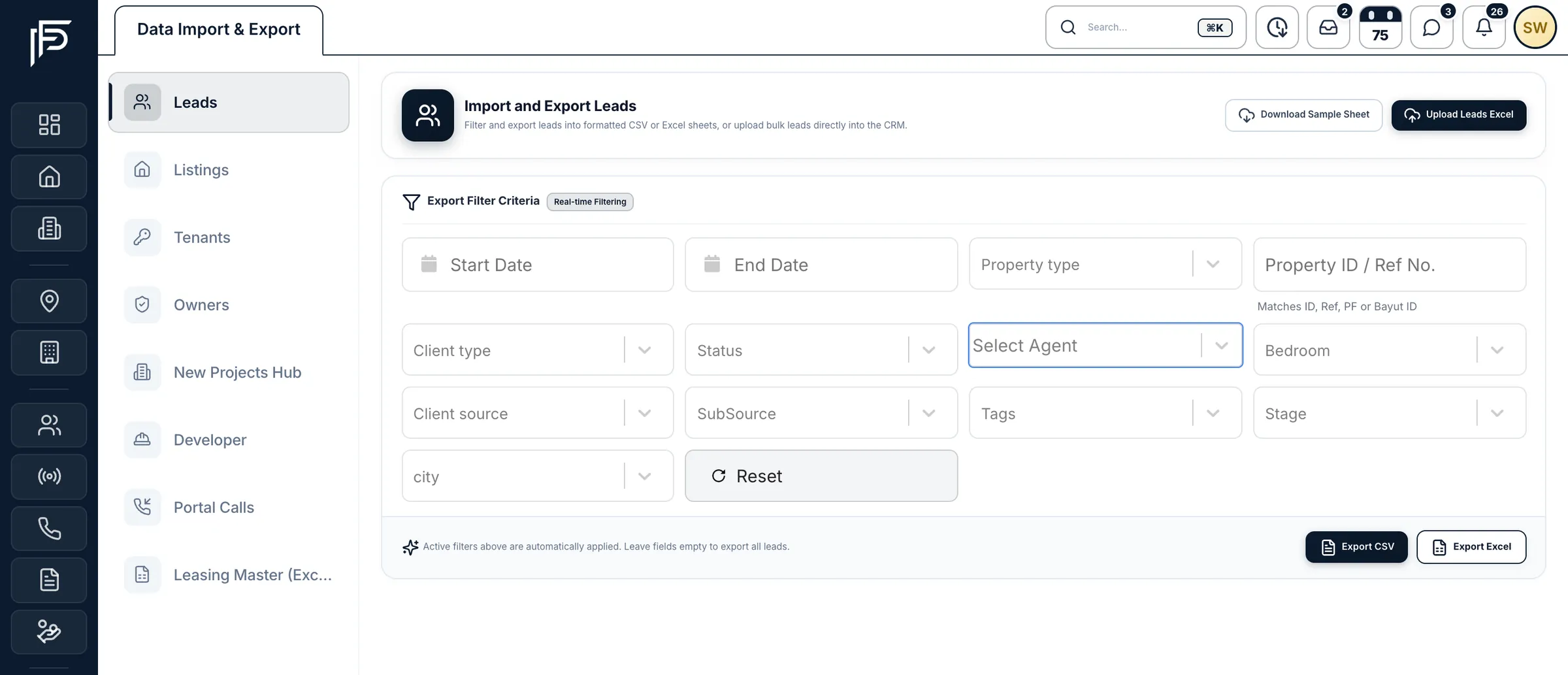
Propfusion has no direct connector to other CRMs. Your old system's spreadsheet exports come in through Propfusion's import templates, and our team helps you plan the move. The Data Import & Export page, which needs the Manage Settings permission, takes:
- Leads and listings from Excel, each with its own sample sheet to download and fill in.
- Owners, tenants and contacts from Excel or CSV. A contacts sheet needs a name column and a phone column.
- A leasing portfolio kept in Propfusion's Leasing Master workbook layout, which brings units, owners, tenants, rental agreements and cheque schedules in together. It takes .xlsx or .xlsm files of up to 10 MB and 10,000 rows per sheet.
Copy your cleaned columns into each template rather than changing the template to look like your export, and keep a note of old columns that have no place in it, so nothing is dropped by accident. The data import page lists every template and how each record comes in.
5. Import in order, with a test batch first
Order matters, because records link to each other. Propfusion's set-up guide puts the company details, roles and team before any data, then imports developers, then listings, then leads, with owners and tenants before the leasing workbook, so everything links up.
Start each kind of record with a small test file and check those rows on screen: the agent, the stage, the source and the phone number. Owner and tenant imports end with a summary of how many rows were added, how many failed and why. The Leasing Master workbook goes further: it is shown in a preview first, saved when you commit, and a committed batch can be rolled back.
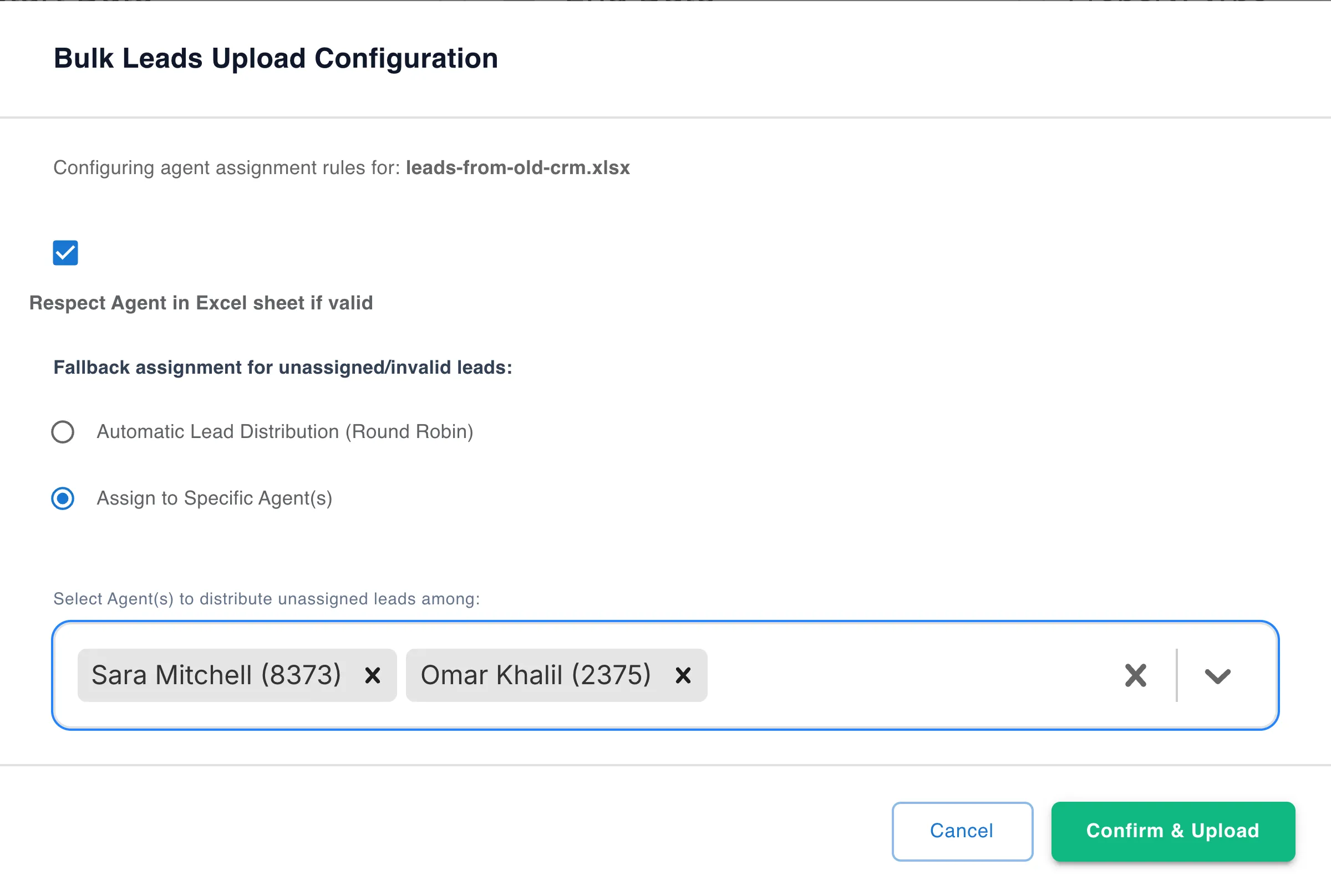
When you upload leads, choose whether to keep the agent given in each row. For leads an agent is already working, that is usually right; the rest can go through your automatic lead distribution or be rotated among the agents you pick.
6. Reconnect portals, Meta forms, WhatsApp and phones
This is where leads go missing: a form still posting to the old CRM, or a portal feed nobody moved. Do all of it on the cut-over day, and test each source with a real enquiry.
- Portals. An admin enters the company's Property Finder and Bayut keys, and the Bayut and Dubizzle feed and webhook keys, under Settings › Integrations. The listings and leads already on your Property Finder account, and the listings already on Bayut, can then be pulled in instead of typed again. Switch each portal on per listing and check that each listing shows as live. See the portals guide.
- Facebook and Instagram lead forms. Connect your pages, map each form once and choose who gets its leads. Leads a form collected before you connected can be imported too, and ones already in the CRM are skipped. Remove the old CRM's access to your pages the same day. See Meta lead ads.
- Website forms. Point your enquiry forms at the new CRM's lead API, so each enquiry arrives with its source. See website forms.
- WhatsApp. Connect the company number and agents' own WhatsApp Business numbers through Meta's official sign-up; agents keep the app on their phones. When an agent connects and chooses to share history, Meta syncs the most recent six months of one-to-one chats, once, and group chats are not included. By default Propfusion brings in the chats with your leads and contacts, so import those before agents connect. If your company number already runs on the WhatsApp Business Platform through your current CRM, plan that step with our team. See WhatsApp set-up.
- Phones. Keep your numbers. Connect your phone system on the Telephony settings page (Yeastar, 3CX, Exotel, Telnyx or any system that sends signed call events), add your company and tracking numbers, give each agent their line and make a test call from a lead. See phone systems.
7. Run the old system alongside for a week, then switch it off
From the cut-over date, new leads land in the new CRM. Keep the old one open, read-only, for a week or two, so agents can look up history and you can check that nothing is missing.
- Each day, compare the enquiries each portal and ad account shows with what arrived in the new CRM.
- Fix mapping problems as they show up, such as a missing source name or a stage mapped to the wrong place.
- Watch the follow-up list: by the end of the week, each agent's due and overdue follow-ups should look normal.
- Train as you go. Everyone gets the guided tours for their role in the CRM, and a searchable user manual is built in.
- When the numbers match, take a final full export of the old system, store it securely as an archive, and switch the old system off.
The checklist on one page
- Name the owner and the cut-over date.
- Check the old contract: notice, export formats and access after cancelling.
- Export everything with an admin login, and keep the files secure.
- Clean duplicates, agents, stages and sources.
- Set up company details, roles and the team, and note each agent's staff ID.
- Copy the data into the import templates.
- Import in order, test batch first: developers, listings, leads, then owners and tenants before the leasing workbook.
- On the cut-over day, reconnect portals, Meta forms, website forms, WhatsApp and phones, and test each one.
- Keep the old system read-only for a week or two, and compare lead counts every day.
- Take a final export, archive it, and switch the old system off.
Want to try the templates before you decide? The free trial runs 7 days with every feature and needs no card, so you can upload a sample sheet and connect a portal with your own accounts.
Where Propfusion fits
Bring your data across, with our team alongside
Propfusion brings in leads and listings from Excel with its sample sheets, and owners, tenants and contacts from Excel or CSV. There is no direct connector to other CRMs: your old system's spreadsheet exports come in through the import templates, and our team helps you plan the move.
A leasing portfolio in the Leasing Master workbook layout comes in together, previewed first and saved when you commit. Leads, listings, owners and tenants can be exported to CSV or Excel whenever you need a copy.
Screens show the Propfusion Demo Realty sample workspace. All people, listings and numbers are fictional.
Frequently asked questions
How long does it take to switch real estate CRMs?
It depends on how much data you have and how clean it is. Plan around one cut-over date, leave time before it for the clean-up and test imports, and keep the old system read-only for a week or two after it.
Is there a one-click import from another real estate CRM?
Not into Propfusion. There is no direct connector to other CRMs: export your records from the old system as spreadsheets, put them into Propfusion's import templates and upload them, with our team helping you plan the move.
Will agents lose their WhatsApp chat history when we change CRM?
Not necessarily. When an agent connects their own WhatsApp Business number to Propfusion through Meta's official sign-up, they can choose to share chat history: Meta syncs the most recent six months of one-to-one chats, once, and group chats are not included. By default Propfusion brings in the chats with your leads and contacts, so import those before agents connect.
What should we export from our old CRM before we cancel?
Leads with their source, stage, agent and notes; contacts, owners and tenants; listings with their permit numbers; deals and commission; tenancy contracts and cheque schedules; documents; and your users, stages and sources. Export with an admin login, and keep one final full export as an archive.
What happens to imported leads whose agent has left the company?
Give those rows the Propfusion staff ID of the agent taking them over, or let them be assigned on upload: you choose whether to keep the agent given in each row, and the remaining leads go through your automatic lead distribution or are rotated among the agents you pick.
Should the old and new CRM both receive new leads for a while?
No. From the cut-over date new leads should land in one system, or agents will work the same lead twice. Keep the old CRM read-only for look-ups for a week or two, then take a final export and switch it off.
Sources
- Bring your data to Propfusion (data import) · Propfusion · checked
- Set up Propfusion for your company (documentation) · Propfusion · checked
- Property Finder, Bayut and Dubizzle integration · Propfusion · checked
- Facebook and Instagram lead ads integration · Propfusion · checked
- Connect WhatsApp Business to Propfusion · Propfusion · checked
- Connect your phone system to Propfusion · Propfusion · checked
- Onboard WhatsApp Business app users (WhatsApp Business Platform) · Meta · checked
- Data protection laws · UAE Government portal (u.ae) · checked
- Real Estate Brokerage Practice Guide (2nd edition, November 2024) · Dubai Land Department · checked
Updated · Checked with AI tools against the product and official sources · How this page is made